POYNT
GETTING STARTED
Ready to start accepting payments with
your Poynt?
What’s in the box
Get to know your Poynt device
Basic transaction steps
Need help?
SET UP YOUR HARDWARE
WHAT’S IN THE BOX
When you receive your Poynt, it will be set up for the type of
internet connection indicated at time of purchase:
Poynt (SIM card pre-installed for mobile networks)
Charging cradle (optional)
USB charger / USB C cable
Ethernet cable (6 ft. blue cable)
Receipt paper roll (pre-installed)
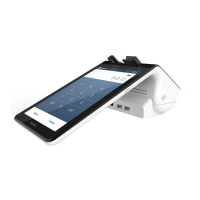
The Poynt is an all-in-one cloud-based terminal that can be
used wherever payments are happening, whether at the
counter or on the move. It features a built-in printer, small
customer-facing display, and charging dock that slots into
place under the printer.
POYNT
Plug the USB C directly into the Poynt device
(or into the charging cradle) and into the wall.
Place the Poynt onto the charging cradle.
Charge your Poynt
When you power on your device, it will prompt
you to select your wi-fi or mobile network. The
Poynt will skip this step for Ethernet users.
Connect to the internet
Your payment device will be pre-activated, with the receipt
roll already installed. Setting up your hardware is as easy
as 1-2-3.
Once your Poynt is fully charged, press and
hold the round button on the back of the
device for 3-4 seconds.
Power on your device
The Poynt device will automatically update with your account
information when connected to the internet via a wired or wi-fi
connection.
If using a wired internet connection (ethernet), the Poynt
must be on the charging cradle when in use. For mobile
network connections, the SIM card slot is on the side
of the terminal. Use a paperclip to eject the carrier tray.
© 2023 Elavon, Inc. All rights reserved. Elavon is a trademark in the United States and/or other countries. This information is prepared by Elavon as
a service for its customers. All features and specifi cations are subject to change without notice.


 To Next Page
 Need help?
 General