PPT Vision
Page 4
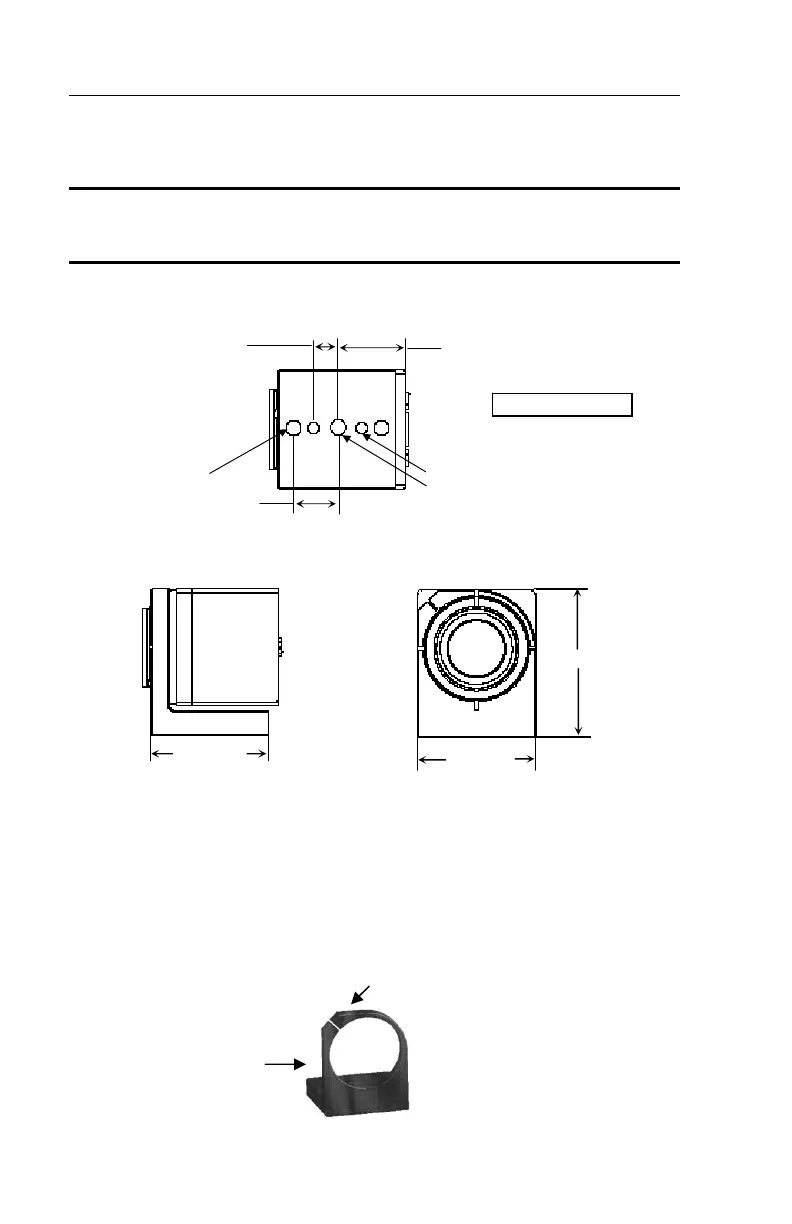
Camera Dimensions
NOTE: The DSL-5000, DSL-5100, and DSL-7000 cameras in this document
have an older body style. Refer to the Digital Camera Users Guide (843-
0085) for mounting dimensions.
The camera with a mounting block, but without a lens, weighs 0.44 pounds
(200 grams).
.69 (17.5)
UNITS: inch
mm
.39 (10.0)
.94 (23.9)
¼”-20 (2)
M5 or #10-32 x .25 (2)
M6 or ¼”-20 (countersunk, inserted
from camera side of block)
Mounting Block and Camera body
Bottom View
1.75 (44.5)
2.19 (55.7)
1.88 (47.8)
Side View
Front View
Mounting a Camera
To mount the digital cameras, attach a mounting block (Part # 381-1114) to
the front of the camera.
Mounting
Ring
Mounting
Screw (M3)
Camera
Mounting
Block
(front side)


 To Next Page