! !!!!!!!!!!!!!!!!!!!!!!!!!!!!!!!!!!!!!! !!!!!!!!! !
Compress!files!stored!on!the!iConnect!
#
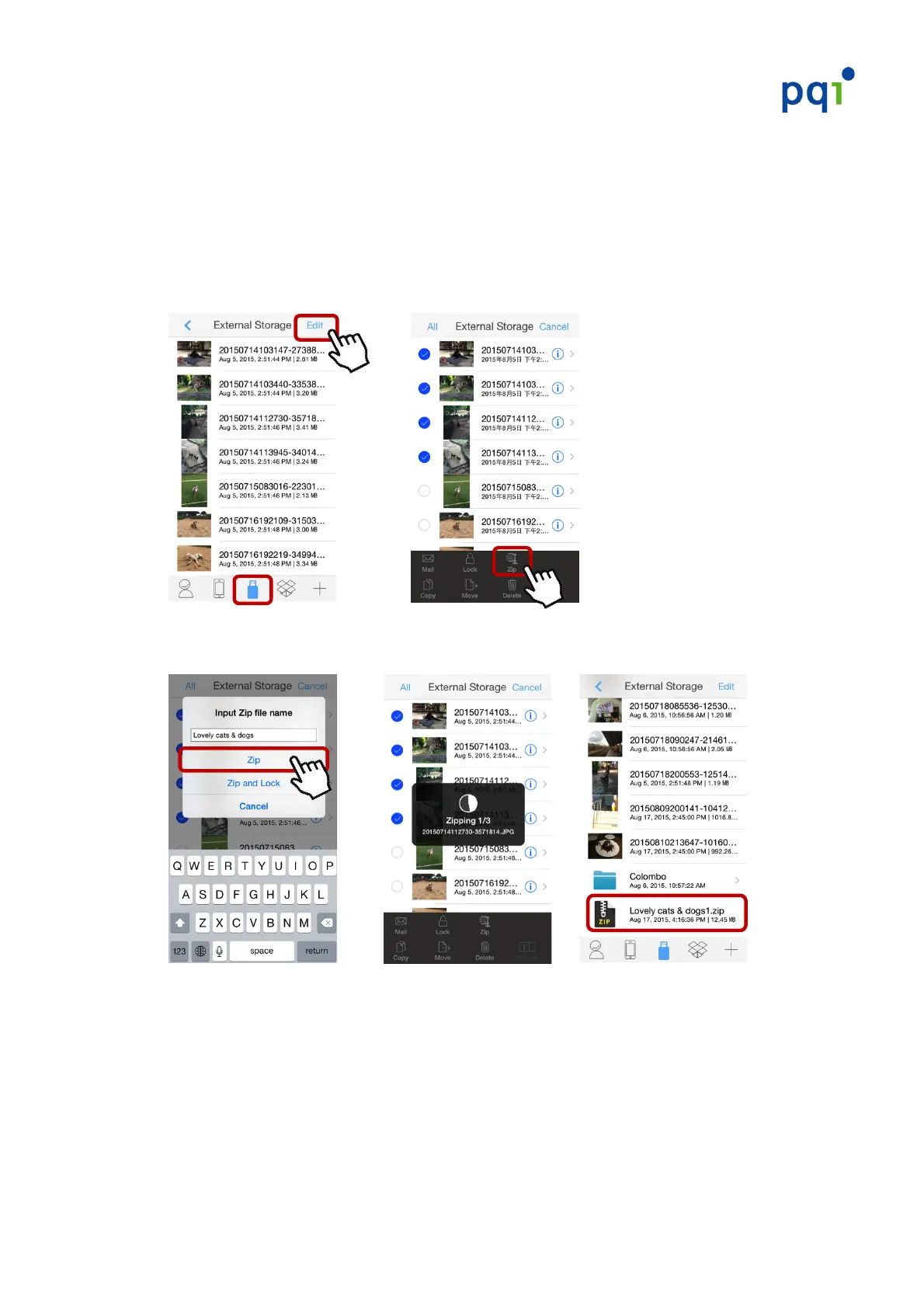
1. Launch!the!PQI!iConnect+!App,!select!“External!Storage”,!then!select!“Edit”!in!
the!upper!right!corner!!Select!the!file(s)!you!wish!to!compress!!Tap!the!
“Zip”!button,!a!dialog!will!appear!requesting!you!to!“enter!a!name!for!the!file!
folder”.!
!!! ! ! !!!!!! !
!
2. Enter!a!name!for!the!folder!!Select!“Zip”!to!complete!file!compression.!
!!! !! !!! !
!
!
!
!
* E%5.#5%?'()**#%.)#%(#?%()#"60)*#*6?&013.)%&*0$@#
* L2)#,Q6'#3.+#R%5P/#"&.516%.3061$#'(%I6+)*#12)#346061$#1%#5%?'()**#3.+#0%5P#%.)#
%(#?%()#"60)*#*6?&013.)%&*0$@#


 To Next Page