! !!!!!!!!!!!!!!!!!!!!!!!!!!!!!!!!!!!!!! !!!!!!!!! !
Extract!the!compressed!files!stored!on!the!iConnect!
#
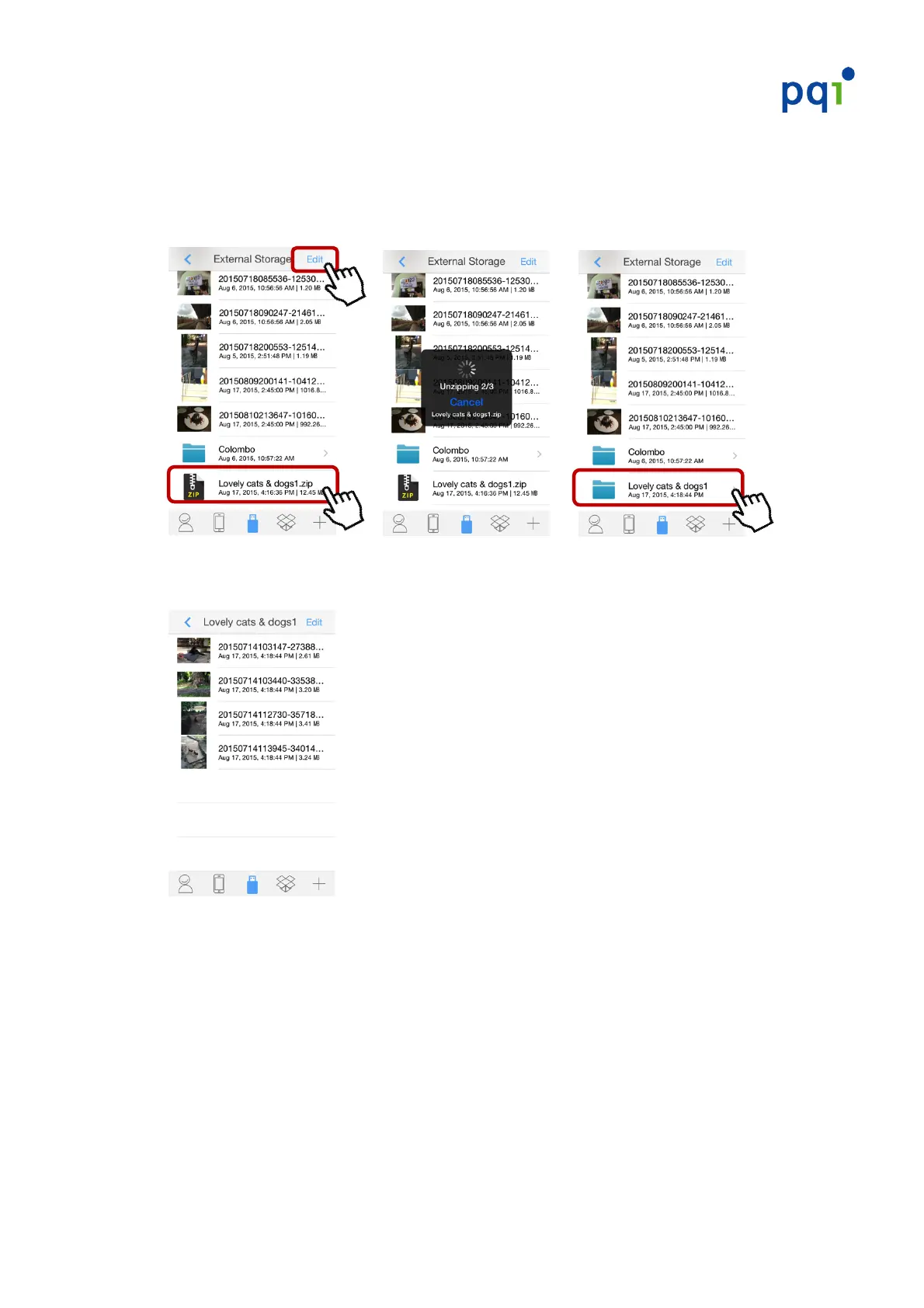
1. Start!the!PQI!iConnect+!App,!choose!“External!Storage”!and!select!the!file(s)!
you!wish!to!extract.!The!extraction!process!will!begin!automatically.!
# ! ! !! ! ! ! !
#######
2. Tap!on!the!file!folder!to!preview!photo!files!stored!within.!
!
#
#
#
* S2).#3#*6.-0)#5%?'()**)+#"60)#6*#)C1(351)+7#61*#65%.#>600#6.+6531)#3#*6.-0)#"60)@#
S2).#?&016'0)#5%?'()**)+#"60)*#3()#)C1(351)+7#12)$#>600#4)#+6*'03$)+#3*#3#"60)#
"%0+)(@#


 To Next Page