2231V104-UK 15
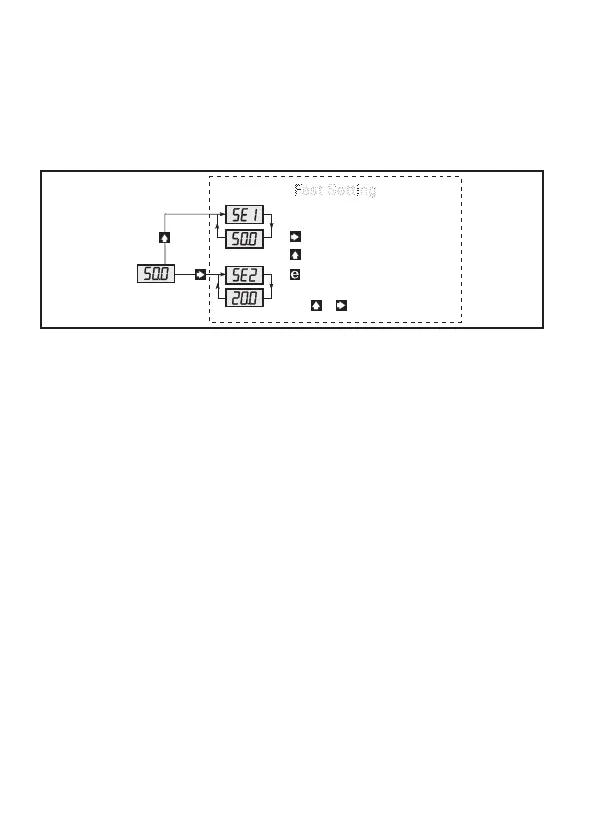
When menu 4.2 has been selected, EFS - Enable Fast SETTING, fast setpoint
change is possible by activating the Fast Setting function. In this menu,
the function keys have a special feature as 1 increases the setpoint and 3
decreases the setpoint from the value it had when activated. Activating for
more than 2 s automatically activates the increment / decrement function.
The setpoint value is displayed in % of the input signal. 2 stores the displayed
setpoint value.
Begin by selecting the function for the device in menu 4.1
1.0 rE1 - SETTING OF PARAMETERS FOR RELAY 1
1.1 SEt / SPL - Setting of relay 1 setpoint
Possible selections are 0...99.9%.
The setpoint is set in % of the input signal. When the selected func tion
in menu 4.1 = {004 = Setpoint window}, the low window value SPL is set
in this menu. When the selected function in menu 4.1 = {005 = Hold}, the
value resetting the hold function of relay 2 is set.
1.2 HYS / SPH - Setting of relay 1 hysteresis
Possible selections are 0...99.9%.
The hysteresis is set in % of the input signal. The hysteresis is the
difference between the setpoint and reset values. When the selected
function in menu 4.1 = {004 = Setpoint window}, the upper window value
SPH is set in this menu.
0.0
Fast Setting
4.2 EFS/dFS - enable / disable fast setting
Upcount setpoint
Store and exit fast setting
Press or 2 s for automatic counting.
Downcount setpoint



 To Next Page