Setup
Audio Options
Display
www.precision-acoustics.com
HD50SB
Powered Soundbar / Barre de son
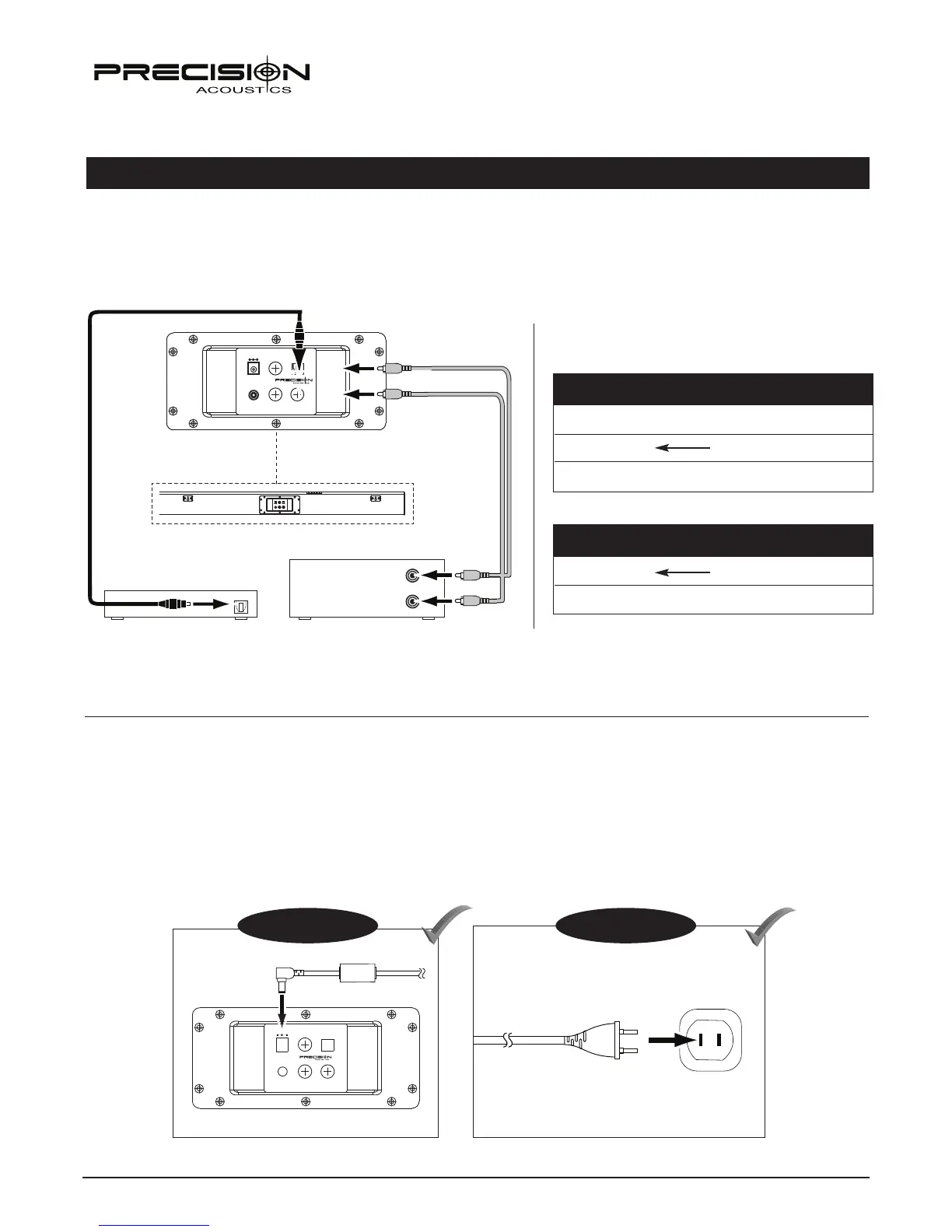
Once you have connected the sound bar to your TV and sources you can then connect it’s power cord. Connect the small, round con-
nector to the back of the sound bar where DC19V is indicated. Then, insert the plug into an active, unswitched AC outlet. DO NOT PLUG THIS
CORD INTO THE ACCESSORY OUTLETS FOUND ON SOME AUDIO COMPONENTS. You are now ready to turn on the sound bar, as well as all other components.
Une fois la barre de son branchée à votre téléviseur et aux autres sources, vous pouvez dès lors brancher le cordon d’alimentation.
Branche le petit connecteur rond à l’arrière de la barre de son où il est indiqué DC19V. Ensuite, insérez la fiche dans une prise de
courant secteur CA active et non commutée. NE PAS BRANCHER CE CORDON DANS LES SORTIES AUXILIAIRES D’ALIMENTATION QUE L’ON RETROUVE À L’OCCASION SUR
CERTAINS APPAREILS AUDIO. Vous êtes maintenant prêt à mettre sous tension la barre de son ainsi que toutes les autres composantes de
Power Connection / Branchement de l’alimentation
OOPPTTIICCAA LL IINN
SSUU BB OOUUTT
RRCCHH
LLCCHH
DDCC IINN 1199VV
LLIINN EE IINN 11LLIINNEE IINN 22
Step 1 / Étape 1
Step 2 / Étape 2
OOPPTTIICCAA LL IINN
RRCC HH
LLCC HH
D
C IN 19V
LINE 2 LINE 1 SUB OUT
( Satellite, DVD, etc. )
OPTICAL
( Satellite, BluRay, etc. )
AUDIO OUT
If you prefer, you can also connect your sources (Blu-ray, Satellite, etc.) directly to the Soundbar. Using this method, you will need to
select the proper video input on your TV to match sound. If you are not getting any sound, you might have to set your source to PCM
output (shown below) in their audio menus. The common choices on a source like a DVD or Blu-ray would be some type of Dolby
Surround or PCM.
Troubleshooting - No Sound / Dépannage - Pas de son
SOURCE MENU
PCM
Stereo
Dol
by Digital
SOURCE MENU
Connecting your Source Directly to the Soundbar / La connexion de votre source directement à la Soundbarion



 To Next Page