Understanding Your Scale
OPERATION
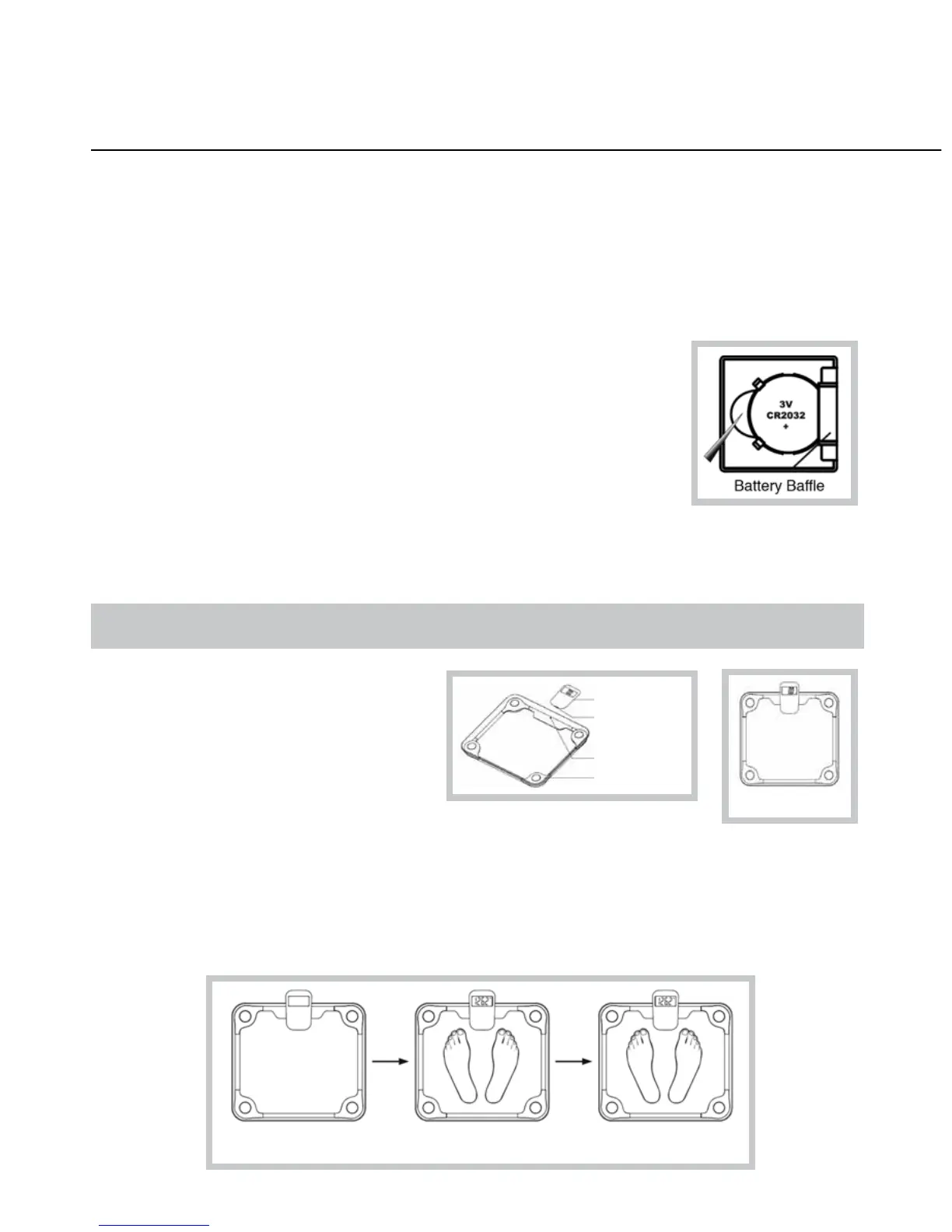
1. Place the scale on a flat, dry surface.
2. Gently step on the scale. The scale will automatically turn on.
3. Stand evenly until on the scale without moving and wait until your weight shown on display is
stable and locked.
You can receive your weight reading in two ways: Wired transmission mode (remote is housed in
the main unit, as shown below)
Step onto the scale
platform directly
2
WIRELESS REMOTE DIGITAL GLASS SCALE
MODEL #7836
Congratulations! You have purchased a precision health monitoring
product that should provide you with years of accurate use. To assure
you obtain the best performance pleaseread the following set-up and
use instructions carefully before using the scale.
Remove plastic strip below 3V battery in both compartment on bottom of scale
and remote before use. Be sure to check that they are installed properly.
If display does not appear when scale is turned on, check this first.
This scale is calibrated to weigh in pounds (lbs), but can also measure in
kilograms and stones. You can covert the weight unit as follows:
1. Find unit button near the battery compartment in the remote.
2. Press the button to convert scale unit between kg and lb.
Always stand reasonably still. If there is too much movement, the scale cannot provide accurate
weight. Place scale on a hard surface. The scale will not weigh accurately on carpet.
Weight reading stabilized
and flashes for 3 times
Engaged wired
readout display
Read-out display
Infrared receiver
Infrared transmitter
Main unit



 To Next Page