955205_01 11/11 17
Setup and Operaon (Planter)
Planng Setup
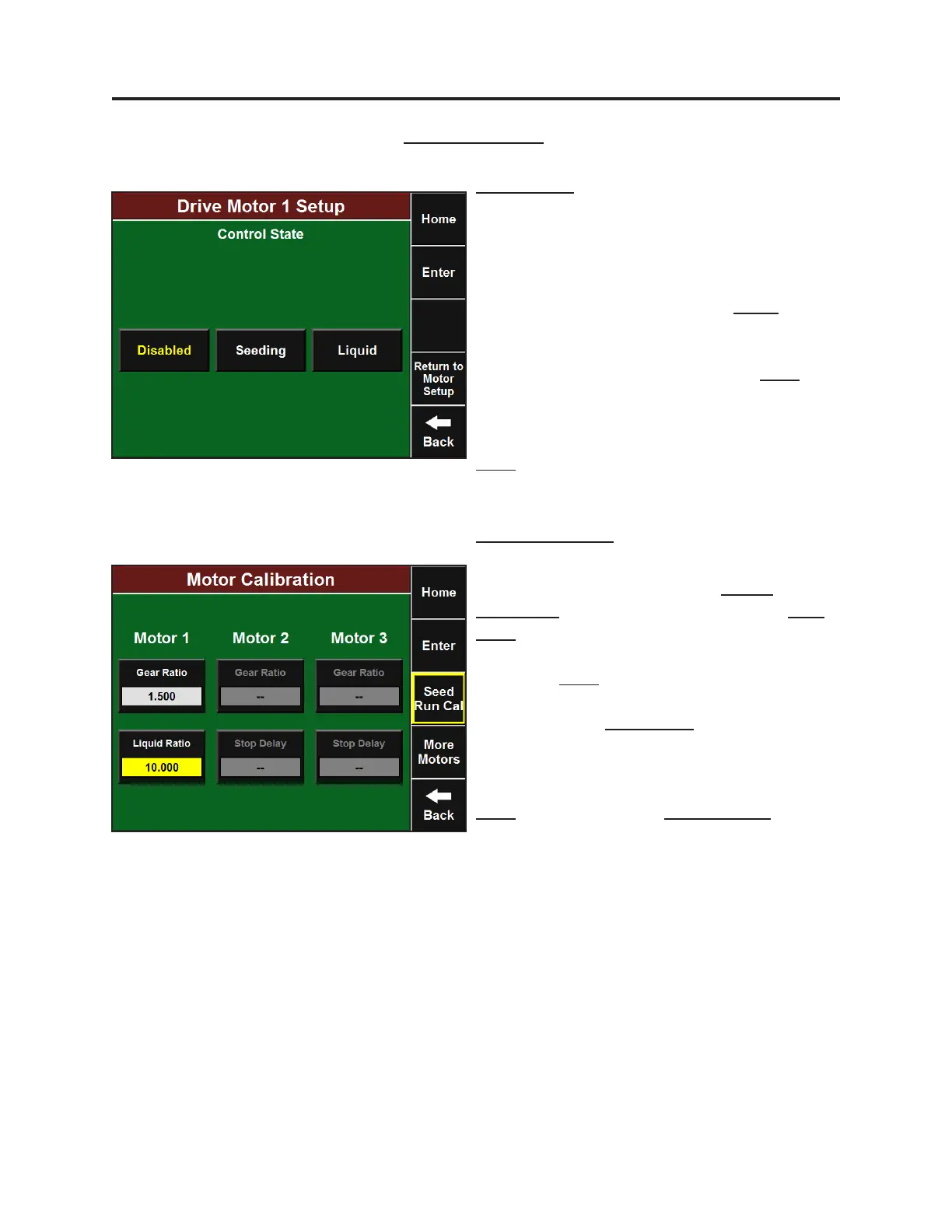
Motor Setup
Setup for liquid control motors can be accessed
from both the standard motor setup screen
for RowFlow or by going to Setup-Systems-RF
Liquid. Select the correct Drive Motor that is
driving the liquid pump and press Liquid. Select
the correct motor brand and then enter the
default rate at which you would like your
product to be applied and then press Enter.
Enter the maximum speed (in RPM’s) for the
liquid pump as dened by the pump’s
manufacturer specicaons and then press
Enter.
Motor Calibraon
Liquid motor calibraon is accessed from the
same motor setup screen. Press Motor
Calibraon at the top and then press the Gear
Rao buon. Enter the gear rao calculated
using the formula provided on this page and
then press Enter. If the Drive Motor is directly
coupled to the liquid pump, the Gear Rao will
be “1”. Press the Liquid Rao buon to open
the liquid motor calibraon screen. If you know
the number of ounces of product produced by
one pump revoluon, type it here and press
Enter. You may also do a Liquid Run Cal to get
this number by pressing the buon at the right
side of the screen.


 To Next Page
 Loading...
