
 Need help?
Do you have a question about the Precision X-Ray X-RAD 160 and is the answer not in the manual?
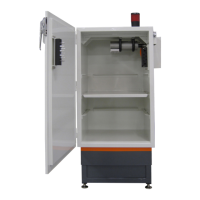
Enclosure protecting from radiation, compliant with regulations, leakage < 0.2mRem/hr.
Features all controls, analog controls/indicators, touchscreen computer for UI.
Touchscreen application to operate all system features like kV, mA, programs, and histories.
Options to enhance capabilities, can be retrofitted on existing units.
Prevent accidental radiation exposure; if disabled, X-Rays are not permitted or shut off immediately.
Visual notification for users and bystanders indicating X-Rays are being produced.
Lead shielding around port holes to limit irradiation leakage; some models have user-accessible baffles.
Controls system modes: Off, Standby, and On, affecting UI operability and X-Ray production.
Steady yellow light indicating X-Rays are being produced; a secondary indicator not in the safety circuit.
Hardwired button that instantly stops X-Rays when activated by pushing inward.
Moves the Motorized/Programmable Shelf up/down to adjust source to specimen distance (SSD).
Hosts the TouchRAD User Interface; turns on/off via System Key-Switch.
Used for downloading system database and plugging in external Wi-Fi adaptors.
Touchscreen application controlling all system functionality, running exposures, setting routines, etc.
System requires positioning key to STANDBY or ON; UI loads and initializes.
User must log in with username and password to access system functionality; displays User Login Screen.
"Manual Mode" or Program 0 enables custom exposure settings for kV, mA, and time.
Steps to produce X-Rays, including setting parameters, selecting "Continue", and then "X-Rays Start".
Defines programs for consistent exposures; allows creating or modifying programs like Time, Dose, etc.
Produces X-Rays at specific kV/mA, ending when a predefined time (5s-99,999s) is reached.
Produces X-Rays at specific kV/mA, ending when a predefined dose (in cGy) is reached.
Produces X-Rays at specific kV/mA, ending when a user-defined dose (in cGy) is reached.
Repeats On-Off X-Ray cycles for a user-defined number of cycles at specific kV/mA.
Recalls pre-defined exposure programs for accurate, consistent results; selects programs from a list.
Describes two methods to recall a program: selecting an item or entering it in the entry box.
Software automatically detects inserted filters to ensure correct program procedures are followed.
Displays an error if the wrong filter is inserted, indicating the current filter's binary number.
User adjusts SSD manually using the Shelf Key-Switch and an on-board scale.
Programs SSD and offset automatically through the UI, or manually via the Shelf Key-Switch.
User may encounter error messages related to safety circuits or system issues during operation.
Lists common error messages, their causes (e.g., Door Open, Emergency Stop), and recommended actions.
Required for long-term product reliability; operators should inspect the unit and report anomalies.
Quick visual checks performed daily by operators to verify system integrity.
System maintenance by an authorized engineer ensures proper system performance and longevity.
Addresses situations where the UI and X-Ray system become unsynchronized, preventing X-Rays.
Describes symptoms indicating the UI is out of sync with the X-Ray system.
Steps to resynchronize the TouchRAD User Interface and X-Ray System.
Common errors caused by open safety interlock switches preventing X-Ray production.
Lists common causes for safety circuit errors, such as door open or emergency stop activation.
Provides steps to resolve safety circuit errors by checking switches and components.
Options available to enhance capabilities, all retrofittable on existing installed units.
Option to specify and terminate exposure based on delivered dose (in Gy) at a known distance.
Filters that remove undesired low energy photons to improve specimen irradiation and prevent skin irritation.
Fixed aperture collimators for precisely defining the irradiation field, available in various sizes and shapes.
Motorized 4-leaf X-ray field diaphragm to define rectangular or square exposure fields.
Key-operated stainless steel shelf for quickly setting up exposures and source-to-shelf heights.
Similar to motorized shelf but with programmable height via TouchRAD control for automatic SSD setting.
Accessory for rotating specimens during irradiation, ensuring uniform exposure.
Allows remote connection for diagnostics, updates, and troubleshooting by Precision X-Ray service engineers.
Compact unit to heat the irradiation chamber, maintaining temperatures up to 35°C.
Designed for introducing and controlling gases in an environmental chamber, with various features for gas control.
Additional option for the environmental chamber to control temperature via an electrically heated floor/base.
Circular cage holding 11 mice for whole body irradiation, with a notched lid for easy insertion/removal.
Restraining fixtures with lead shields for partial body irradiation applications like flank, spine, abdomen, or head exposure.
The X-RAD Biological Irradiator is a sophisticated system designed for precise and controlled X-ray irradiation in biological research. It features a robust radiation enclosure, a touchscreen user interface, and various accessories to enhance its capabilities for diverse experimental needs.
The primary function of the X-RAD Biological Irradiator is to produce controlled X-ray radiation for biological specimens. It allows users to manipulate X-ray parameters (kV and mA), run time-dependent or dose-dependent programs, and review exposure histories. The system is designed to provide accurate and consistent exposures, crucial for reproducible research. Safety is paramount, with multiple interlocks and warning systems to prevent accidental radiation exposure.
Radiation Protection: The irradiation cabinet is a one-piece radiation enclosure manufactured to comply with Federal Regulations CFR1020.40, providing radiation protection with a leakage of less than 0.2mRem/hr at any point on the outside surface.
System Control: The system is controlled via a TouchRAD Panel, which includes analog controls/indicators and a touchscreen computer. The System Key-Switch allows changing the system state between OFF, STANDBY, and ON. An Emergency Stop button instantly halts X-ray production when activated.
X-Ray Parameters: The system allows manipulation of kV and mA settings. Exposure times can be set from a minimum of 5 seconds to a maximum of 99,999 seconds in Time Mode. For Dose Mode, exposures end when a pre-defined dose (in cGy) is reached.
Safety Interlocks: All X-RAD Biological Irradiators are equipped with safety interlocks on the cabinet door and baffle. These interlocks prevent X-ray production if disabled and immediately shut off X-rays if activated during an exposure. A CDRH Switch on the cabinet door physically inhibits X-rays from being produced while the door is open.
Warning Lamp: An "X-Ray On" warning lamp provides visual notification when X-rays are being produced. If the warning lamp fails, X-rays will shut off, and an error will be displayed.
Baffle: The baffle provides lead shielding around the port hole(s) to limit irradiation leakage. Some models feature dedicated user-accessible baffles for running wires, cables, hoses, and equipment into the cabinet without radiation leakage.
Dose Measurement Control (PN 150010) (Optional): This option allows users to specify the actual dose (in Gy) to be delivered and terminates exposure when the dose is reached. It uses a PTW 7862 parallel plate transmission chamber to measure relative dose.
X-Ray Beam Conditioning/Hardening Filters with Filter Recognition (Optional): These filters remove undesired low-energy photons, preventing superficial tissue irritation/burns and delivering only desired photons to the specimen. The system automatically recognizes the inserted filter and displays an error if the wrong filter is used.
Fixed Collimators (Optional): Standard or customized fixed aperture collimators define the irradiation field, with sizes ranging from 0.5cm to 10cm diameter. Specialized shapes are available for specific irradiation needs.
Adjustable Collimator (Optional): A motorized 4-leaf X-ray field diaphragm allows users to define rectangular or square exposure fields from less than 1x1 cm to 20x20 cm at 50 cm FSD.
Motorized Shelf (PN XD1602001) (Optional): A key-operated stainless steel specimen shelf allows manual adjustment of the source-to-specimen distance (SSD) via a Shelf Key-Switch. A scale behind the shelf aids in accurate positioning.
Programmable Shelf (PN XD1602201) (Optional): Similar to the motorized shelf, this option allows automatic setting of SSD and specimen offset through the User Interface for each program. It can also be manually positioned via the Shelf Key-Switch. SSD values are in centimeters and must be whole numbers, not accounting for specimen height (offset must be entered separately).
Turntable (Optional): A motorized turntable ensures uniform irradiation of specimens.
Remote Access (Optional): Allows Precision X-Ray to remotely connect for system diagnostics, updates, and troubleshooting, reducing the need for on-site service calls.
Cabinet Heater (PN XD1608401) (Optional): A wall-mounted, thermostatically controlled ceramic heating unit can heat the irradiation chamber up to 35°C.
Environmental Chamber (PN XD1608101) (Optional): Designed for introducing and controlling gases in an environmental chamber. Features include a CO2 controller and sensor, pressure relief valve, two sensors with three access ports, circulation fan, two gas inlets, pullout sliding shelves, and a humidification tray.
Environmental Chamber Temperature Control (PN XD1608101) (Optional): An additional option for the environmental chamber, allowing thermostatic adjustment of the chamber temperature via an electrically heated floor/base.
Pie Cage (PN XD1905005) (Optional): A circular mouse pie cage designed for whole-body irradiation, capable of holding 11 mice. It has a notched ventilated lid for easy insertion and removal of mice.
Mouse Fixtures/Shields (Optional): Lead-shielded mouse restraining fixtures for various partial body irradiation applications (flank, spine, abdomen, head).
User Interface: The TouchRAD User Interface is a touchscreen-based application controlling all X-RAD system functionalities, including running exposures, setting exposure routines, and administering user accounts.
System Startup: The system starts by positioning the System Key-Switch to STANDBY or ON. The computer automatically boots, and the TouchRAD User Interface loads after initialization (approx. 10 seconds).
Logging In: Users must log in to access system functionalities. The Login Screen requires a username and password, which can be entered via an onscreen keyboard or selected from a dropdown list.
Manual Mode (Program 0): Allows users to run exposures without a predefined program, manipulating kV, mA, and exposure time as needed. Users must confirm filter and SSD settings before starting X-rays.
Program Types:
Program Recall: Allows users to select and run pre-defined exposure programs for consistent results.
Warm-up/Conditioning: The system automatically determines if an X-ray tube warm-up is required (if no X-rays have been produced within 8 hours). Warm-up ensures the tube is ready for maximum kV and mA production and prevents damage. Exposures cannot be performed until warm-up is complete (typically 20 minutes for 8-96 hours downtime). Weekly warm-ups are highly recommended regardless of usage.
Specimen Observation Camera (Optional): A closed-circuit live feed camera inside the cabinet allows users to monitor specimens before, during, and after an exposure. Crucial X-ray data and an "X-RAYS STOP" button are displayed on the screen.
Error Handling: The system displays error messages for safety circuit issues or X-ray system malfunctions. Users must fix the error and then clear it using the "CLEAR" button before producing X-rays.
Daily Inspection: Operators should perform daily visual inspections before use:
Annual Maintenance: Performed by an authorized Precision X-Ray Engineer to ensure long-term product reliability and performance. The TouchRAD console displays a message when annual maintenance is due. Services include:
 General
| Brand | Precision X-Ray |
|---|---|
| Model | X-RAD 160 |
| Category | Industrial Equipment |
| Language | English |

 To Next Page
