EasyManua.ls Logo

Precision AP004 - User Manual

Precision AP004
4 pages
Print Icon
To Next Page IconTo Next Page
Loading...
AP004 - Instruction Manual
The Radio-Controlled Clock
With the Radio-Controlled Clock, you can have the most accurate time within the UK. It can receive the
time signal transmitted by VT Communications of United Kingdom, which is regulated by atomic clock
and in average deviates less than 1 second in 10 million years. VT Communications transmit the time
signal (MSF 60kHz) continuously from Anthorn at latitude 54°55′N and longitude 3°15′W. The main
caused of reception difficulties are local interference and screening due to nearby metalwork, for
example in a steel-frame building.
For more information, please study the WEB page of VT at: http://www.npl.co.uk/time/msf.
Environmental Reception Effects
The Radio-Controlled Clock obtains the accurate time with wireless technology. As with all wireless
devices, the receiving ability may be affected by, but not limited to, the following circumstances:
* Long transmitting distance.
* Nearby mountains and valleys.
* Among tall buildings.
* Near railway, high voltage cables, etc.
* Near motorway, airport, etc.
* Near construction site.
* Inside concrete buildings.
* Near electrical appliances.
* Near computers and televisions.
* Bad weather.
* Inside moving vehicles.
* Nearby metallic structures.
Location precautions
This clock receives a radio wave much like a TV or radio. Be sure to locate it near a window or some
other locations where reception is good. Avoid the following locations, which can interfere with proper
reception:
In moving vehicles (cars, trains,
airplanes etc.)
Inside or near concrete/steel buildings Next or close to power station.
or structures, unless the clock is close/ where radio transmission or electronics
may interfere,
next to a window (with curtain open). with reception of the radio-controlled clock.
Too close to household appliances Near construction sites, Close to or on top of metal
traffic lights, neon lights etc. (computer, TV, video/audios, fax
machines, speakers).
Birmingham International Park. Bickenhill Lane, Solihull,B37 7GN
PH Services, Precision House, Unit 4, Startey Way,
Email Address: customerservice@peershardy.co.uk
We recommend keeping the minimum distance of 8 feet from any interfering source like TV’s
computer monitors.
Within concrete rooms (basements, superstructures, tower block, office buildings, etc.), the received signal
will be weakened. In extreme cases, the unit should be placed close to a window and/or point the clock face
or back towards the Frankfurt, Germany (DCF77) / Cumbria, England (MSF).
Avoid placing the unit on or next to metal surfaces.
Do not start reception whilst moving such as in a vehicle or on a train.
During the night, the atmospheric disturbances are usually less severe and reception is possible in most
cases. A single daily reception is adequate to keep the accuracy within 1 second.
CARE OF YOUR CLOCK
Replace the battery promptly when necessary and store the clock without batteries when not in use. It is time to
replace the batteries when the LCD display becomes dim. Clean your clock with a soft cloth or paper towel. Do
not use corrosive cleaners or chemical solutions on the clock. Avoid putting the clock in a highly humid environ-
ment such as poolside or in a bathroom. Do not expose the clock to direct sunlight, extreme hot or cold tempera-
tures. Do not use rechargeable batteries. Non-rechargeable batteries are not to be recharged. Different types
of batteries or new and used batteries are not to be mixed. Only batteries of the same or equivalent type as
recommended are to be used. Batteries are to be inserted with the correct polarity. Exhausted batteries are to
be removed from the product. The supply terminals are not to be short-circuited. Do not dispose of batteries in
fire; batteries may explode or leak.
Note:Attention ! Please dispose of used unit and batteries in an ecologicalsafe manner.
Customer help line 0121 524 1400 (Monday - Friday 9:00am - 5:00pm.)
For more inlormation relating to Precision Radio Controlled products.
Please visit our website www.precisiontimekeeping.com
National Physical Laboratory
The National Physical Laboratory (NPL) is the UK's home of measurement and
the nation's timekeeper. NPL is responsible for operating the national time system
and making accurate time available across the UK. The clock you have just received
keeps accurate time by picking up NPL's radio signal, called MSF, which is broadcast
on 60 khz from a location in Cumbria. This transmission carries a date and time code
that radio controlled clocks use to set themselves to the correct time. The signal is
controlled by atomic clocks at the radio station, and is adjusted to keep it in step with
the national time maintained at NPL's laboratory in south-west London. For more
informations visit www.npl.co.uk/time Your clock is controlled by the MSF signal which
is synchronised to the national time scale at NPL, making it ‘forever accurate'.
TIME FROM NPL
forever accurate
Note:
The WEEE symbol indicates that waste electrical and electronic equipment should not be treated
as normal household waste. It should be segregated and recycle when it has reached the end of
its life, which can be done free of charge at local Civic Amenity Sites. For your nearest facilities
see www.recycle-more.co.uk.
When the signal icon on the clock flashes, this indicates that the clock is receiving the radio signals from the
Germany (DCF) or UK (MSF) radio station (this depends on which version you purchase). When the time code is
received the signal icon turns on. If the signal icon does not appear at all and the time is not yet set, please take
note of the following should just be:
Question and Answer IconNeed help?

Do you have a question about the Precision AP004 and is the answer not in the manual?

Summary

The Radio-Controlled Clock

Environmental Reception Effects

Factors affecting wireless reception of the radio-controlled clock, including distance, obstacles, and weather.

Location Precautions for Reception

Advice on optimal clock placement and locations to avoid for reliable radio signal reception.

Radio Controlled Clock with Temperature

Function Keys Overview

Details and functions of each button on the clock interface.

Display Symbols Explanation

Explanation of icons and indicators shown on the clock's LCD display.

Battery Installation and Replacement

Instructions for inserting and replacing clock batteries.

Manual Time Setting Guide

Step-by-step instructions for manually adjusting the clock's time.

Manual Calendar Setting

Instructions for manually setting the year, month, and date.

Daylight Saving Time (DST) Feature

Information on the clock's automatic DST adjustment and display.

Signal Strength Indicator

How to interpret the signal strength indicator for radio reception.

Alarm Setting Instructions

Guide on how to set the alarm time on the clock.

Using Alarm and Snooze

Instructions for activating and using the alarm and snooze functions.

Manual Signal Seek

Procedure to manually initiate radio signal reception.

Summary

The Radio-Controlled Clock

Environmental Reception Effects

Factors affecting wireless reception of the radio-controlled clock, including distance, obstacles, and weather.

Location Precautions for Reception

Advice on optimal clock placement and locations to avoid for reliable radio signal reception.

Radio Controlled Clock with Temperature

Function Keys Overview

Details and functions of each button on the clock interface.

Display Symbols Explanation

Explanation of icons and indicators shown on the clock's LCD display.

Battery Installation and Replacement

Instructions for inserting and replacing clock batteries.

Manual Time Setting Guide

Step-by-step instructions for manually adjusting the clock's time.

Manual Calendar Setting

Instructions for manually setting the year, month, and date.

Daylight Saving Time (DST) Feature

Information on the clock's automatic DST adjustment and display.

Signal Strength Indicator

How to interpret the signal strength indicator for radio reception.

Alarm Setting Instructions

Guide on how to set the alarm time on the clock.

Using Alarm and Snooze

Instructions for activating and using the alarm and snooze functions.

Manual Signal Seek

Procedure to manually initiate radio signal reception.

Overview

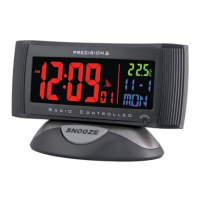
This document describes a Radio-Controlled Clock with Temperature, model AP004, designed for accurate timekeeping within the UK. The clock automatically sets its time by receiving radio signals from either the Germany (DCF77) or UK (MSF) radio stations, depending on the version purchased.

Function Description:

The primary function of this device is to provide highly accurate time, automatically synchronized via radio signals. It displays the time (hour, minute, second), date (month, date, day of the week), and temperature. The clock also features an alarm with a snooze function and automatically adjusts for Daylight Savings Time (DST). A backlight is included for viewing in darkness, powered by a DC adaptor.

Important Technical Specifications:

  • Time Synchronization: Receives time signals from VT Communications in the United Kingdom (MSF 60kHz) or Frankfurt, Germany (DCF77kHz).
  • Accuracy: Deviates less than 1 second in 10 million years (when synchronized with VT Communications).
  • Reception Frequency: MSF 60kHz (UK) or DCF77kHz (Germany).
  • Automatic Synchronization Schedule: The clock attempts to receive the atomic clock signal four times a day at 2:00 AM, 3:00 AM, 4:00 AM, 8:00 AM, 2:00 PM, and 8:00 PM. The 3:00 AM and 4:00 AM attempts occur if previous attempts were unsuccessful.
  • Temperature Display: Shows temperature in either Celsius (°C) or Fahrenheit (°F).
  • Time Format: 12-hour or 24-hour format.
  • Calendar: Auto calendar display from January 1, 2000, to December 31, 2099.
  • Power: Requires 1 AAA battery. DC adaptor for backlight.
  • Alarm: Single alarm with a 5-minute snooze function. The alarm features a 3-step crescendo and will automatically snooze four times for a total of 60 seconds if not deactivated.

Usage Features:

Initial Setup and Time Synchronization:

Upon battery installation, the clock will automatically begin searching for the radio signal. This process typically takes 3-6 minutes under good conditions. If no signal is received after 12 minutes, manual time setting is recommended. The signal icon on the LCD display flashes when receiving signals and turns solid when synchronized.

Manual Time Setting:

  1. Slide the SWITCH key to the TIME SET position. The time will flash.
  2. Use the MONTH • HOUR key to set the hour and the DATE • MIN key to set the minutes.
  3. Slide the SWITCH key back to the RUN position to exit. The seconds will reset to 00.
  4. The YEAR • 12/24 key can toggle between 12 and 24-hour formats in normal time mode.

Manual Calendar Setting:

  1. Slide the SWITCH key to the CAL SET position. The year, month, and date will flash.
  2. Use the MONTH • HOUR key to set the month, DATE • MIN key to set the date, and YEAR • 12/24 key to set the year.

Alarm Setting:

  1. Slide the SWITCH key to the AL SET position. The alarm time (hour, minute) will flash.
  2. Use the MONTH • HOUR key to set the alarm hour and the DATE • MIN key to set the alarm minute.
  3. Slide the SWITCH key back to the RUN position.

Activating/Deactivating Alarm and Snooze:

  • To activate the alarm, slide the ALARM ON/OFF switch to ON. A bell indicator will appear on the display.
  • To deactivate, slide the ALARM ON/OFF switch to OFF. The bell indicator will disappear.
  • The snooze function is automatically enabled when the alarm is active.
  • To activate snooze, press the SNOOZE button during an alarm. The alarm will stop and sound again in 5 minutes.

Daylight Savings Time (DST):

The clock is pre-programmed to automatically switch for DST, indicated by "DST" on the display. If DST is not observed in your area, the clock's time display will be +/- one hour during the DST period.

Signal Strength Indicator:

The display shows signal strength in three levels. A flashing wave segment indicates signal reception. A sync-time symbol appears on the LCD if the clock successfully receives a signal.

Environmental Reception Effects and Location Precautions:

The clock's wireless reception can be affected by:

  • Long transmitting distance.
  • Nearby mountains and valleys, tall buildings.
  • Proximity to railways, high voltage cables, motorways, airports, construction sites.
  • Being inside concrete buildings.
  • Near electrical appliances, computers, televisions.
  • Bad weather, moving vehicles, or metallic structures.

For optimal reception, place the clock near a window or in locations with good reception. Avoid placing it:

  • Inside or near concrete/steel buildings (unless close to a window).
  • Next to or close to a power station.
  • In moving vehicles (cars, trains, airplanes).
  • Too close to household appliances (computers, TVs, video/audio devices, fax machines, speakers).
  • Near construction sites, traffic lights, neon lights.
  • Close to or on top of metal objects. A minimum distance of 8 feet from interfering sources like TVs and computer monitors is recommended.

Maintenance Features:

Battery Replacement:

  • Replace the battery promptly when the LCD display becomes dim.
  • Open the battery compartment cover at the bottom of the clock.
  • Insert 1 AAA battery, ensuring correct polarity.
  • Store the clock without batteries when not in use.
  • Do not mix different types of batteries or new and used batteries.
  • Do not use rechargeable batteries.
  • Remove exhausted batteries from the product.
  • Do not short-circuit the supply terminals.
  • Do not dispose of batteries in fire, as they may explode or leak.

Cleaning:

Clean the clock with a soft cloth or paper towel. Do not use corrosive cleaners or chemical solutions.

General Care:

  • Avoid highly humid environments (e.g., poolside, bathroom).
  • Do not expose the clock to direct sunlight, extreme hot, or cold temperatures.
  • In case of malfunction after battery insertion, use a pin to press the RESET key to restart the clock.

Environmental Responsibility:

The WEEE symbol indicates that waste electrical and electronic equipment should not be treated as normal household waste. It should be segregated and recycled at local Civic Amenity Sites free of charge. Further information can be found at www.recycle-more.co.uk.

Precision AP004 Specifications

General IconGeneral
BrandPrecision
ModelAP004
CategoryClock Radio
LanguageEnglish

Related product manuals