1
English
Specifications
• Model: PMW710
• Connector Type: USB
• Cable Length: Ø3.2, 1800mm
• Dimensions (L x W x H): 127.3 x 65.3 x 39.5 mm (Default SKU)
• Weight: 118.5±5g
• Maximum DPI: 5000
• Programmable buttons: 4
• Sensor Type: Optical
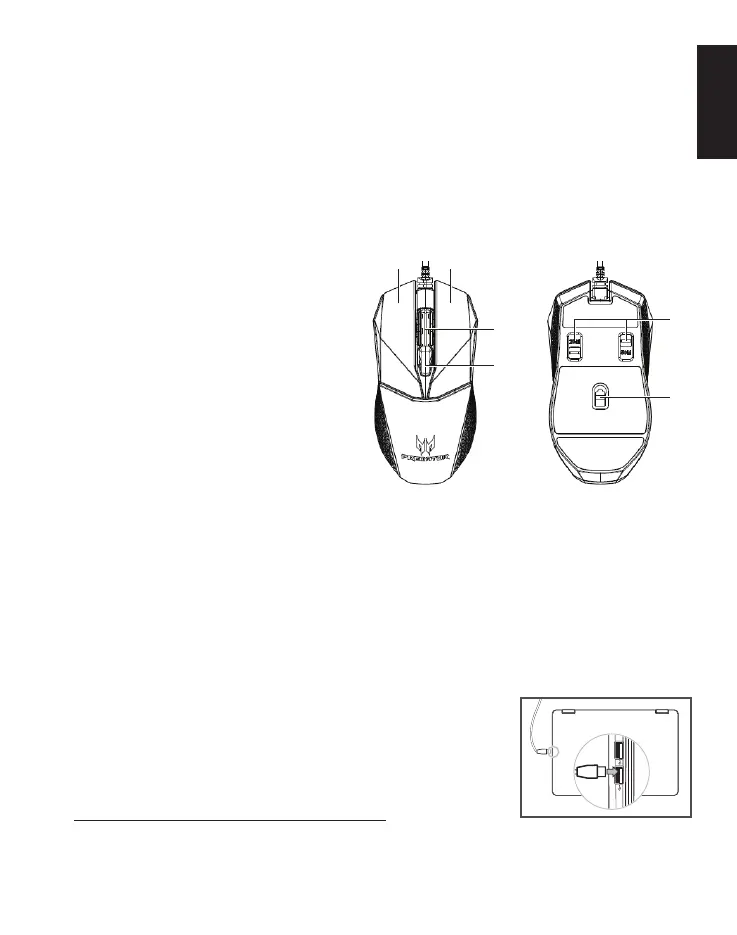
Device features
1. Scroll wheel
2. Left button
3. Right button
4. DPI settings
5. Omron dual switches
(50M + 20M)
6. Optical sensor
Contents of the box
• Gaming mouse x 1
• Quick start guide x 1
System Compatibility
• Microsoft
®
Windows
®
10, Windows
®
8.1, Windows
®
8, Windows
®
7
• USB Port
• Internet connection for optional software downloads
Getting started
1. Plug the USB cable into your PC.
2. System will automatically detect the device.
3. Lighting modes can be adjusted after
installation completes.
4. You can download the software from
http://go.acer.com/quartermaster
4
1
2 3
5
6



 To Next Page