The provided document is a user manual for the CT-XCL01 Series Mini-ITX Industrial Motherboard.
Function Description
The CT-XCL01 is a Mini-ITX industrial motherboard designed to support Intel 8th/9th Generation Core i7/i5/i3, and Pentium Processors. It features two DDR4 SODIMM memory sockets, supporting up to 32GB of memory. The integrated Intel® UHD Graphics 610/630 supports triple independent displays via DVI, DisplayPort, HDMI, or LVDS. The I/O interface offers rich connectivity, including 2x Gigabit Ethernet, USB3.0 with an optional 1x Type-C port, COM, GPIO, SATA, mSATA, and M.2 for various applications. The mini PCIe and PCIe x16 slots also provide flexibility and expandability. This motherboard is suitable for industrial applications requiring robust performance and versatile connectivity in a compact form factor.
Important Technical Specifications
System:
- Processor: LGA 1151 socket supporting 8th/9th Gen Intel® Core™ i3/i5/i7 Desktop Processor (e.g., i7-9700E, i7-9700TE, i7-8700T, i7-8700, i5-9500E, i5-9500TE, i5-8500T, i5-8500, i3-9100E, i3-9100TE, i3-8100T, i3-8100, Pentium® G5400T, G5400).
- System Chipset: Intel® Q370 PCH.
- LAN Chipset: 2x Realtek RTL8111G GbE LAN (supports Wake-on-LAN and PXE).
- Audio Codec: Realtek ALC888S.
- Memory: 2x 260-Pin DDR4 2133/2400/2666MHz SODIMM, Max. Size: 32GB.
- BIOS: AMI 256Mbit SPI BIOS.
- Watchdog: Software Programmable, supports 1~255 sec. System Reset.
- TPM: TPM 2.0 supported (optional).
Display:
- Graphics: Intel® UHD Graphics 610/630.
- Outputs: 1x DVI-D, 1x LVDS, 1x DisplayPort 1.2, 1x HDMI 1.4.
- Multi-Display: Triple Display.
Storage:
- SATA: 4x SATA 3.0Gb/s, supports RAID 0, 1, 5, 10.
- M.2: 1x M.2 (M-Key, Type: 2280, SATA).
Expansion:
- Mini PCI Express: 1x Full-size Mini PCIe.
- PCI Express: 1x PCIe x16 (Gen3).
Rear I/O:
- Display: 1x DVI-D, 1x DisplayPort, 1x HDMI.
- COM: 1x RS-232/422/485.
- USB: 4x USB 3.2 Gen 1.
- LAN: 2x RJ45.
- Audio: 1x Line-out, 1x Mic-in.
- Optional: 1x USB 3.2 Gen 1 Type-C.
Internal I/O:
- Display: 1x 2-ch 24-bit LVDS.
- COM: 4x RS-232.
- USB: 2x USB 3.2 Gen 1, 2x USB 2.0.
- SATA: 4x SATA 3.0Gb/s.
- Audio: 1x Front panel audio.
- GPIO: 1x 8-bit GPIO (4-in/4-out).
- Others: 1x LPC, 1x Front panel, 1x SPI, 2x PWM fan.
Operating System:
- Windows: Windows 10.
- Linux: Linux kernel 5.X.
Power:
- Power Connector: 2x12-pin and 2x2-pin power connector.
- Power Input: ATX power.
- Management: ACPI.
Mechanical & Environment:
- Form Factor: Mini-ITX.
- Dimension: 170mm x 170mm.
- Operating Temp.: 0°C ~ 60°C.
- Storage Temp.: -40°C ~ 90°C.
- Relative humidity: 10% ~ 90% relative humidity, non-condensing.
Usage Features
The CT-XCL01 motherboard offers several features for flexible usage:
- Triple Display Support: Enables connection of up to three independent displays, ideal for multi-monitor setups in industrial control rooms or digital signage.
- Extensive Connectivity: A wide array of I/O ports, including multiple USB, COM, and LAN ports, ensures compatibility with various industrial peripherals and networking requirements. The optional USB Type-C port adds modern connectivity.
- Expandability: Mini PCIe and PCIe x16 slots allow for further expansion with specialized cards, adapting the motherboard to specific application needs.
- RAID Support: SATA ports support RAID 0, 1, 5, 10 configurations, providing data redundancy and improved storage performance.
- Watchdog Timer: A software-programmable watchdog timer (1-255 seconds) ensures system stability by automatically resetting the system in case of software hangs or failures, crucial for unattended industrial operations.
- BIOS Configuration: The AMI BIOS provides comprehensive settings for system customization, including boot options, security features (TPM), and hardware monitoring. Users can configure boot priorities, enable/disable specific ports, and adjust power management settings.
- GPIO Control: General Purpose Input/Output (GPIO) pins are available for interfacing with external sensors, actuators, and control systems, offering flexibility for custom industrial automation solutions.
- Wake-on-LAN (WoL): Supports WoL functionality, allowing the system to be remotely powered on over a network, which is convenient for remote management and energy saving.
- AT/ATX Mode Select: A jumper (JPSON1) allows selection between AT and ATX power modes, accommodating different power supply configurations.
- Clear CMOS: A dedicated jumper (CLCMOS1) simplifies clearing the CMOS settings, useful for troubleshooting or resetting BIOS configurations.
- M.2 Socket: Provides a high-speed M.2 slot for SATA-based SSDs, enabling fast boot times and data access.
Maintenance Features
- BIOS Updates: The manual outlines how to access and configure BIOS settings, which is essential for system maintenance, troubleshooting, and applying firmware updates.
- Hardware Monitoring: The BIOS includes a hardware monitor (NCT6106D HW Monitor) to display real-time system temperature, CPU temperature, fan speeds, and voltage levels, aiding in proactive maintenance and preventing overheating.
- Error Messages: The manual emphasizes the importance of noting exact error messages for effective technical support, streamlining troubleshooting.
- Safety Precautions: Detailed safety precautions are provided for installation and handling, including proper grounding, power disconnection before maintenance, and avoiding extreme environmental conditions, ensuring user safety and device longevity.
- Battery Replacement: Instructions mention the battery-powered real-time clock circuit and the danger of explosion if incorrectly replaced, advising replacement with the same or equivalent type.
- Environmental Protection: An announcement encourages recycling the electronic device to minimize pollution, promoting responsible disposal practices.
- Technical Support: Users are directed to the Premio Inc. website for the latest product information and encouraged to contact distributors or technical support with specific details (model name, serial number, peripheral attachments, software description, problem description, error messages) for efficient assistance.
- Restore Defaults: The BIOS offers a "Restore Defaults" option to reload factory-optimized settings, which can be useful for resolving configuration-related issues.

 Need help?
 General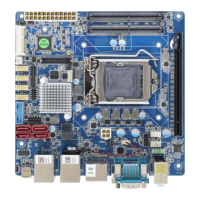

 To Next Page