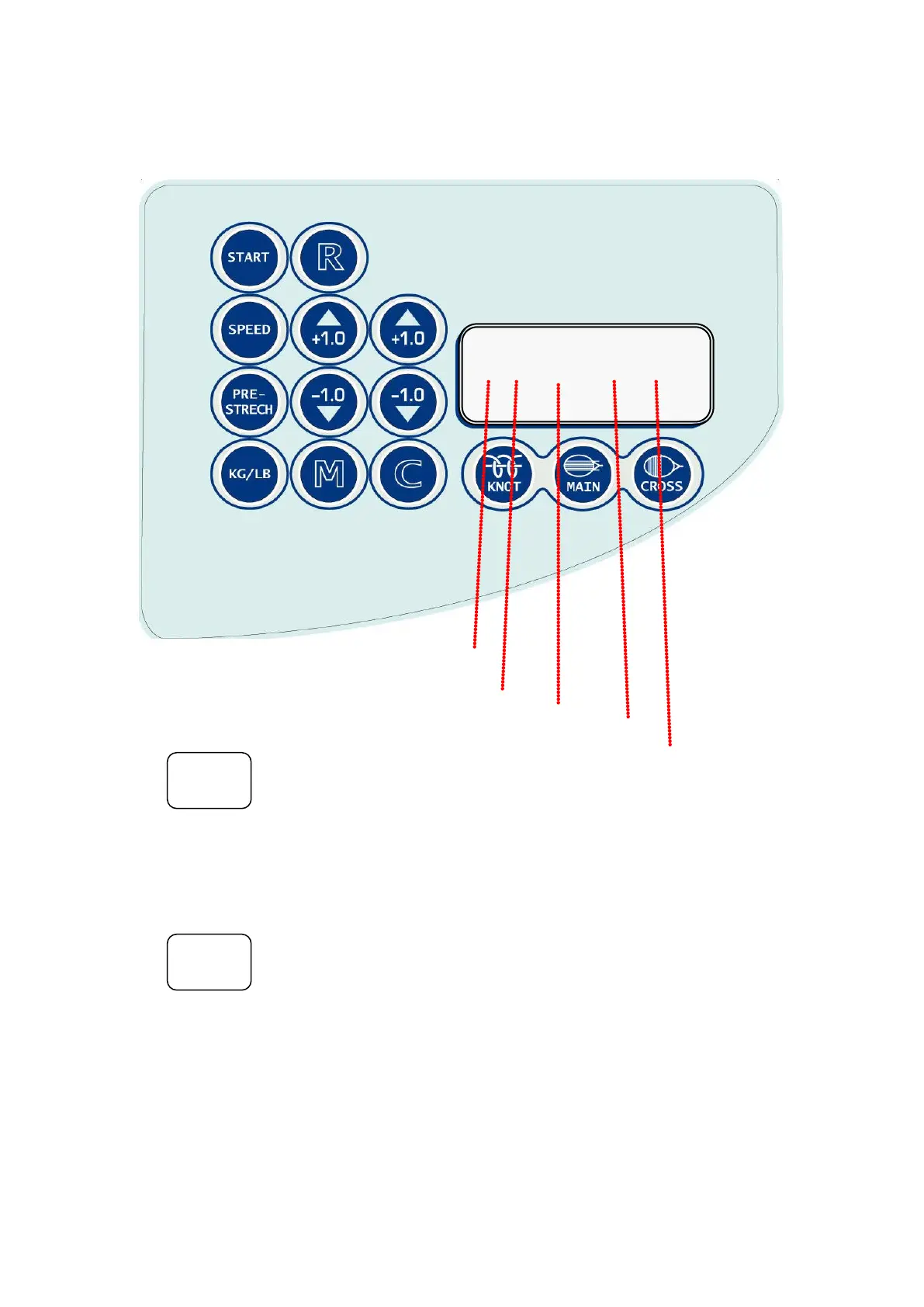
CONTROL PANEL
Screen : Hi / Mid / Low Speed
10%/20% / 0% Pre-Stretch
Main/Cross/Knot String
Tension
KGS/LBS
1. KG/LB Conversion Key :
To change the tension display from Lbs to Kgs,
press the “KG/LB” key and then
“KG” or “LB” will be displayed on the screen.
Each press of the key toggles between Lbs and Kgs.
2. SPEED Selection Key :
To select the desired string pulling speed, press the “SPEED” key
and screen will be changed into the speed mode.
Each press of the key toggles between
HI SPEED, MID SPEED & LOW SPEED.
To get back to the main screen mode,
press one of the “KNOT”, “MAIN” or “CROSS” key
and the selected speed will be abbreviated into
H (HIGH SEED), M (MID SPEED) or L (LOW SPEED)
on the screen.
KG/LB
SPEED
H 0 Main 4.5 KG


 To Next Page