VSL Virtual StudioLive Quick Start Guide
VSL - Overview Tab
At the top of the VSL window, you will see three tabs: Overview, Channel, and Setup. The Overview tab
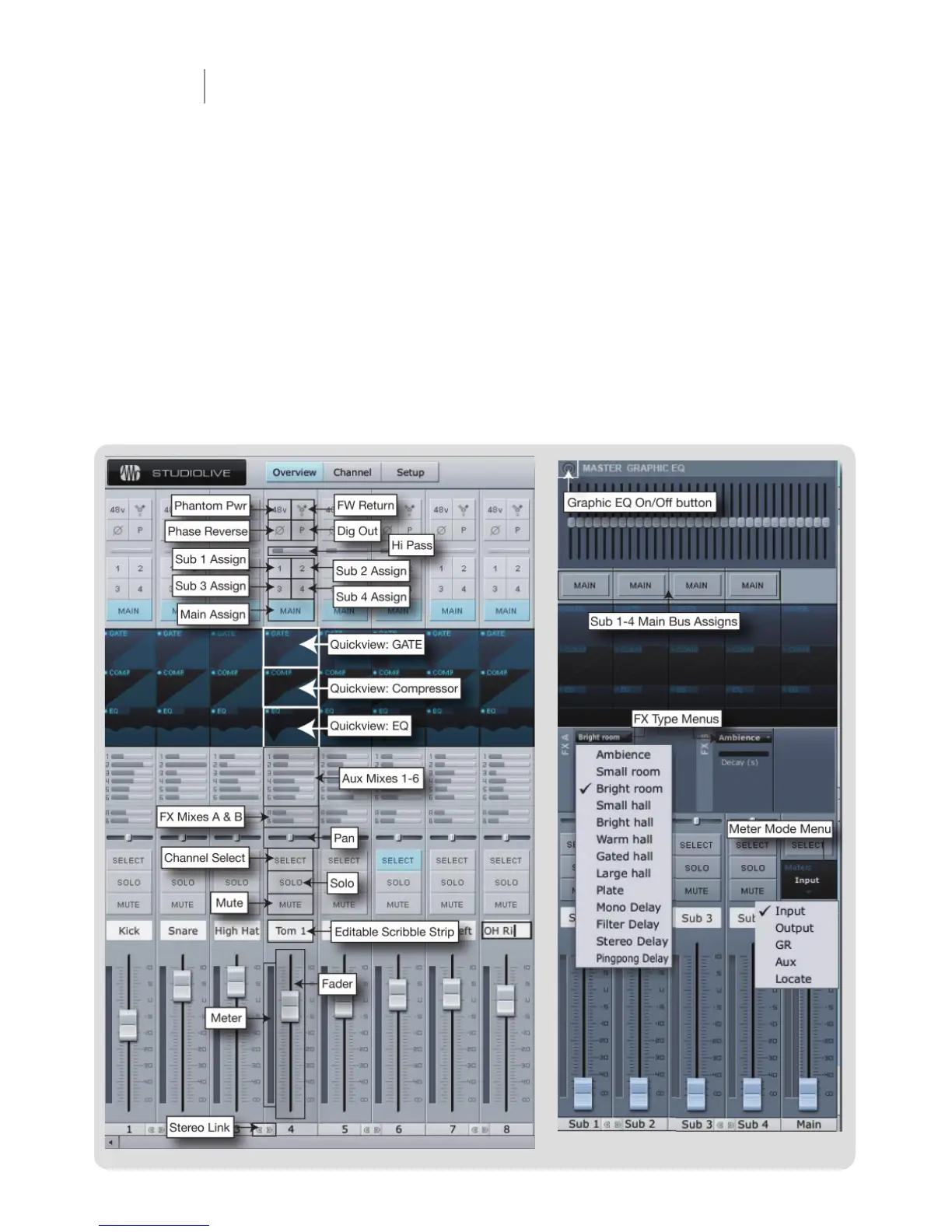
provides you with a complete graphical representation of your StudioLive. As you adjust parameters
on the StudioLive, you will notice that the VSL overview is also updated. If you use your mouse to
adjust a parameter in VSL, the StudioLive will be updated remotely. It is important to remember that
every button, knob, slider, and fader on the VSL corresponds directly to a button, knob, slider, or fader
on your StudioLive. The graphic below identifi es each controller and labels it with its corresponding
control on the StudioLive. To engage/disengage the same button over multiple channels, simply click
it for one channel and swipe your mouse over the rest of the channels. To move multiple faders or
sliders to the same position, move one to the desire position and then right-click and swipe your
mouse over the faders or sliders on the other channels. Holding the Shift-key while making changes
to make minute incremental adjustments.


 To Next Page
 Loading...