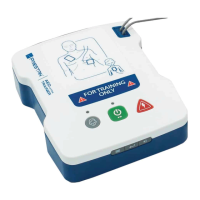
The Prestan AED UltraTrainer is a compact and lightweight training device designed to provide a realistic training experience for students learning to use an Automated External Defibrillator (AED). It is intended for training purposes only and does not deliver an actual shock, ensuring a safe learning environment. To avoid confusion, it should never be stored in the same area as actual AEDs.
Function Description
The AED UltraTrainer simulates the operation of an AED, guiding users through various scenarios with clear and calm voice prompts. It features a Pad Sensing System that automatically detects when the training pads are placed on a manikin, enhancing the realism of the training. The device offers five distinct training scenarios, allowing instructors to cover a range of emergency situations. Users can choose between semi-automatic and automatic shock-delivery programming options, which dictate whether the student needs to manually push the shock button or if the unit will auto-shock.
The trainer includes a Chest Compression Rate Metronome, which can be turned on or off, providing audible count reminders at 10, 20, and 30 compressions to help students maintain the correct compression rhythm. Instructors can also customize the training class by turning the ventilation voice prompt on or off, which provides time for breaths after the compression cycle. The device supports both adult and child training, with a dedicated Child Button that, when activated, lights up to indicate the child option has been selected and active, and provides child AED-specific voice prompts.
The AED UltraTrainer is preprogrammed with English/Spanish language options, making it versatile for different training needs. It also features an On/Off Button with a lighted indicator and a program pause option, allowing instructors to control the flow of the training session. A bright illuminated shock button flashes when a shock is advised, mimicking the visual cues of a real AED.
Usage Features
The Prestan AED UltraTrainer is designed for ease of use and customization in a training setting. The device comes with pre-connected adult/child training pads that feature clear anatomical placement graphics and a long-life adhesive, ensuring they adhere well to all manikins without leaving messy residue. These pads are durable, lasting for 100+ uses, and are stored on a convenient double-sided pad tray. The unique pad connector with a locking pin ensures secure attachment to the trainer.
The Menu Button allows instructors to customize four options: available training scenarios, semi-automatic/automatic toggle, ventilations toggle, and metronome toggle. By repeatedly pushing the Menu Button, instructors can scroll through and hear each currently active selection. The Selection Button is then used to scroll through and change these options, with a beep confirming the selection is set. The Volume Button allows users to toggle between three volume levels independently of the menu and selection buttons.
The trainer is water and splash resistant, adding to its durability in various training environments. It also boasts a long battery life, with an automatic shut-off feature that extends battery life and a low battery voice prompt warning to alert users when power is running low. The programming is compliant with current AHA Guidelines (2015), ensuring that the training provided aligns with the latest resuscitation standards.
Maintenance Features
Proper care and maintenance are essential to ensure the longevity and optimal performance of the Prestan AED UltraTrainer. The device should be stored in its case in a cool, dry area. The training pads and cables should be returned to their respective storage pouches located on the interior lid of the unit's cover to prevent the cables from imprinting grooves or indentations into the surface of the pads.
For long-term storage, it is recommended to remove the batteries to protect against corrosion. Users should never pick up or carry the unit by its cables. The AED UltraTrainer should be kept clean by wiping it with a clean, damp, soft cloth. For more stubborn dirt, common cleaners can be used cautiously with a minimum amount of abrasion, but the unit should never be submerged in water.
Pad replacement is straightforward. Prestan Training Pads are designed to last approximately 100 uses, and it is good practice to replace both pads at the same time when needed. Existing pads can be released from the gray cable connectors by popping out the black pad connector pins with a ballpoint pen. New pads are then inserted into the cable connectors, and the connector pins are used to lock them in place. It is crucial to ensure the pad graphics are on the same side as the large head of the connector pin and that the connector pin snugly fits into the indentation in the cable connector. Additionally, users must ensure the pad is not upside down. If the replacement pads have a protective backing over the adhesive, it should be removed and disposed of, and the pads adhered to the double-sided pad case.
The device also includes troubleshooting guidance for common issues such as the unit not turning on, pads not advancing to analysis, or distorted voice prompts, providing solutions like re-orienting batteries, re-positioning pads, or replacing components. For product questions, reordering parts/accessories, or warranty issues, users are advised to contact their Prestan Authorized Distributor or visit the Prestan website for additional resources and help guides. The AED UltraTrainer comes with a three-year limited warranty, covering defects in workmanship or materials under normal use.


 To Next Page
 General