www.prestigio.com
Connect to the Internet
Web browse
31
4
2
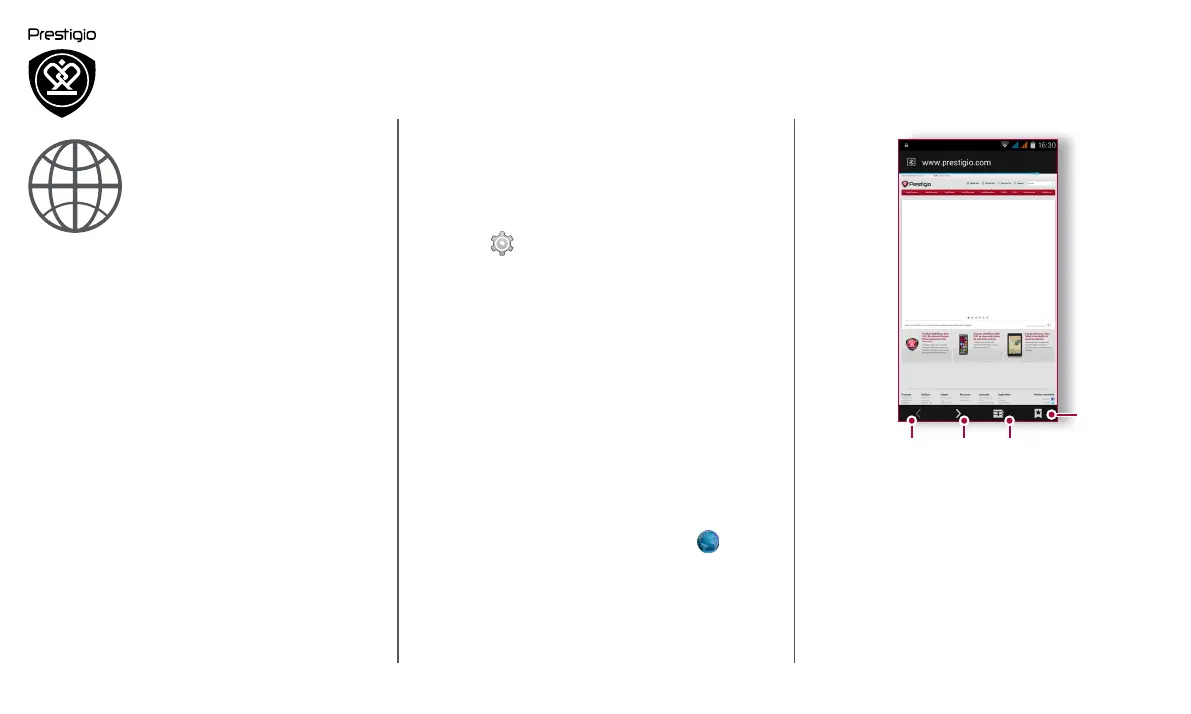
1. The previous web page
2. The next web page
3. Web page preview
4. View Bookmarks, History and Saved pages.
Wi-Fi
Connect the device to a Wi-Fi network to use the
Internet or share media files with other devices.
Connect to a wireless network
1. Go to Settings > Wi-Fi.
2. Make sure Wi-Fi is switched to On.
3. The Wi-Fi section will show the list of networks
detected.
4. Tap the desired Wi-Fi network you want to
connect to.
- If you selected a secured network, you will be
asked to enter the network key or password.
Web browse
You can use your phone to browse websites. Before
browsing a website, please confirm that you have
turn on data connection or Wi-Fi.
Browse a web page
1. On the home screen or list menu, tap
Browser.
2. Enter your search keywords or a web page
address.



 To Next Page