Fig. R
Sensor
Sensor hole
Fig. Q
Boiling Water Canning Display Icons
CANCEL
ADVANCE
CONTROL KNOB
Fig. S
Air vent/cover lock
in down position.
No pressure in unit.
Green latch
aligned with
handle
17
BOILING WATER CANNING
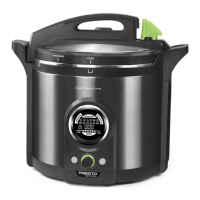
Your canner is designed for use as a boiling water canner to process half-pint and pint jars only. Do not use it for quart jars.
I. GETTING READY
1. Complete the steps on page 6. Select canning recipe (see pages 20 to 24) and
gather needed supplies.
2. Begin preparing the food that will be used for lling the jars in step 12.
NOTE: Any food that is described in a recipe as “Hot Pack” should be freshly
prepared or, if made in advance, it should be reheated as instructed in the canning
recipe.
3. Place the removable pot in the canner body. Put the canning rack in the pot.
NOTE: Jars will be placed on the rack in step 8. If set directly on the bottom of
the pot, jars may break.
4. Pour 3 quarts of water into the pot up to the ll line (Fig. A, page 3).
Tip: You may use hot tap water to shorten the time to heat the water.
5. Attach the power cord to the canner body, making sure to fully insert it in the
receptacle. Then plug into a 120VAC wall outlet. The default icon PRESSURE
CAN will ash in the display window.
6. SLOWLY rotate the control knob until BOILING WATER CAN ashes in the display (Fig. Q).
Press the control knob to select the BOILING WATER CAN mode; the default time (5 minutes) will light up. The
BOILING WATER CAN icon will remain illuminated for the duration of the canning process.
7. Rotate the knob to adjust the time for the specic boiling water canning recipe and jar size being used. The time adjusts in
5-minute increments up to 120 minutes. IMPORTANT: Verify you have set the right program and time. Make sure you
have increased the processing time if you live at an altitude above 1,000 feet.
NOTE: If the PRESSURE CAN program is accidentally selected or the wrong time is entered, press and hold for
3 seconds. Then repeat steps 6 and 7.
II. JAR WARMING
8. Press . INSERT JARS will light up. Fill the jars to be canned half full with water
and place the jars on the canner rack.
Tip: Use hot tap water to speed the warming process.
9. REMOVE THE REGULATOR by pulling it rmly from the canner cover. Never
use the regulator for boiling water canning.
10. Place the cover on the canner body, aligning the INSTALL/REMOVE vertical mark
within the mark on the canner body (Fig. D, page 3). Rotate the cover clockwise
until it stops. The canner cover is properly installed when the LOCKED vertical
mark is within the mark on the canner body (Fig. R).
Lock the cover on by rst lowering the temperature sensor arm and inserting the
sensor into its hole in the cover (Fig. R). It may be necessary to rotate the cover
slightly so the hole aligns with the sensor. Then, grasp the green latch and, using
a slight downward pressure, turn the latch clockwise until it is aligned with the
handle (Fig. S).
11. Press . WARM will light up and the progress bar will begin scrolling from left to
right, indicating the unit is heating. Jar warming will take about 20 minutes.
During this time, complete any necessary food preparation. Also, heat at least
3 quarts of water to boiling in a large kettle for use in step 13. More water will be
needed if canner is not lled to jar capacity.
Important: Never use the regulator
when boiling water canning.


 To Next Page
 Loading...