V-CHIP Setup:
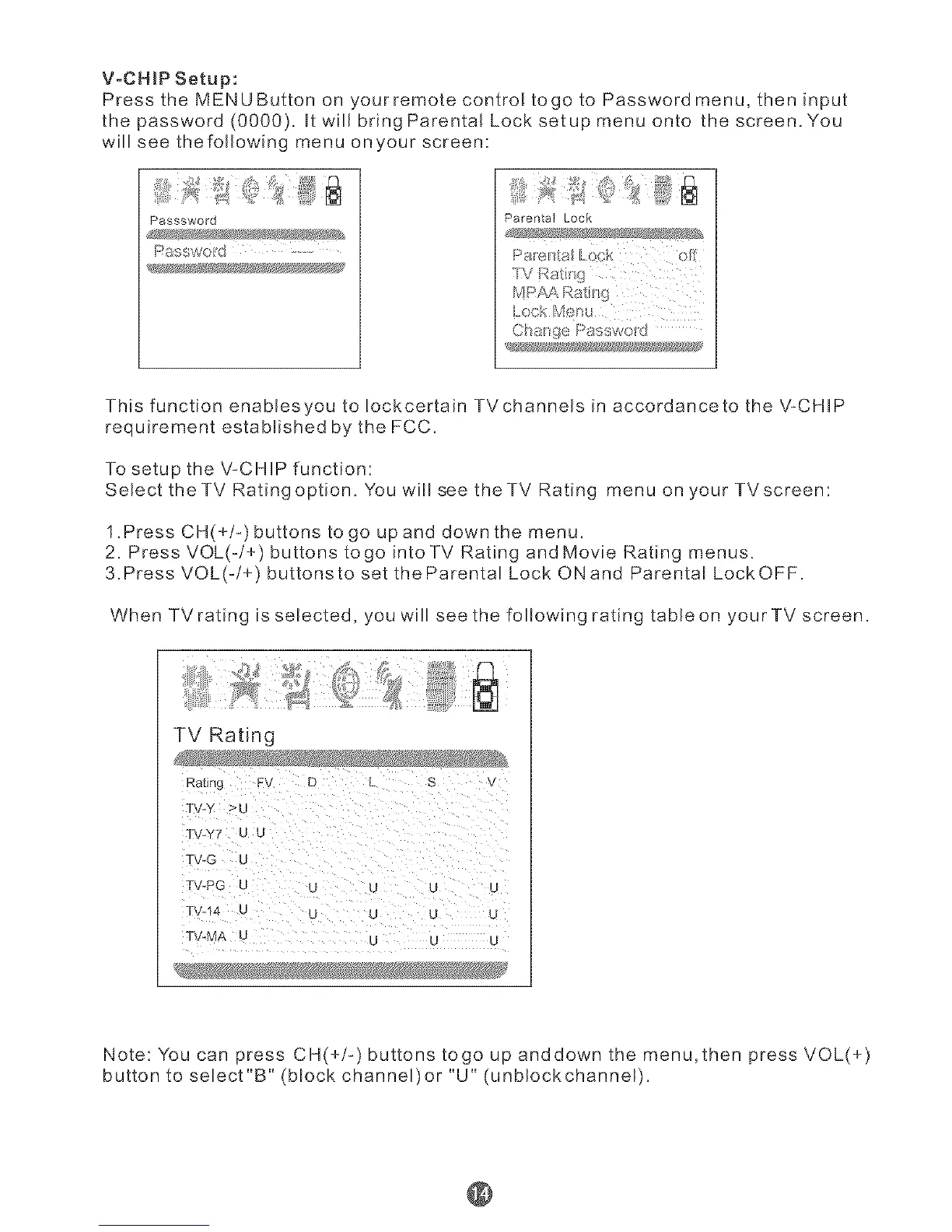
Press the MENUButton on yourremote controE togo to Password menu, then input
the password (0000). Utwill bring ParentaE Lock setup menu onto the screen. You
will see thefollowing menu onyour screen:
Passsword
Parental Lock
_IV R_ti_ 9
CI stage Passwolrd
This function enabresyou to Iockcertain TVchannels in accordanceto the ',,/:CHIP
requirement established by the FCC.
To setup the V-CHIP function:
Select theTV Ratingoption. You will see theTV Rating menu on your TVscreen:
1.Press CH(+/-)buttons to go up and down the menu.
2. Press VOL(-/+) buttons togo intoTV Rating and Movie Rating menus.
3.Press VOL(-/+) buttonsto set theParental Lock ONand Parental LockOFF.
When TVrating is selected, you will see the following rating tableon your TV screen.
TV Rating
_atmq FV D
TV-Y >U
_" _Y'F U U
TV-G U
T -PG U u u
T -14 U u L _ _
T',,LM A -
Note: You can press CH(+/-) buttons togo up anddown the menu,then press VOL(+)
button to select"B" (block channel)or "U" (unblockchannel).
@



 To Next Page