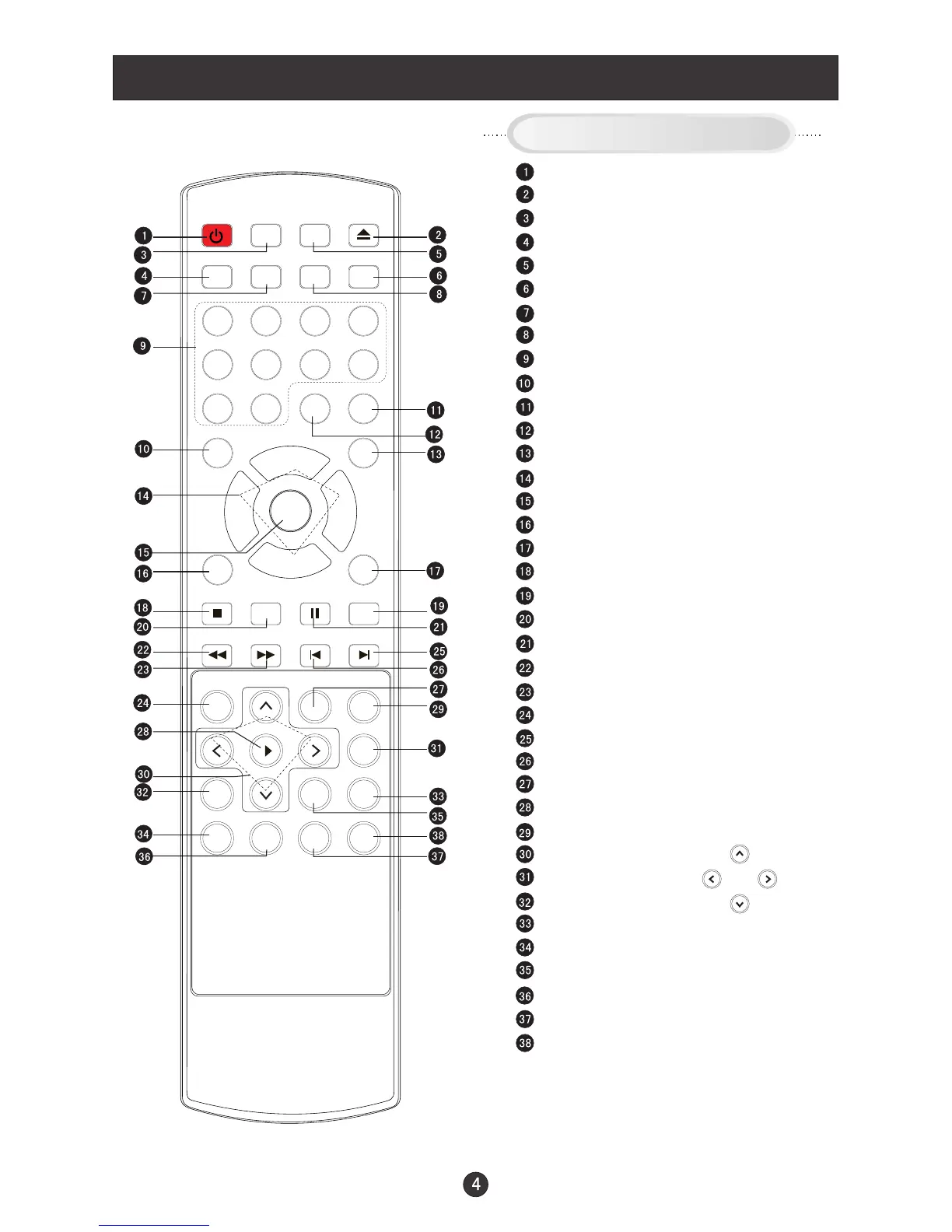
Remote Control Key Functions
When using the remote control, aim it
towards the remote sensor on the TV
Stand By
DVD Open/close
Scan
TV/DVD
Mute
Call Screen Display
Program Number
TV Sleep button
Volume/Channel Selection
MENU
DVD 10+
DVD STOP
DVD SUBTITLE
DVD SETUP
DVD PAUSE/STEP
DVD FAST REVERSE
DVD FAST FORWARD
DVD MENU
DVD NEXT
DVD PREVIOUS
DVD REPEAT
DVD PLAY/ENTER
DVD A-B REPEAT
DVD Cursor Move button
DVD SLOW
DVD ANGLE
DVD SEARCH
DVD TITLE/PBC
DVD PROGRAM
DVD CALL
TV/AV and input selection
Return to Previous Channel
CCD ( closed caption) On / Off
Adjust Picture Mode
Exit On Screen Display
Mode
Zoom Function
Select MONO,STEREO, SAP in NTSC system
DVD AUDIO
Buttons on the remote control
POWER TV/DVD
OPEN/CLOSE
SCAN RECALL
DISPLAY
MUTE
1 2 3 4
5 6 7 8
99 00
CCD
P.STD
CH+
CH-
VOL
-
VOL
+
MENU
EXIT 10+
STOP
SETUP
PA USE/STEP
REV FWD . PREV NEXT
D.MENU
REPEAT
A-B
PLAY/ENTER
SLOW
ANGLE
TITLE/PBC
SEARCH
ZOOM
D.CALL
PROGRAM
SUBTITLE
MTS/SAP
TV/AV
SLEEP
AUDIO
UP
DOWN
LEFT RIGHT



 To Next Page