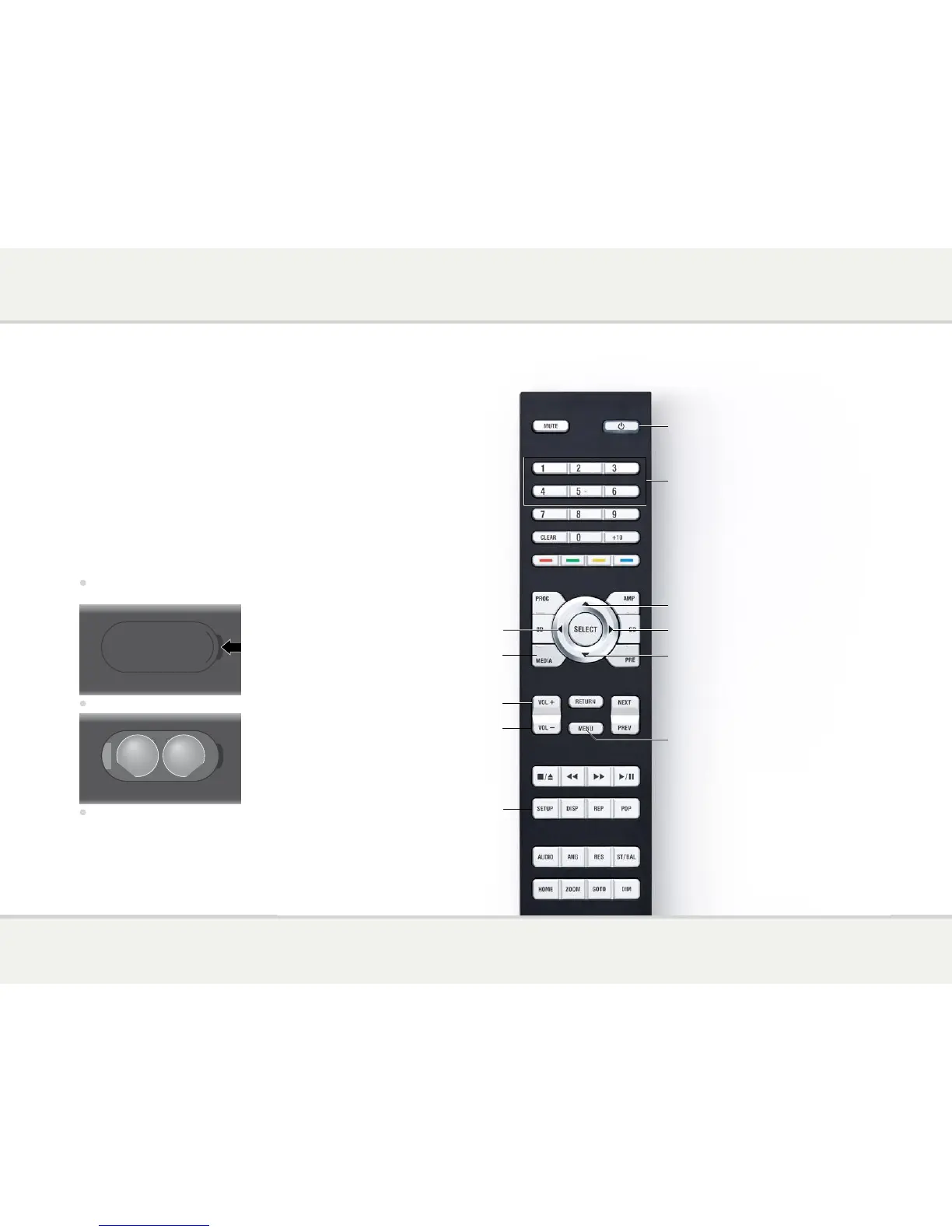
Switch on/off
Increase the volume (NP30)
Select next source or
configuration option
Select previous source or
configuration option
Configuration options (NP30)
Configuration options (NP30)
Decrease the volume (NP30)
Select NP30/DAC30 mode
Select a source
Increase volume of amplifier
Decrease volume of amplifier
Before using the remote control you need to insert
the two button cells supplied with the C24.
•
Open the cover on the back of the remote
control by pressing the tab gently:
•
Insert the two batteries, positive side uppermost:
+
CR2025
LITHIUM BATTERY
3V
+
CR2025
LITHIUM BATTERY
3V
•
Replace the cover and push until it clips into place.
Note: Replace only with 3V button cells
type CR2025 or equivalent.
When disposing of old batteries please be considerate
to the environment.
This page explains how to use the C24 remote control to
operate the NP30, and how to fit the batteries into the remote
control.


 To Next Page