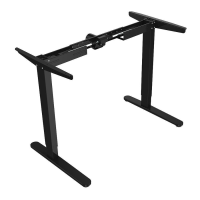
This document provides assembly instructions and operational details for a dual-motor electric standing desk, identified by model numbers Cab-PC-08143/08144. The product is branded as "ERGO PrimeCables," emphasizing "Stronger Cables & More!"
Function Description
The device is a height-adjustable electric standing desk, featuring dual motors for smooth operation. It is designed to allow users to switch between sitting and standing positions, promoting a more dynamic work environment. The desk's height can be adjusted using a digital memory controller, which also offers features like memory presets for specific heights, unit switching (cm/inch), and collision sensitivity adjustment. The system includes safety features such as overload protection and collision detection to prevent damage and injury during operation.
Important Technical Specifications
- Tube Material: Steel
- Expandable Desk Frame: 41.3" - 63.0" (105 - 160 cm)
- Frame Adjustable Height: 25.4" - 51.0" (64.5 - 129.5 cm)
- Depth of Desk Frame: 22.6" (57.4 cm)
- Load Capacity: 265 lb (120 kg)
- Speed: 1.5" / s (38 mm / s)
- Power Supply Voltage: 100-240V
- Duty Cycle: 10% (2 minutes on, 18 minutes off)
Usage Features
Assembly:
The assembly process requires at least two people and a screwdriver. Users are advised to assemble the item on a clean, flat surface. It is crucial to check all hardware before starting and to ensure that screws are not fully tightened until all components are in place, allowing for minor adjustments. The instructions include detailed diagrams for each step, from attaching the side brackets to the lifting columns, connecting the crossbar, installing the feet, and finally securing the desktop and control box.
Digital Memory Controller Operation:
- Rise and Fall: The desk's height can be adjusted by holding down the "A" (up) or "∀" (down) keys on the hand controller. Releasing the key stops the movement.
- Common Height Memory: Up to four different heights can be stored. To save a height, adjust the desk to the desired level, press and hold the "M" key for about 3 seconds until the screen flashes, then press one of the preset buttons (1, 2, 3, or 4). The screen will stop flashing, indicating the height is saved. These memory settings are retained even after a power outage.
- Unit Switching: To switch between centimeters (cm) and inches (inch), press and hold the "M" and "1" keys simultaneously for 3 seconds. The screen will flash and display "C-E." Within 10 seconds, press "A" for "C" (cm) or "∀" for "E" (inch), then press "M" to save.
- Collision Sensitivity Adjustment: To adjust the anti-collision sensitivity, press and hold the "M" and "2" keys simultaneously for 5 seconds. The display will show "3." Use the "A" and "∀" keys to adjust the sensitivity: "0" turns off the function, "2" indicates slight anti-collision strength, "3" indicates moderate strength, and "4" indicates heavy strength. Press "M" to save the setting.
- System Reset: In case of an exception, a system reset can be performed. Press and hold the "∀" key for five seconds until "RES" is displayed. The reset will start in about 5 seconds, lowering the desk to its lowest point, followed by a bounce and a "drop" sound. Releasing the button completes the reset, and the current height is displayed. If the table is already at a certain height, the "∀" key must be held until it reaches the lowest point, bounces, and makes the "drop" sound. If a reset fails, turn off the power, wait for the screen to go out, then turn the power back on, turn off the collision function (set to "0"), perform the reset, and then re-enable the collision function.
Adjustable Feet: The desk is equipped with adjustable feet to ensure stability on uneven ground. Users should turn these feet to level the desk as needed.
Maintenance Features
Safety Instructions:
- Keep all electrical components away from liquids to prevent electric shock and injury.
- Keep children away from the desk, control units, and memory controller due to the risk of injury and electric shock.
- Individuals without knowledge of the product or with reduced physical/mental abilities should only use the product under surveillance or after thorough instruction.
- Ensure no obstacles are in the desk's path and that the desktop does not touch walls during operation.
- All cords must be of appropriate length to accommodate height changes.
- Do not sit or stand on the desk frame, or crawl/lie under it.
- Do not place objects taller than 20" underneath the desk.
- Do not open any components (legs, control box, switch) to avoid injury and electric shock.
- Verify the power supply is between 110V and 240V before plugging in the control box.
- The product has a duty cycle of 10% (2 minutes on, 18 minutes off).
- The manufacturer is not liable for damages caused by improper use or handling.
Troubleshooting (Error Codes):
The manual lists several error codes and their resolutions:
- E01 (Lifting speed sync/HALL signal failure): Confirm all wired connections are secure (legs to cables, cables to control box).
- E04 (Leg 1 overload/over-current protection): Remove everything from the desktop and perform a system reset (hold for 18 minutes).
- E08 (Leg 2 overload/over-current protection): Remove everything from the desktop and perform a system reset (hold for 18 minutes).
- E10 (Leg 1 collided and rebounded): The desk stops and bounces back 2 cm. Perform a system reset.
- E20 (Leg 2 collided and rebounded): The desk stops and bounces back 2 cm. Perform a system reset.
- HOT (Overheating protection): Hold for 18 minutes to restart.
If error messages persist after a reset, contact the seller.
General Maintenance:
- The product should be used for a maximum of 2 minutes continuously, followed by an 18-minute rest period.
- Keep the product away from water and corrosive liquids.
- Do not disassemble the product privately if there is a malfunction; contact customer support.

 Need help?
 General

 To Next Page