This document describes the PRINETTI Portable 2.7kW Air Conditioner with Wi-Fi (IA5036), a portable air conditioning unit designed for residential use.
Function Description:
The PRINETTI Portable Air Conditioner is designed to cool indoor spaces, offering a 2.7kW cooling capacity. It features Wi-Fi connectivity, allowing users to control the appliance remotely via a smartphone or tablet using the Smart Life app. The unit operates in various modes including cooling, fan, and dehumidifying, and offers timer functions for scheduled operation. It uses R290 (propane) as a refrigerant, which is a colourless and odourless hydrocarbon gas with a low Global Warming Potential (GWP) and no potential for ozone depletion.
Important Technical Specifications:
- Cooling Capacity: 2.7kW
- Refrigerant: R290 (propane)
- Wi-Fi Connectivity: Yes, compatible with the Smart Life app for remote control.
- Minimum Clearance: Requires at least 30cm clearance from walls, furniture, curtains, or other obstacles to ensure proper airflow and prevent malfunction or injury.
- Minimum Room Area: The Air Conditioner is designed for use in a room of approximately 15-20m².
- Power Supply: Operates via a power outlet.
- Control Panel: Features buttons for Power On/Off, Temperature Up/Down, Operation Mode, Fan Speed, Timer On/Off, and Water Full Indicator.
- LED Display: Provides visual feedback on settings and status.
- Remote Control: Included, requires 2 x AAA batteries.
- Air Exhaust: Can be installed in vertical or horizontal sliding windows. The exhaust hose is flexible and adjustable.
- Drainage: Features a drainage outlet for condensate water.
Usage Features:
- Before First Use: Users are instructed to unpack the product, check for damage, and uncoil the electrical cord. All instructions should be read carefully.
- Installation:
- The air exhaust hose connects to the unit and extends to a window kit, which can be adjusted for vertical or horizontal sliding windows.
- A minimum 30cm clearance around the unit is crucial for proper airflow.
- The unit should not be installed outdoors, near water sources (bath, shower, laundry basin, swimming pool), near oil, hot gas/electric burners, heat sources, direct sunlight, or in areas where airflow is obstructed. It should also be kept away from flammable substances or dry cleaner's premises.
- Operation:
- Switching On/Off: Press the POWER button on the control panel or remote.
- Cooling Mode: Press the MODE button until the cooling mode indicator illuminates. Temperature can be set between 16°C and 31°C using the DOWN (-) or UP (+) buttons. The unit has a built-in thermostat and cycles Off and On depending upon the ambient temperature of the room.
- Fan Speed Selection: Press the SPEED button to select High or Low fan speed.
- Dehumidifying Mode: Press the MODE button until the dehumidifying mode indicator illuminates. The unit automatically sets the fan to Low speed and maintains the room temperature at 2°C lower than the current room temperature (within the 16°C to 31°C range). This mode removes excess moisture from the air.
- Timer Operation: A 24-hour timer allows users to set a specific time for the unit to turn On or Off. The timer can be set in 1-hour increments up to 24 hours.
- Water Full Alarm: The unit will indicate when the internal drip tray is full. Users must place a pan under the water drainage outlet and attach a water drain hose (not supplied) to empty the tray.
- Wi-Fi Control:
- The Smart Life app allows remote control of the air conditioner.
- Setup: Users need to download the Smart Life app, register an account, and add the device. This involves entering a verification code sent to email, setting a password, and then pairing the device.
- Pairing Process: The app guides users through selecting "Large Home Appliances - Portable Air Conditioner (Wi-Fi)". The Wi-Fi indicator light on the control panel will blink during pairing. Users must press and hold the SPEED button for 5 seconds until a beep is heard to initiate pairing.
- Functionality: Once connected, users can control mode, speed, and set temperature via the app. The app also indicates if the unit is connected to Wi-Fi.
- Unpairing/Re-pairing: Instructions are provided for unpairing the current smart device and pairing another device, or for resetting the Wi-Fi module if needed.
Maintenance Features:
- Cleaning the Air Conditioner:
- Wipe the housing with a damp cloth and mild detergent. Do not use harsh cleaners or solvents.
- Ensure the unit is switched off and disconnected from the power outlet before cleaning.
- Cleaning the Air Filter:
- The unit has an air intake filter at the side. It should be cleaned every two weeks.
- To clean, remove the filter, open the air inlet grille, and wash the filter with a mild detergent in lukewarm water (max. 40°C). Rinse thoroughly and let all parts dry completely in the shade before reinstallation.
- Before Storage:
- At the end of the summer season, follow steps to disconnect and prepare for storage.
- Place a pan under the water drainage outlet and remove the rubber stopper to drain all water.
- Operate the unit in fan mode for a few hours to let the drainage pan dry.
- Switch Off the unit and disconnect the plug.
- Disconnect the drain hose (if installed) and keep the hose and stopper with the Air Conditioner during storage.
- Store the appliance in its original packaging, in a dry, cool place, out of children's reach.
- Instructions For Repairing Appliances Containing R290:
- Only qualified expert electrical service repair agents should perform repairs.
- The manual emphasizes the importance of safety checks for flammable refrigerants and ensuring proper ventilation during work.
- No person carrying out work in relation to a refrigeration system should expose any pipe work that could lead to fire or explosion. All possible ignition sources must be kept away from the site of installation, repair, removal, or disposal.
- The area where work is being carried out must be adequately ventilated.
- Troubleshooting (Frequently Asked Questions):
- Provides solutions for common issues such as Wi-Fi connectivity problems (incorrect password, router issues, device not found), indicator light blinking, and pairing difficulties.
- Offers solutions for operational problems like the unit not starting (water full indicator, room temperature lower than set), heat sources present, exhaust hose issues, and noisy operation.
- Lists error codes (E0, E1, E2, E3) and their corresponding causes and solutions (e.g., room temperature sensor failed, condenser temperature sensor failed, water drip tray full, evaporator temperature sensor failed).

 Need help?
 General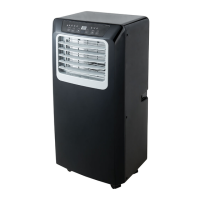

 To Next Page