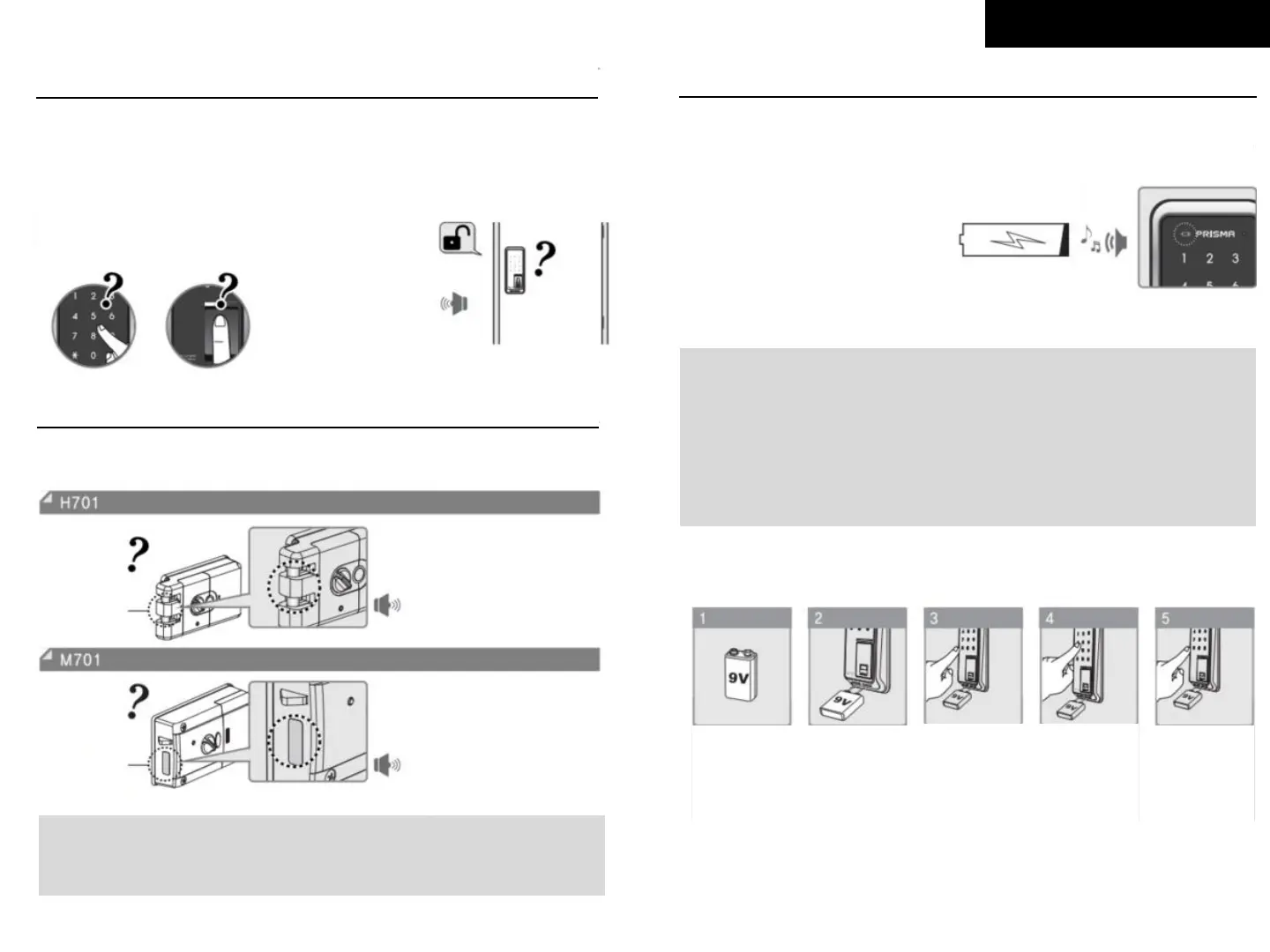
If a password or a RFID card is yet to be
registered is entered for 5 consecutive times,
the alarm will go off and
nothing will work for 1 minute.
5 consecutive times??
Deadbolt Alarm
When a door is opened or closed, if a deadbolt work abnormally,
the alarm will go off with ‘Beep’ sound for 3 times.
Beep, Beep, Beep
Caution !
If Deadbolt Alarm keeps going off and the lock is not working normally, the lock
may need be to re-installed. Please contact to experts.
Beep, Beep, Beep
When Low Battery Lamp is on
and battery alarm goes off,
please change batteries.
Make sure change the all used
batteries and put all new ones.
Emergency Power Supply for Discharged Batteries
Prepare
9V battery
Contact the
9V Battery
onto the
emergency
power supply
terminal
Press [*]
button
Enter each
number of
your password
Press [*]
button again
With a
confirmation
sound, the
door will be
unlocked
Vertical
deadbolt
Beep, Beep, Beep
Deadbolt
Alarm Feature
Caution !
Please use batteries from same manufacturers because it may lead
leakage problem.
After Low Battery Alarm, password and/or RFID card registration
may not work before changing the batteries.



 To Previous Page