How to Use
Caution !
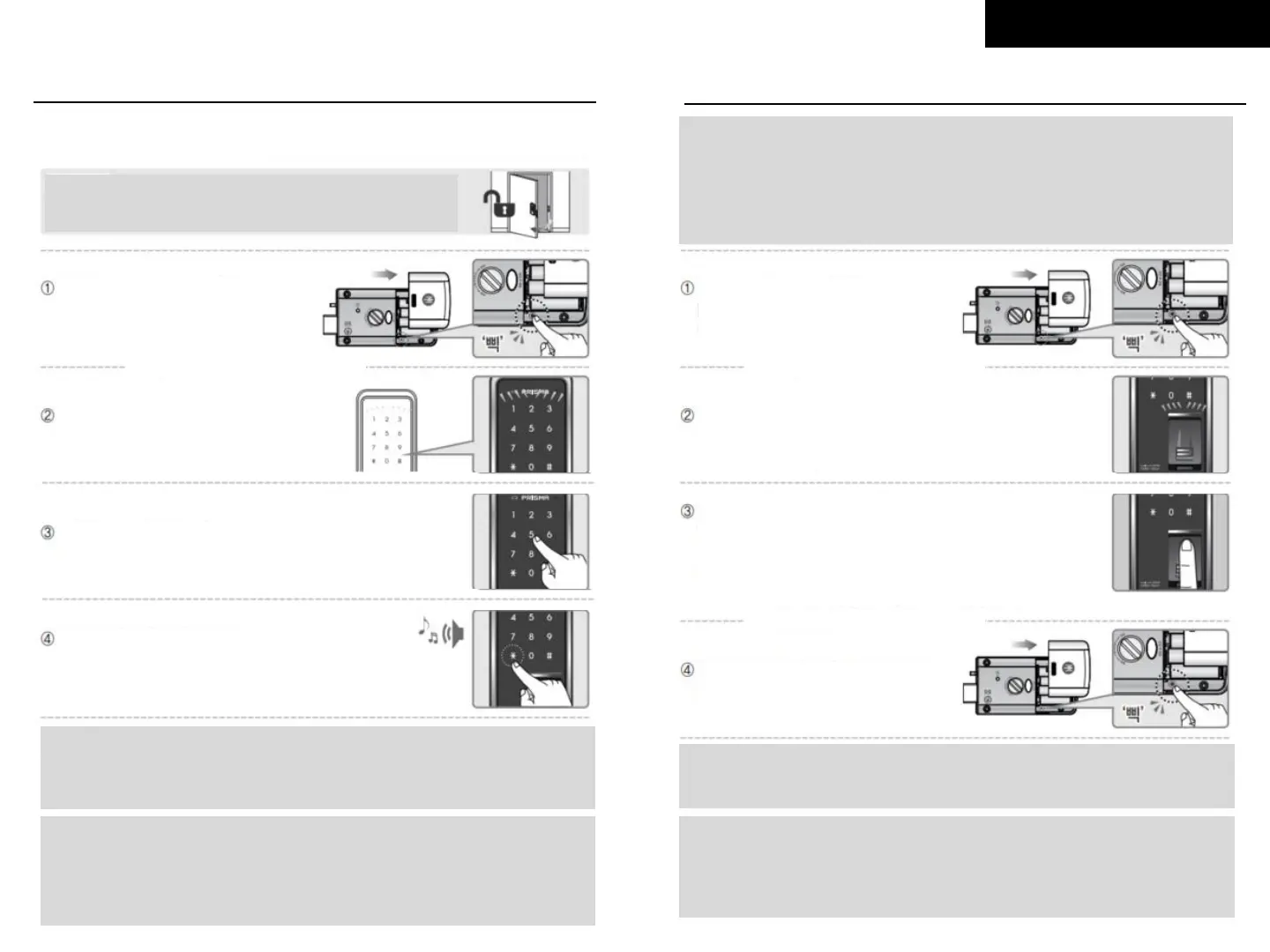
Make sure to leave the door open
when registering password
Open the battery cover of indoor
body and press [Registration]
button
Please check outdoor body from here
Enter password
(4 to 12 digits)
Press [*] button to complete and
confirmation sound will be followed
Note:
To add more password (up to 4), repeat steps ③ and ④
before keypad light turns off
Caution !
- If do not enter password for 10 seconds after press [Registration] button,
the process will be canceled.
- When new password is registered, previously registered-password
will be automatically deleted.
Check if the keypad’s light is on
1. Register and Change Password
2. Register and Change Fingerprint
Please check outdoor body from here
Caution !
When you register new fingerprint, remember that already registered
fingerprints are still in the memory. So if you want to erase already
registered fingerprints, please refer to next page and erase them.
When 100 fingerprints are registered, you cannot register before you erase
all fingerprint already registered.
Press [Registration] button to
complete and confirmation sound
will be followed
Note:
To add more fingerprints (up to 100), repeat step ③ and ④
before keypad light turns off
Caution !
- If do not register fingerprints for 20 seconds after press [Registration]
button, the process will be canceled.
- Weak fingerprints from elderly or young children might not be easy to
register.
Open the battery cover of the
indoor body and press
[Registration] button
Check if the keypad’s light is on
and [Auto Cover] is opened
Sweep your fingerprint through the fingerprint sensor
2 times to register. You can hear a confirmation sound
and see the number of registered fingerprint.
Note: if the first fingerprint dose not match with the
second one, you cannot register fingerprint.
Please check indoor body from here



 To Next Page
 Loading...