How to Use
All Registered Fingerprints
Door from Outside (Continued)
Door from Outside
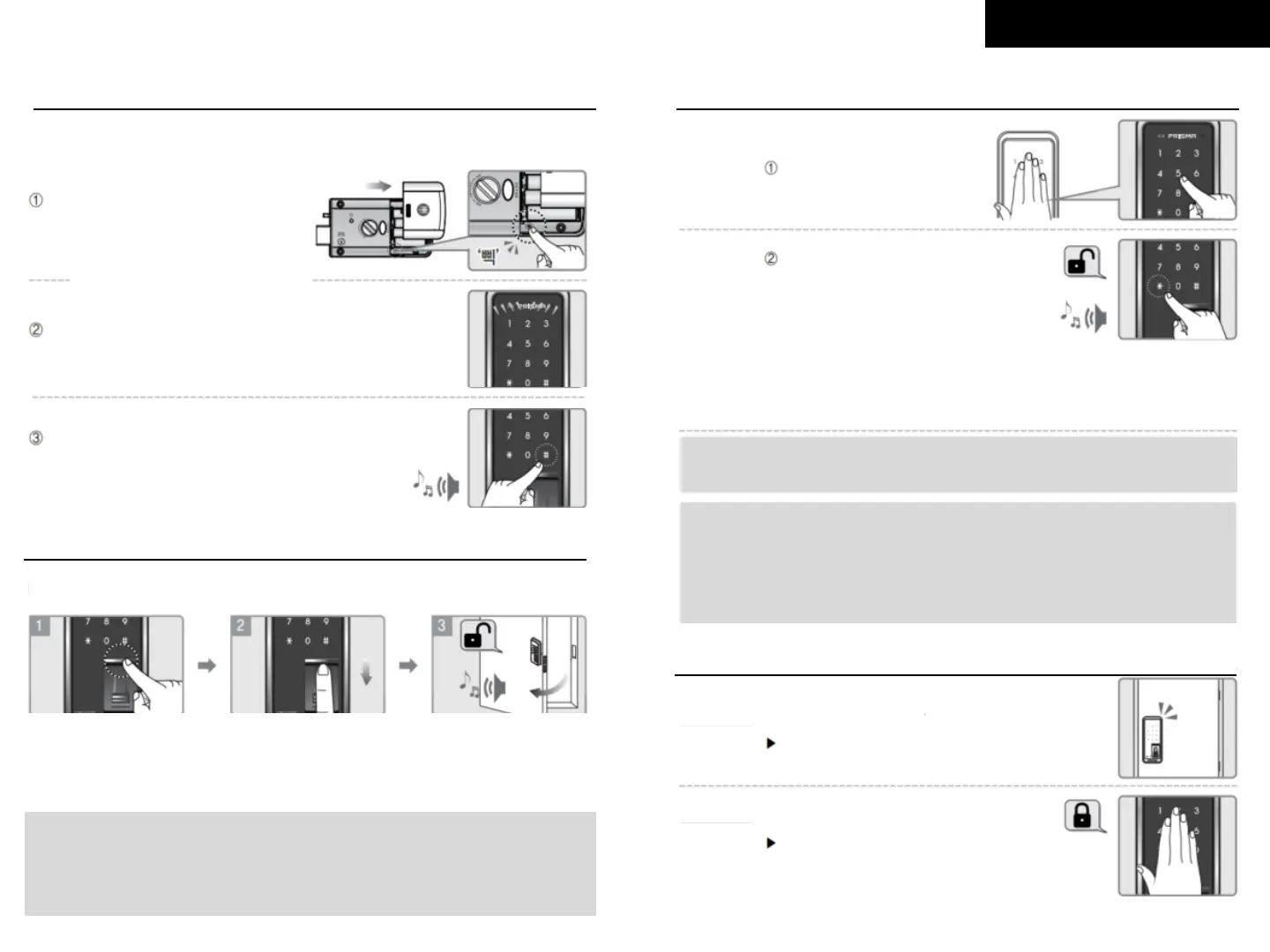
By Fingerprint
Touch [Activation Sensor],
[Auto Cover] will be open
and green light on the
sensor will be on
Sweep registered
fingerprint through the
fingerprint sensor
With a confirmation sound,
the door will be opened
Open the battery cover of indoor
body and press [Registration]
button
Please check outdoor body from here
Check if the keypad’s light is on
Press [#] button for 5 seconds to
delete and confirmation sound will be
followed
5 Seconds
Note:
- If you sweep unregistered fingerprint more then 5 times, the lock will
activate 1-Minute Lock mode.
- Pushing Auto cover is a same function with touching sensor bar.
By password
Touch keypad first and
enter your password
Press the [*] button,
open the door with
confirmation sound
By Password with Random No. Function
Touch keypad first, enter random numbers, enter your password and press [*]
OR Touch keypad first, enter your password, enter random numbers,
and press [*]. Open door with confirmation sound
Note:
This function is useful when your password can be exposed.
Make sure enter under 20 digits including your password.
Caution !
When ‘Multi-Touch Security’ is on, first enter your password and touch
automatic random 3 numbers seen, and press [*] button to open door.
Random No. Function is automatically off when ‘Multi-Touch Security
Function’ is on and vice versa.
New products are set with Random No. Function by default.
5. Close Door from Outside
If Auto Lock is set
A door will automatically be closed once
closed within 2 seconds
Touch keypad, a door will be closed
If Auto Lock is NOT set


 To Next Page
 Loading...