How to Use
from Inside
Caution !
If you close a door in Auto Lock status, it will be closed within 7 seconds
by the automatic lock sensor.
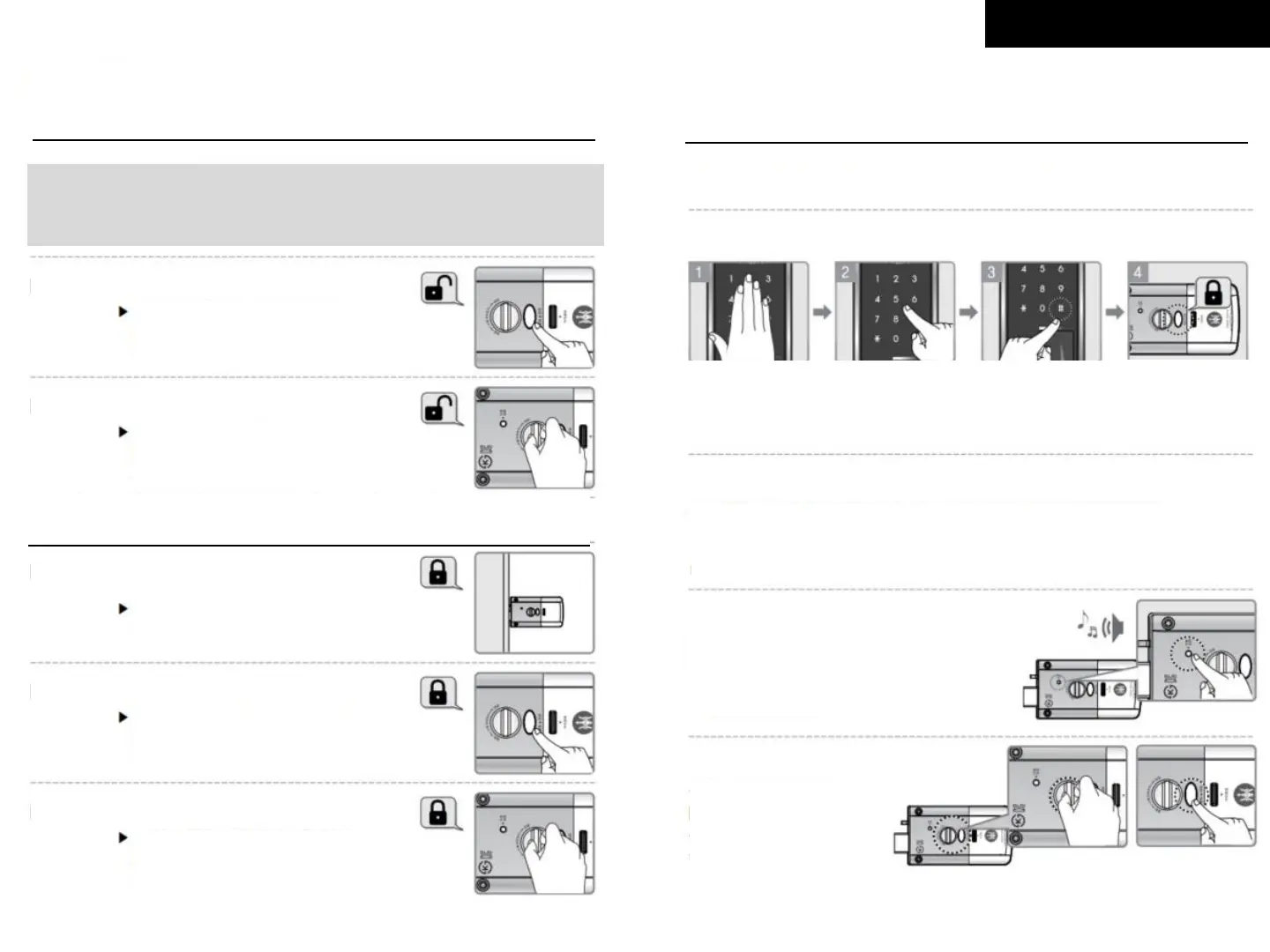
Door from Inside
By [Open/Close] button
Press [Open/Close] button
When a door is closed
By Manual Knob
Turn the [Manual Open/Close
Knob] to OPEN side
When a door is closed
If Auto Lock is set
A door will automatically be closed
once closed within 2 second.
By [Open/Close] button
Press [Open/Close] button
By Manual Knob
Turn the manual open/close
knob to CLOSE side
□ Outside Forced Lock : To stop the function of [Open/Close] button
Setting
Unsetting
Touch the
keypad
when a door is
locked
Enter your
password
Press
[#] button
and press
[0] button
Outside Forced
Lock is set with a
confirmation
sound
Enter password and card to open the door. The function will be unset.
□ Inside Forced Lock : To stop password and card to open the door
Setting
Unsetting
Press the [Double Lock] button for 3
seconds to complete the setting
with a confirmation sound
Press the [Open/Close]
button OR turn the
[Manual Open/Close] Knob
and open the door
Lock



 To Next Page