EN
Function
Thank you for choosing this camera. Please carefully read the manual before using, and
keep it at a safe place for future reference.
The compilation of the manual refers to the latest information. The manual quotes
captured screen displays and graphics, with the aim to introduce the digital camera
through detailed and direct methods. Due to the differences of technical R&D and
production batch, those captured screen displays and graphics indicated un the manual
may be different from that of actual digital camera.
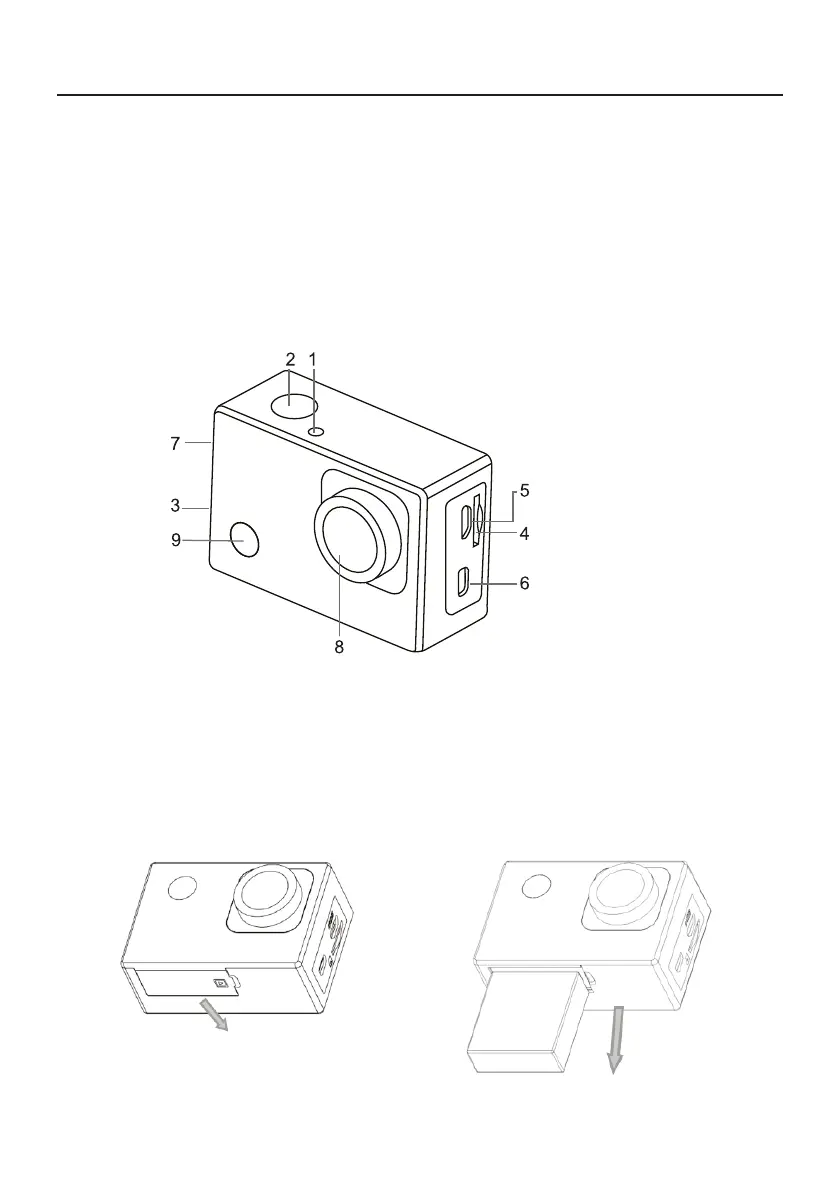
Appearance
1.Ligh indicator
2.Shutter button
3.Sound alert
4.MicroSD card slot
5.Type C port
6.Micro HDMI port
7.Up / down buttons
8.Lens
9.POWER / Mode
Removing the battery from the camera
1.Remove the battery door by
placing your thumb
2.Allow the door to pop out.
Grasp the battery pull-tab and
remove from the camera
BATTERY



 To Next Page