3
OPERATION
• Once the button is touched the switched power will be supplied for the time period
set on the internal controls. The power will be cut at the end of the timed cycle
regardless of any additional touches of the button.
• When the timed cycle has elapsed and the outgoing power is cut, the button can be
touched again to begin the timed cycle once more.
9. Fit the front part of the switch to the rear part and insert the 4 screws and tighten.
Do not overtighten or you may strip the threads.
10. Restore mains power and wait 20 seconds for the switch circuitry to stabilise then
activate the switch and check the ‘on’ duration.
11. If incorrect turn off the mains power and open the casing and adjust the setting then
ret the front panel before restoring the power and re-testing.
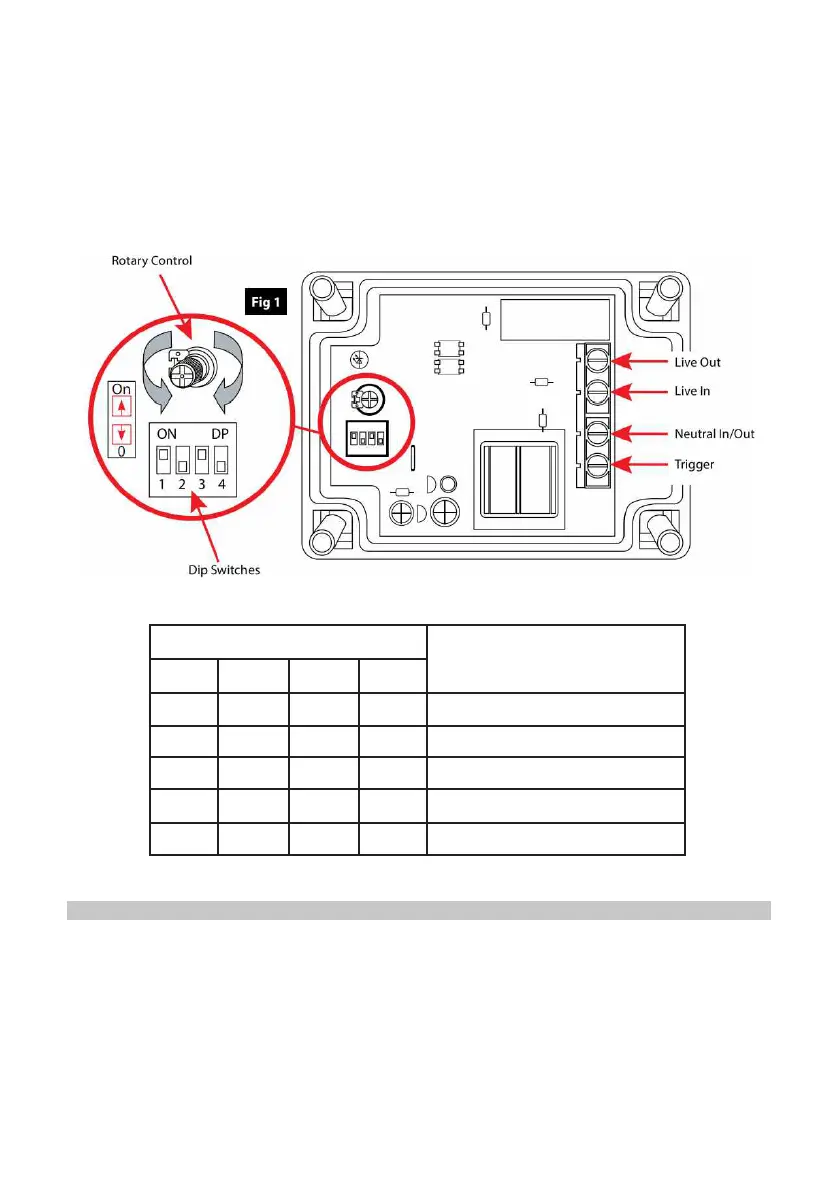
Figure 1.
Figure 2.
DIP SWITCH SETTING
TIMER
FUNCTION
1 2 3 4
0 0 1 0 2 seconds to 50 seconds
1 0 1 0 50 seconds to 20 minutes
1 1 1 0 20 minutes to 70 minutes
1 1 0 0 70 minutes to 2 hours
- - - 1 Timer function disabled


 To Next Page