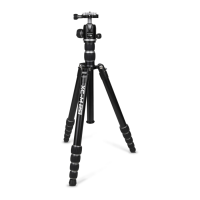
Figure 6
U-shaped Slot
(for vertical positioning)
Laser-Engraved Scale
Panning Knob
Tension Knob
Memory
Lock
Bullseye
Level
Line Levels
Ball Joint
Neck
QR Knob
QR Plate
Tool Kit
(2.5mm)
Medium Hex Wrenches (4mm)
OPERATING THE TRIPOD
5) USING THE WEIGHT HOOK
A retractable Weight Hook is connected to the bottom of your XC-M’s Center Column (see gure 4). This is a
pretty cool accessory that can help a lot in achieving better stability for your tripod, especially in windy
weather conditions and/or when taking extremely long exposures.
Using the Weight Hook is easy. Just tug on the silver hook to extend it and then attach some form of weight
to the hook. A camera bag is normally the most convenient type of weight nearby.
Another method is to connect a small cord or rope to the weight hook using a slip knot, running the cord to
the ground, and using a tent stake (driven at an angle) to make the rope taught. This takes a little practice
but can be an excellent method for adding stability for long exposure photography outdoors.
6) REMOVING AND REVERSING THE CENTER COLUMN
You may choose to remove the Center Column to connect another type of XC-M accessory, such as a Tilting
Column Adapter or Ground Level Adapter. Or you may wish to reverse the center column to achieve a
unique camera position.
Begin by removing the Weight Hook (see gure 4). Simply unscrew it from the bottom of the Center Column
using the ‘Lefty-loosey, righty-tighty’ method. Now loosen the Center Column Lower Lock and slide the
column out. Once removed, you can insert an accessory or you can reverse the column by sliding it back into
the Center Column Lower Lock from the bottom side of the Yoke. Be sure to reconnect the Weight Hook
when the column is reversed so it can act as a stop for the Center Column and prevent it from falling out of
the tripod.
7) REMOVING AND MOUNTING THE HEAD
You may choose to remove the included XC-MH ball head to install a dierent type of head or to mount the
head to a dierent tripod, clamp, or grip item.
Begin by extending the Center Column so you can access the bottom side of the Center Column Platform.
Use the Small Hex Key in the included Took Kit (see gure 3) to loosen the Grub Screw (see gure 3). It’s OK
to loosen the Grub Screw a few turns to ensure it is no longer making contact with the bottom of the ball
head. Just be sure not to take it all of the way out since it is small and easily lost.
With the Grub Screw loose, you can now remove the Ball Head. Be sure the Panning Knob on the Ball Head is
not loose, or the head will spin on its own base rather than coming o of the Center Column Platform. Turn
the entire ball head to remove it from the rest of the tripod. Be sure you have a good hold on the head as
well as the tripod so nothing falls to the ground once these two are separated.
Once the ball head is removed you will notice a special bolt in the middle of the Center Column Platform. If
you do not see it, check the bottom of the ball head as this bolt might have come out with it instead. This
Double-sided Platform Screw should be kept in the Center Column Platform and used to attach another
head. It is reversible. The larger side is a 3/8”-16 thread and works with XC-M heads (and many other brands
of heads). The smaller side is a ¼”-20 thread and works with some other brands of lightweight heads. If you
happen to lose, or need a replacement Double Sided Platform Screw for your XC-M tripod visit your friendly
neighborhood ProMaster dealer and ask for product 4014.


 To Next Page
 Loading...