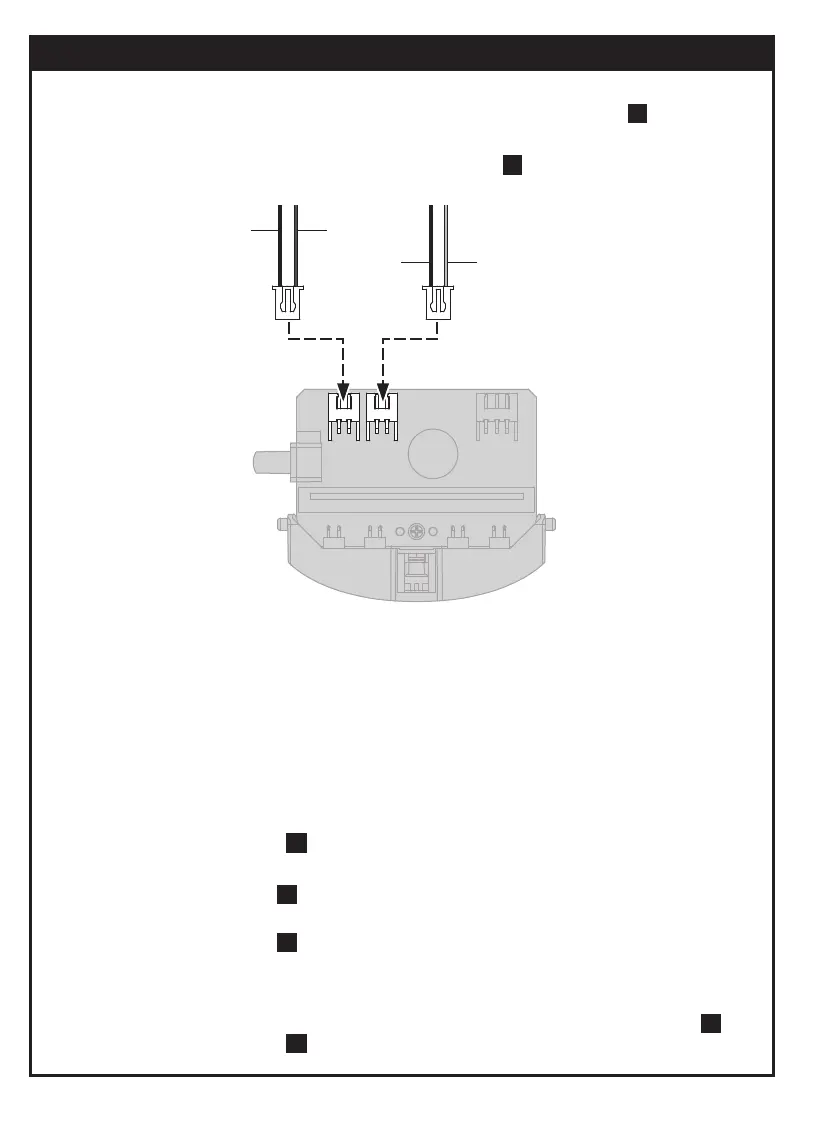
BlueBlack
黑色
Black
黑色
Red
紅色
藍色
Ensure all wirings are correct (refer to page 20, step wire
configuration as below)
5
2. 請確認線路安裝位置正確(見第20頁,步驟5,線路圖如下)
3. 當寶比處在紅外線感應的模式時(如探險家寶比、小跟班寶比),請避免在陽光下或
鹵素燈下與寶比遊戲,以免寶比在移動時方向錯誤。
When infrared sensors are used (ex: explorer or follow me funways), do not play
the Probbie II under direct sunlight or halogen lamps. It may cause the robot to go
wrong direction.
5.
若寶比走路不穩或跌倒,請確認 A1(見第18頁,步驟16) 、 A2(見第22頁,步驟22)
是否混淆且是否組裝正確。
1. 請確保電池安裝位置是否正確
10
Ensure batteries are placed in correct polarity (refer to page 21, step ).
(1) 請確認A19皆安裝正確(見第15頁,步驟23)
(2)請確認A15是否已取下(見第6頁,步驟8)
(3)請確認所有螺絲皆如指示位置鎖緊(見第6頁,步驟 7)
4. 當寶比前進時,齒輪機箱發出 ”答答”聲響, 請依如下方式檢查
When Probbie II is moving forward but with abnormal sound “ Da Da Da”, please
follow steps below.
Refer to page 15, step , check and ensure A19 is installed correctly.
23
Refer to page 6, step , check and ensure A15 is removed.
Refer to page 6, step , check and ensure all screws are fastened tightly.
8
7
If Probbie II is walking unstably or tumbling, check if A1(refer to page 12, step ) &
A2(refer to page 16, step ) are not mixed. Ensure both parts are installed correctly.
25
19
簡易故障排除 Trouble Shooting
30



 To Next Page