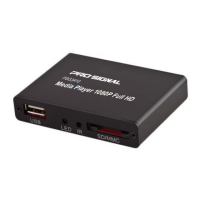
Need help?
Do you have a question about the PRO SIGNAL PSG3411 and is the answer not in the manual?
Details on hardware specifications including CPU, GPU, RAM, ROM, HDMI version, interfaces, and dimension.
Detailed breakdown of the RK3229 Application Processor's CPU, GPU, memory, multimedia capabilities, and interfaces.
Identifies the physical ports on the back and front of the media player for connectivity.
Overview of the available settings in the media player's menu, including sound, display, and language.
Guide to navigating and accessing video, audio, and photo files from connected USB or SD/MMC devices.
Explains the different video playback modes such as Single, Repeat one, Repeat all, and Random.
 General
| Type | Portable Media Player |
|---|---|
| Connectivity | USB 2.0 |
| Video Output | Composite Video |
| Supported Formats | AVI, MP3, WMA |
| Memory | SD Card |
| Battery | Built-in Lithium-ion Battery |

 To Next Page