Caution:
1. When inputting AC RMS over 10V, it could show reading, but excess
vibration may appear.
2. It is recommended to test weak signals by shielded cable under noisy
circumstances.
3. Select ACV gear when testing the frequency of high voltage. Then
press “Hz/%” button to enter frequency measurement status.
4. Don’t input voltage over 250V DC or AC peak value in case it may
damage the meter.
• Input Sensitivity: >0.7V RMS
• Overload Protection: 250V DC or AC Peak Value.
2-2-9. Temperature (˚C/℉)
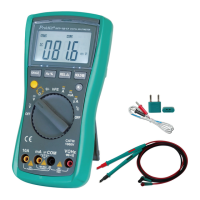
A) Rotate function switch to“℃/℉”gear.
B) Insert the cathode (black pin) of cold end (free end) of thermocouple
into “COM” jack and anode into“VΩHz”terminal. Then put the
working end (temperature measurement end) of thermocouple on
the surface or inside the object to be tested. Then you can read
temperature from the screen, and the data is in Centigrade. Press
the SELECT button to Fahrenheit (℉).
Caution:
1. When the input terminal is open-circuit, it will display the “OL” symbol
on the screen.
2. Don’t change the temperature probe at random, or the value accuracy
could not be guaranteed.


 To Next Page