3.2 Measurement guidelines
3.2.1 AC Voltage and DC Voltage Measurement
The meter provides DC voltage measuring ranges as follows: 200.0mV,
2.000V, 20.00V, 200.0V and 600V, and AC voltage measuring ranges:
200.0V and 600V.
To avoid any electric shock and/or damage to the meter, do
not attempt a voltage measurement if the voltage (valid value)
is over 600V DC or AC current.
To avoid any electric shock and/or damage to the meter, don't
attempt to impose between any public terminal and ground
any voltage whose valid value is over 600V for DC or AC
current.
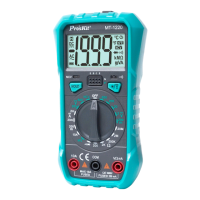
Turn the rotary switch to the position ~V or V.
Connect the test lead in black and test lead in red to COM input
socket and V input socket respectively.
Use another two ends of the test lead to measure the voltage of the
circuit to be measured. (In parallel connection with the circuit to be
measured)
Read the measured voltage value on LCD screen. When DC voltage
measurement is attempted, the display unit will show the voltage
polarity of the circuit connected to the pen-shaped meter in red.
3.2.2 Electric Resistance Measurement
Ohm is the unit of electric resistance ().
The measuring ranges of electric resistance of this meter are 200.0,
2.000k, 200.0k, 2.000Mand 20.00M
To avoid the meter or the measured equipment from damage,
do not attempt a resistance measurement unless the operator
has already cut off all power sources for the circuit to be
measured and fully discharged all high-voltage capacitors.
Turn the rotary switch to the appropriate position.
Connect the test lead in black and test lead in red to COM input
socket and V/input socket respectively.
Use another two ends of the test lead to measure the electric
resistance of the circuit to be measured.
Read the measured electric resistance value on LCD screen.


 To Next Page