3
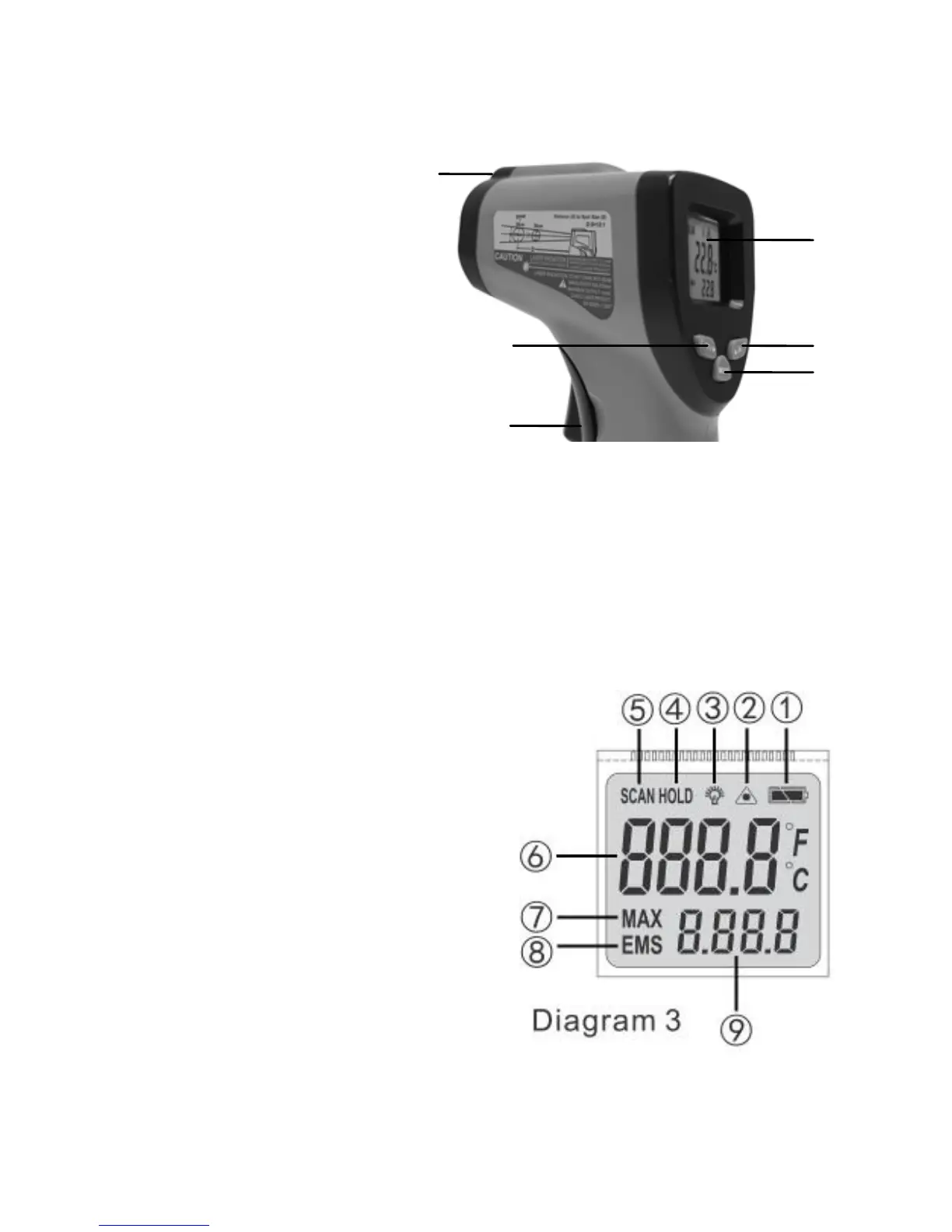
5. Detailed function
1: LCD
2: laser button
3: function button
4: ℃/℉ button
5: infrared lens
6: measurement
trigger
Button Function:
After power on
1) Press button 4 (℃/℉ button), switch the ℃/℉
2) Press button 2 (laser button), test with laser
3) Press button 3 (function button) to get into the emissivity adjust,
and then press button 2 or 4 to adjust emissivity
4) Press and hold button 6 (measurement trigger) and then the
same time press button 2 to turn on or turn off the backlight
Display
1. Low Battery Indication: to remind
user to change battery
2. Laser Sign: test with laser
3. Backlight Indication: working with
backlight
4. Data Hold: to keep current
reading
5. Scan Mode: shows on LCD when
testing
6. Measuring Result: current
temperature reading
7. Max Measuring Reading: it
shows maximum temperature reading after pressing the measure
button and holding for a while
1
2
3
6
4
5
Diagram2


 To Next Page
 Loading...