This document is an instruction manual for PROSTORMER submersible water pumps, models BDP40020 and BDP75020. It provides comprehensive information on the device's function, technical specifications, usage, and maintenance.
Function Description
The PROSTORMER submersible water pump is designed for draining, conveying, and pumping clear water over clear water with the contained suspended matter not exceeding a maximum particle size of 16 mm. It is suitable for various applications, including emptying flooded basements, tanks, and containers, and for water withdrawal from wells and shafts. The pump is fully submersible (watertight encapsulation) and can be immersed up to 23 ft into the conveyed medium. It is not suitable for continuous operation, recirculation pump for ponds, or for pumping potable water. It should not be used for aggressive, abrasive, caustic, combustible, or explosive pumping media such as brine, sandy water, food, cleaning agents, fuels (e.g., petrol, diesel), oils, greases, petroleum, nitro-cellulose thinner, or waste water from lavatories and urinal installations. The device is not suitable for pumping at freezing temperatures.
The pump features an integrated float switch that can be set to either an automatic (AUTO) or manual (MANUAL) position. In AUTO mode, the pump switches on and off automatically depending on the water level. In MANUAL mode, the pump will continuously operate as long as it is plugged in, regardless of the water level. The device is equipped with a thermal protection circuit which is activated by overheating of the device and then switches the device off.
Important Technical Specifications
The manual provides detailed technical data for both models:
| Parameter |
BDP40020 |
BDP75020 |
| Power consumption |
1/2 HP (3.2 A) |
1 HP (4.1 A) |
| Power supply |
120 V ~ 60 Hz |
120 V ~ 60 Hz |
| Max. flow rate |
2110 GPH |
3500 GPH |
| Max. pump height |
16 Ft |
26 Ft |
| Max. submersion depth |
23 Ft |
23 Ft |
| Max. water temperature |
35 °C |
35 °C |
| Protection type |
IPX8 |
IPX8 |
| Minimum operating depth |
5 ½" (AUTO) / 2 ½" (Manual) |
5 ½" (AUTO) / 2 ½" (Manual) |
| Max. water level after suction |
1" (AUTO) / 3/4" (Manual) |
1" (AUTO) / 3/4" (Manual) |
| Cable type & length |
18AWG*3C SJTW*16 Ft |
18AWG*3C SJTW*16 Ft |
| Protection class |
I |
I |
| Weight approx. |
7.7 lbs |
11.0 lbs |
| Dimensions (length x width x height) |
8.6 x 7 x 12 inch |
8.6 x 7 x 12 inch |
| Max. particle size |
1/2 inch |
1/2 inch |
| Height for switch-on |
5 ½" (AUTO) / 2 ½" (Manual) |
5 ½" (AUTO) / 2 ½" (Manual) |
| Height for switch-off |
2" (AUTO) / 3/4" (Manual) |
2" (AUTO) / 3/4" (Manual) |
| Hose connection, inner diameter |
1", 1 ¼" |
1", 1 ¼" |
| Threaded connection |
1", 1 ½" |
1", 1 ½" |
The water temperature must not exceed 35 °C. The device is fully submersible and can be immersed up to 23 ft into the conveyed medium.
Usage Features
The pump is designed for ease of use with several important considerations:
- Hose Connection: The pump includes a reducer (7) that allows connection to hoses with inner diameters of 1" and 1 ¼", and a threaded connection of 1" or 1 ½". The hose clamp should be used to secure the hose.
- Float Switch Adjustment: The float switch can be adjusted to control the automatic on/off operation based on water level. For automatic operation, the float switch must be able to move freely and should not be impeded by obstacles. The minimum operating depth for automatic mode is 5 ½", while for manual mode it is 2 ½".
- Operation: Before the first use, the air exhausting process must be completed. This involves placing the device into the water at a slight angle to allow any remaining air to escape. The float switch can then be set to the M position (manual) or AUTO position.
- Safety Precautions:
- Always ensure the device is not a toy and is kept out of reach of children.
- Do not pull the mains plug by the power cable.
- Do not submerge the pump in potable water.
- Do not use damaged power cables or mains plugs.
- Do not use at freezing temperatures.
- Always store the manual in the immediate vicinity of the device or its site of use.
- Before any work on the device, remove the mains plug from the mains socket.
- Hold onto the mains plug while pulling the power cable out of the mains socket.
- Do not leave the device running unattended to ensure early detection of when the device runs dry or switches off automatically.
- Do not place any objects on the device – not even to weigh it down.
- Do not use this appliance if it is a toy. Keep away from children and animals.
- Never insert any objects or limbs into the device.
- Ensure that the pump does not freeze. Before winter sets in, run the pump dry and store it in a frost-free location.
Maintenance Features
Regular maintenance is crucial for the longevity and proper functioning of the pump:
- Cleaning:
- Clean the device with a soft, damp, and lint-free cloth.
- Protect electrical components from moisture.
- Do not use any aggressive cleaning agents such as cleaning sprays, solvents, alcohol-based or abrasive cleaners.
- Disassemble the cover panel at the bottom of the pump to access the air intake opening.
- Rinse the reducer (7) as well as other connections using clear water.
- Clean the bottom of the pump as well as the impeller by means of a jet of water.
- Reattach the cover panel to the device.
- Storage:
- When the device is not being used, observe the following storage conditions: dry and protected from frost and heat, in an upright position where it is protected from dust and direct sunlight, with a cover to protect it from invasive dust if necessary.
- Place no further devices or objects on top of the device to prevent it from being damaged.
- If you do not use the device for an extended period of time, it must be cleaned thoroughly after its last application and before recommissioning. Deposits and residues could lead to start-up difficulties.
- General Maintenance:
- Check the power connection.
- Check the power cable and mains plug for damages.
- Check the on-site fusing.
- Check whether the float switch is located above the automatic switch-on position.
- Check whether the device might be overheated and the thermal protection circuit is activated.
- If so, wait for approx. 10 minutes before restarting the device.
- Check the water temperature is above 35 °C and the thermal protection circuit is activated.
- Check whether there are any foreign objects in the air intake opening, the impeller, the reducer (7) and / or the hose or pipe.
- Check the inside of the device for any remaining air.
- Check whether the minimum water level has been reached.
- Check whether the device requires a minimum water level.
- Check whether the hoses are blocked and whether the water contains any suspended matter with a particle size of more than 16 mm.
- Check whether the used hose diameter is too small.
- Check whether the hose line is kinked or blocked. Remove kinks and / or blockages.
- Check reducer (7) for blockages.
- Troubleshooting: The manual provides a section on errors and faults, guiding users on how to identify and resolve common issues. If the device still does not operate correctly after these checks, contact customer service.
- Regular Checks: Regularly check that the float switch is working effectively, particularly if you have set the pump to work automatically (every 3 months). Regularly remove residues from the float with clean water. Turn the pump upside-down, open the side-panel with a pin or similar and remove clean water.
Disposal
The device must not be disposed of with household waste. It should be taken to designated collection points for free return of waste electrical and electronic equipment in your vicinity. The separate collection of waste electrical and electronic equipment aims to enable re-use, recycling, and other forms of recovery of waste equipment, as well as to prevent negative effects for the environment and human health caused by the disposal of hazardous substances potentially contained in the equipment.

 Need help?
 General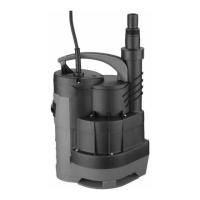

 To Next Page