16
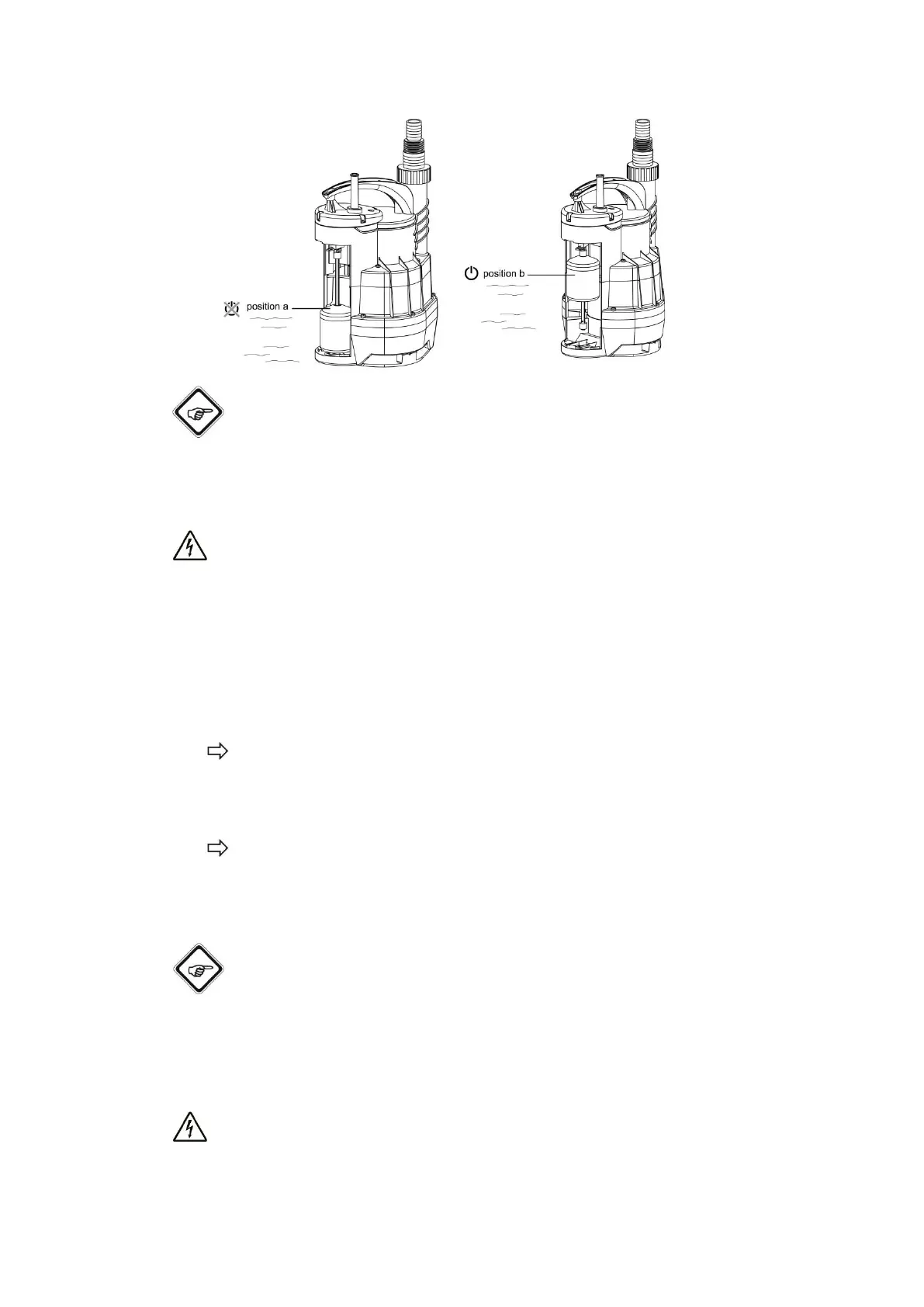
(fig. 11)
Info
Once the device has been switched off, any water still remaining in the line can flow back
through the device.
Warning of electrical voltage
Do not touch the mains plug with wet or damp hands.
Notice
Running dry can cause damage to the device. Switch the device off before it can run dry.
1. Hold onto the mains plug while pulling the power cable out of the mains socket.
2. If necessary, pull the device out by means of the nylon cord.
3. Lock the float switch in the following position:
With the float switch affixed in M position, the device is switched on permanently.
4. Lower the device into the water at a slight angle to allow any remaining air to escape.
Make sure that the position of the float switch does not change.
5. Plug the mains plug into a sufficiently fused mains socket.
The device switches on.
6. Oversee the pumping process.
7. When the device starts to suck in air, disconnect the power cable from the mains socket
by holding onto the mains plug.
Info
If the device switches off again after only a brief period of operation, the float switch might
have come loose. Fix the float switch again as depicted.
Shutdown
Warning of electrical voltage
Do not touch the mains plug with wet or damp hands.


 To Next Page