EasyManua.ls Logo

Pro Vision BODYCAM 4 - User Manual

Pro Vision BODYCAM 4
28 pages
Print Icon
To Next Page IconTo Next Page
Loading...
USER GUIDE
provisionusa.com
01/12/2021
BODYCAM 4

Other manuals for Pro Vision BODYCAM 4

Question and Answer IconNeed help?

Do you have a question about the Pro Vision BODYCAM 4 and is the answer not in the manual?

Summary

Important Notices

General Notices

Covers notices regarding comprehensiveness, updates, copyright, and warranty disclaimers.

Software and Firmware Updates

Commitment to Updates

Details PRO-VISION's commitment to ongoing software and firmware improvement.

Third-Party Products

Disclaimer for Third-Party Products

PRO-VISION disclaims responsibility for installation, use, performance, and support of third-party products.

Suggestions

Customer Feedback Encouraged

Encourages customer feedback for product improvement and future services.

Manufacturer Contact Information

Contact Details

Provides contact details for PRO-VISION Solutions, LLC, including address and phone number.

Overview

Introduction and System Overview

Introduces the BODYCAM 4 system, its components, and purpose.

Video Management Software

Explains SecuraMax Cloud and PV Transfer software for data management.

Core Recording Functions

Details Event, Pre-Event, Post Event, and Background Recording modes.

Additional Recording Features

Covers configurable options like audio mute, bit rate, and resolution.

Status Indicators

Describes visual, audible, and vibration indicators for camera status.

Documentation

Informs about availability of setup, configuration, and operation guides.

Camera Familiarization

Identifies physical components and buttons of the BODYCAM 4 camera.

Recharge and Upload Process

Explains charging the camera and uploading files using a docking station.

Function and Action Mapping

Lists camera functions and their corresponding button actions.

Display Status Icons

Explains icons displayed on the camera's screen.

Setup

Docking Station Setup

Describes the setup for single and 10-unit docking stations.

Network Requirements and Considerations

Details network requirements, IP addressing, and considerations for docking stations.

Security Requirements

Outlines security requirements for network-connected devices and firewalls.

Firewall Configuration

Specifies required outbound firewall ports for SecuraMax and PV Transfer software.

Vehicle Network Configuration

Explains how to connect a dock in a vehicle using a router or laptop.

Windows Laptop 4 G Setup

Provides step-by-step instructions for setting up internet connection sharing on a Windows laptop.

Single Dock Mounting Options

Details desktop, surface, and bracket mounting for the single dock.

Single Dock Connections

Explains power and network connections for the single dock.

Multi-Dock Mounting and Connections

Describes placement, mounting, and connections for the multi-dock, including chaining.

Software Setup

Covers initial setup for SecuraMax Cloud and PV Transfer software.

Camera Configuration Profiles

Explains how to create and modify configuration profiles for cameras.

Assigning Configuration Profiles

Details assigning configuration profiles to user groups in SecuraMax.

Camera Registration Process

Provides instructions for registering new cameras with SecuraMax and PV Transfer software.

Camera Mounting

Rotating Garment Clip

Describes the rotating garment clip mount, its installation, and removal.

Heavy-Duty Magnet Mount

Details the two-part magnet mount, its installation, removal, and storage.

Magnetic Mount Safety Information

Provides safety precautions for individuals with medical devices and general handling.

Molle Mount

Explains the Molle mount for attaching to vests/jackets and camera attachment/removal.

Epaulette Mount

Details the epaulette mount for uniform attachment and camera attachment/removal.

Screw-to-fit Mount

Describes the screw-to-fit mount for thick garments and its attachment/removal.

Screw-on Mount

Explains the screw-on mount for fixed applications and camera attachment/removal.

Operation

User Notifications Overview

Explains how the camera provides status notifications via display, sound, and vibration.

User Notification Table

Lists actions, display, sound, vibration, and status LED ring for various camera states.

Front LED Indicator

Details the function and colors of the front LED ring for recording and charging states.

Audible Tones

Describes the audible tones for different operations and their disable option.

Vibrations

Explains haptic feedback through vibrations for various functions and their disable option.

Display Information

Describes the LCD display, its modes, dimming, and brightness adjustment.

Docked and Operational Modes

Explains the icons and information displayed in docked and operational modes.

Covert Mode

Details how to enable and disable Covert mode to suppress notifications.

Mute Function

Explains how to mute and unmute audio recording, indicated by a mute icon.

GPS Location Tracking

Describes the built-in GPS module, signal status, and how location data is stored.

Video On-Screen Display (OSD)

Shows examples of GPS coordinates displayed on the video feed.

Video File Naming Convention

Explains the structure and components of video file names, including date and time.

Remote Activation

Remote Activation Overview

Explains the radio-based remote activation of recording for BODYCAM 4 devices.

Configurable Activation Options

Lists options for camera activation by other cameras, in-car systems, or trigger devices.

BODYCAM 4 to BODYCAM 4 Activation

Details how BODYCAM 4 units can activate each other when in proximity.

Trigger Device Activation

Describes activation via a vehicle trigger device (BC4-TRIGGER), installation, and operation.

DVR-906 LE In-Car System Activation

Explains how to activate cameras from a PRO-VISION In-Car System (DVR-906LE).

In-Car System Configuration

Details steps to configure the DVR unit for remote activation of cameras.

RFID User Login

RFID Scanner Functionality

Introduces the RFID scanner for logging users in and out of the camera via SecuraMax.

Device Setup for RFID

Explains selecting 'Multi User' mode for RFID login during camera registration.

RFID Tag Assignment Process

Details how SecuraMax administrators assign RFID tags to specific users.

User Login and Logout Procedures

Describes how to manually log in and out users via RFID scan and dock.

Automatic User Logout Configuration

Explains how to configure automatic log out based on inactivity or docking time.

Care and Maintenance

Battery Charging Information

Provides details on charging the battery, charging times, and low battery notifications.

Camera Date and Time Synchronization

Explains how cameras synchronize date and time when docked, requiring internet access.

Cleaning the Camera

Offers guidelines for cleaning the camera, lens, and display using safe materials.

Camera Storage Recommendations

Advises on optimal temperature ranges for storing the camera.

Firmware Updates

Details the importance of firmware updates and how the camera automatically checks and downloads them.

Battery Replacement Procedure

Provides step-by-step instructions for replacing the camera's battery.

Technical Support

Support Contact and Hours

Provides contact information and hours for technical support.

Warranty Information

Warranty Details

Directs users to the PRO-VISION website for detailed warranty provisions.

Radio Waves and FCC Compliance

RF Emissions and Compliance

Details radio transmission frequencies, FCC compliance, and safety guidelines for RF energy exposure.

Overview

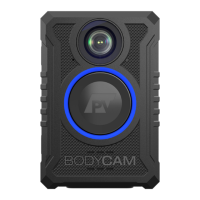
The BODYCAM 4 is a battery-powered body-worn camera system designed to capture video and audio events. It offers various mounting options and records both video and audio, storing them securely on internal storage. Recordings can be initiated manually by the user or remotely by another camera, a vehicle DVR, or an independent trigger device.

Function Description:

The BODYCAM 4 system provides comprehensive event recording capabilities. It supports four main recording functions:

  1. Event Recording: Manually started and stopped by the user via the camera's front event button.
  2. Pre-Event Recording: When enabled, the camera continuously records to a buffer while powered on. If an Event recording is initiated, the configured buffer length before the button press is added to the start of the video.
  3. Post Event Recording: When enabled, the camera continues Event Recording for a configured time after the user ends the Event.
  4. Background Recording: When enabled, the camera records to a non-event video location, overwriting older non-event video as storage fills. Background videos are only transferred upon specific software requests.

The camera offers configurable settings for recording, including the option to record video only without audio, mute audio with a button, and adjust recording bit rate, resolution, and frame rate.

Important Technical Specifications:

  • Connectivity: The BODYCAM 4 does not use USB for data transfer. It connects to a network via its docking station for video offloading and charging.
  • Docking Stations: Available in single-unit (BC4-DOCK-S) and 10-unit multi-dock (BC4-DOCK-10) versions. Both provide secure magnetic camera docking, simultaneous charging and transfer, and direct network uploads without requiring a PC.
    • Single Unit Dock: USB-C power input, mounting bracket for wall and vehicle mounting, small size.
    • 10-Unit Multi-Dock: Supports 10 cameras simultaneously, secondary network port for chaining docks, integrated power supply, wall mounting slots.
  • Network Requirements: Each BODYCAM 4 device requires its own IP address when docked. DHCP is recommended for IP address provisioning. Static IP addresses are not supported. The multi-dock functions as an Ethernet switch.
  • Upload Speed: Capable of up to 64 Mbps per device, if not regulated by network administrators.
  • Firewall Configuration (Outbound Ports):
    • SecuraMax Cloud: Port 443 (TCP) for HTTPS uploads.
    • SecuraMax Server (self-hosted): Port 443 (TCP) for HTTPS uploads.
    • PV Transfer: Port 5004 (TCP) for HTTPS uploads (default, configurable).
    • Firmware Updates: Access to https://firmware.provisionusa.com.
    • Date/Time Sync: Access to NTP time server at https://us.pool.ntp.org.
  • GPS Module: Built-in GPS provides location information, stored in video metadata and displayed on-screen.
  • Radio Transmissions: Operates in frequency ranges of 2402 – 2480 MHz, 2412 – 2462 MHz, 5180 – 5210 MHz, 5745 – 5825 MHz, and 13.56 MHz (RFID).
  • RFID Scanner: High Frequency (HF) RFID scanner behind the front Event Button for user login/logout with SecuraMax Cloud Evidence Management software.
  • Battery Life: Approximately 14 hours of normal operation on a full charge. Recharging can take up to 5 hours.
  • Display: Full-color LCD display on top, automatically rotates from docked to operational mode, dims after 30 seconds of inactivity. Brightness can be temporarily increased.
  • LED Indicator: LED ring around the front Event button indicates recording state (Light Blue for Pre-Event, Bright Blue for Event Recording, Pulsing Bright Blue for muted audio) and charging state (Solid White for Charged, Pulsing White for Charging).
  • Audio/Vibration: Provides audible tones and haptic feedback (vibrations) for various functions (power on/off, low battery, event recording start/stop, low storage).
  • Remote Activation: Features a radio for transmitting and receiving signals to remotely start recording from other BODYCAM 4 cameras, PRO-VISION In-Car Systems (DVR-906LE), or PRO-VISION Trigger Devices (BC4-TRIGGER). Range up to 30ft.

Usage Features:

  • Power On/Off: Press and hold the Power button for 3 seconds.
  • Start/Stop Event Recording: Double-press the Event button to start, press and hold for 3 seconds to stop.
  • Add Marker: Single-press the Event button during Event recording.
  • Mute/Unmute Audio: Press and hold F1 button for 3 seconds.
  • Covert Mode: Enter/exit by pressing and holding F1 and F2 buttons simultaneously for 3 seconds. Disables sounds, vibrations, and front LED. Automatically disables when powered off.
  • Display Brightness: Single-press the power button to temporarily increase display brightness for 5 seconds.
  • User Notifications: Visual (LCD, front LED), audible tones, and vibrations indicate status (e.g., "READY," "NOT READY," "BATTERY LOW," "STORAGE FULL," recording status, charging status, upload status, firmware updates).
  • Camera Registration: New cameras must be registered to the software (SecuraMax Cloud or PV Transfer) by scanning QR codes displayed on the server interface while the camera is powered on, then docking the camera.
  • Configuration Profiles: Centralized management of camera settings via software. "Default" profile created automatically; additional profiles can be created for different user types.
  • RFID User Login: Users can log in/out by scanning an RFID tag with the camera's front event button. RFID tags are assigned to users via the software. Automatic logout options are configurable.
  • Video File Naming: Video files are named with detailed information including camera number, date, time (hour, minute, second, millisecond), video format, camera serial number, and logged-in username.

Maintenance Features:

  • Charging: Cameras are charged by inserting them into a single or multi-unit docking station. The front LED ring flashes white during charging and turns solid white when fully charged.
  • Date/Time Synchronization: The camera synchronizes date and time each time it is connected to a docking station with internet access.
  • Cleaning: Use a soft, damp cloth (possibly with isopropyl alcohol) to clean the camera surface. For the lens, use a blower brush and then a soft cloth. For the display, use soapy water and a soft cloth. Avoid harsh cleaners, ammonia-based cleaners, running water, or compressed air. Ensure the microphone opening is clean.
  • Storage: Store cameras in environments where temperatures are between -4 °F (-20 °C) and 95 °F (35 °C).
  • Firmware Updates: The camera automatically checks for and downloads the latest firmware when docked and connected to the internet.
  • Battery Replacement: The BODYCAM 4 has a replaceable battery (P/N: BC4-BAT).
    1. Power off the camera and place it lens-side down.
    2. Remove six screws from the rear cover using a #1 Philips screwdriver.
    3. Remove the back cover.
    4. Disconnect the old battery by gently pulling on the red/black wires from the connector (use plastic, wood, or non-metal tools).
    5. Connect the new battery, ensuring the red wire is oriented towards the top.
    6. Place the new battery with the label facing outward and wires folded under the top edge.
    7. Inspect the gasket on the back cover for proper seating.
    8. Place the back cover back on and reinstall the six screws, starting with the center screws. Apply a screw torque of 3 in-lbs for water-tight seal.
    9. Dispose of the old battery according to local regulations.

Pro Vision BODYCAM 4 Specifications

General IconGeneral
BrandPro Vision
ModelBODYCAM 4
CategoryDigital Camera
LanguageEnglish