
 Need help?
Do you have a question about the Pro Vision BODYCAM BC-300 and is the answer not in the manual?
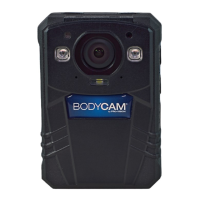
Identifies external buttons, ports, and indicators on the BC-300 camera.
Explains how to turn the camera on and the meaning of initial status lights and vibrations.
Details how to start and stop video recording using the camera's buttons.
Explains the pre-record feature, including its indicator and recording buffer.
Describes how to take photos while in Video Record or Preview mode.
Explains how to initiate and end audio recording using the dedicated button.
How to enter the playback menu and navigate through recorded files.
Explains the functions of the Power button in various states (OFF, ON, Recording).
Details the actions performed by the Video Record button in different modes.
Describes the actions of the Photo button in various states.
Explains the functions of the Audio Record button.
Covers Event button actions (Wi-Fi, marking events) and White Light button control.
Explains the functions of the Menu, Left, and Right Arrow buttons for navigation.
Details the functions of the OK button for selection and playback control.
Explains the meaning of the Blue, Green, Amber, and Red LED indicators on the camera.
Describes the camera's feedback through vibrations for different actions.
Explains the various tones and beeps the camera uses for feedback.
Detailed configuration for video quality, mode, pre/post-event, and motion recording.
Configuration options for photo resolution, quality, burst capture, and auto exposure.
Settings for LCD, audio, tones, vibrations, Wi-Fi, IR, and file management.
Details on USB modes and accessing system information like firmware and battery status.
Step-by-step guide to connect the camera to a computer for file transfer.
Important notes regarding playback software and USB connection precautions.
Details on field-of-view, dimensions, waterproof rating, weight, and night vision.
Information on screen size, display type, and sleep mode features.
Specifications for pre-event, post-event, video format, resolution, and storage capacity.
Details on battery type, charging time, and expected battery life.
 General
| Waterproof | IP67 |
|---|---|
| Memory | 32GB internal |
| Battery Life | 8 hours |
| Resolution | 1920x1080 |
| Frame Rate | 30 fps |
| Night Vision | Yes |
| Video Resolution | 1920x1080 |
| Storage | MicroSD card slot |
| Viewing Angle | 140 degrees |

 To Next Page