Drivetrain Lubrication
Always replace the drivetrain parts when they are damaged
or show visible wear or injury and damage may result.
Lubricating the flex shaft is vital to the life of the
drivetrain. The lubricant also acts as a water seal, keeping
water from entering the hull through the stuffing tube.
Lubricate the flex shaft and all moving parts after every
30 minutes of operation. Lubricate the drive strut after
every 30 minutes of operation.
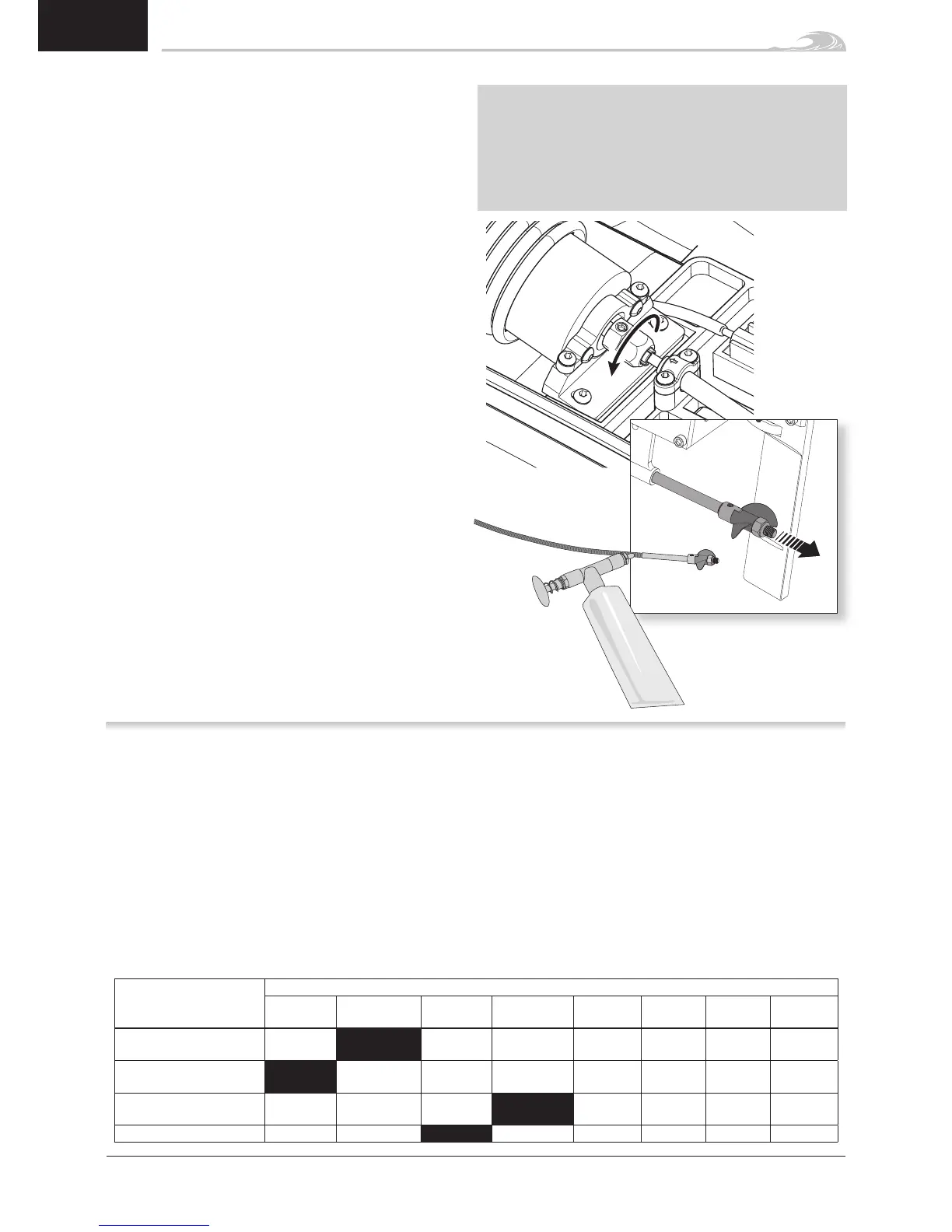
1. In the hull, use a 10mm open-end wrench to loosen
the collet nut from the flex shaft.
2. Slide the flex shaft out from the stuffing tube and
drive strut at the rear of the boat.
Tip: Use paper or cloth to touch the flex shaft and other
lubricated parts.
3. Wipe the old lubricant and material from the flex
shaft.
4. Lubricate the full length of the flex shaft assembly up
to the drive dog using marine grease (DYNE4200 or
DYNE4201). Also apply grease to the collet threads.
5. Carefully reinstall the flex shaft in the drive strut,
stuffing tube and collet. If the flex shaft is difficult
to remove or install in the collet, use a flat screw-
driver to spread the grips of the collet.
Ensure there is a 1–2mm gap between the drive strut and
drive dog to allow for flex shaft shrinkage under load.
NOTICE: Running the boat in saltwater could cause some
parts to corrode. If you run the boat in saltwater, rinse it
thoroughly in freshwater after each use and lubricate the
drive system.
NOTICE: Because of its corrosive effects, running RC
boats in saltwater is at the discretion of the modeler.
1. Pull and hold the Throttle Trigger to full throttle and
turn the ESC on.
2. After 2 seconds a “-B-B” will sound. Wait another 5
seconds and the ESC will give a rising tone to indicate
you have entered Programming Mode.
3. After entering Programming Mode, you will hear 4
tones in a loop indicating Programmable Items. Push
the Throttle Trigger to full brake within 3 seconds
after the tone sounds matching the programmable
item you want to select.
4. After selecting a programmable item, you will hear
several tones in a loop indicating Programmable
Values. Pull Throttle Trigger to full throttle to select
the value matching the tone. The ESC will give an
alternating tone to indicate the item is selected.
5. Keep the trigger in Full Throttle to return to Step 3 and
continue item selection. Move the throttle stick to full
brake position within 2 seconds to exit the Program
Mode.
The black-shaded setting is the factory default
Programmable Items
Programmable Value -B Single Beep B–– Long Beep
-B -B-B -B-B-B -B-B-B-B B––
B––
-B
B––
-B-B
B––
-B-B-B
Running Mode -B
Forward
Only
Forward/
Backward
Li-Po Cells -B-B
Auto
Calc.
2s 3s 4s 5s 6s
Low Voltage Cutoff
-B-B-B
None 2.8V/Cell 3.0V/Cell 3.2V/Cell 3.4V/Cell
Timing -B-B-B-B 0.00º 3.75º 7.50º 11.25º 15.00º 18.75º 22.50º 26.25º
Transmitter Programing
12


 To Next Page