Impulse
™
31
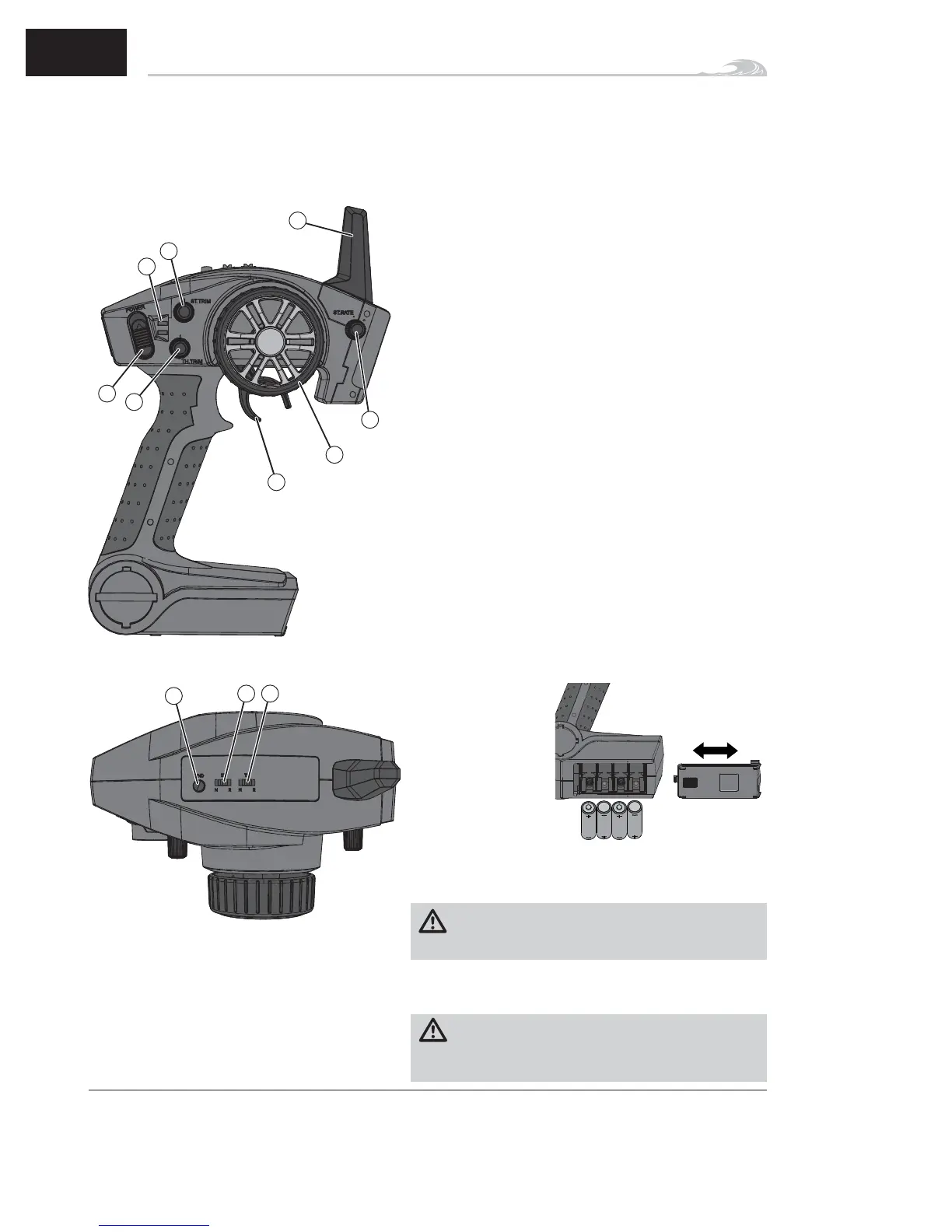
1. Steering Wheel controls direction (left/right) of the model.
2. Throttle Trigger controls speed.
3. Antenna transmits the signal to the model.
4. ON/OFF Switch turns the power ON/OFF for the
transmitter.
5. Indicator Lights
• Solid green light indicates adequate battery power.
• Flashing green light indicates the battery voltage is
critically low. Replace batteries.
6. ST. Trim adjusts the “hands off” direction of the model.
7. TH. Trim adjusts the motor speed to idle at neutral.
8. Steering Dual Rate adjusts the amount the rudder moves
when the steering wheel is turned left and right.
9. BIND Button puts the transmitter into Bind Mode.
10. ST. REV reverses the function of the steering when the
wheel is turned left or right.
11. TH. REV reverses the function of the speed control when
pulled back or pushed forward.
Spektrum DX2E Radio System
For more information on the transmitter, go to
www.spektrumrc.com and click on the support tab to find the
full manual for the DX2E transmitter.
6
EN
1. Push in the battery
cover a small
amount to release
the retaining tab,
then remove the
cover.
2. Install 4 AA
batteries, taking
care to align
battery polarity to
the diagram in the
transmitter’s battery
case.
3. Carefully reinstall the battery cover by aligning the tabs
with the slots on the transmitter.
CAUTION: NEVER remove the transmitter batteries
while the vehicle is powered on, as loss of control,
property damage or injury may result.
IMPORTANT: Remove the transmitter batteries after use.
CAUTION: If using rechargeable batteries, charge only
rechargeable batteries. Charging non-rechargeable bat-
teries may cause the batteries to burst, resulting in injury to
persons and/or damage to property.
Installing the Transmitter Batteries
1
2
6
5
9
10
3
4
7
8
11



 To Next Page