You can use any CAM software to generate g-code for LinuxCNC. Most CAM software
programs will have appropriate post processors named either LinuxCNC or EMC2. You
can use generic g-code post processors as well. We also have post processors on our
wiki specifically for our machines. If using the ATLaS Automatic Tool Length Sensor, you
need to make sure the post processor you are using is inserting the proper tool change
routine.
CNC machines use a numbered coordinate system. G54 is the default coordinate
system. Some post processors carelessly do not insert a coordinate system. The
results of not specifying a coordinate system in the g-code is unpredictable and
dangerous. Be sure the coordinate system is being inserted into the g-code preamble.
After you mount your stock to the table and insert the tool you will be cutting with, use
the jog controls to move the tool to the origin of the part. This is the same location you
told the CAM software you wanted the origin to be. It could be on one of the corners of
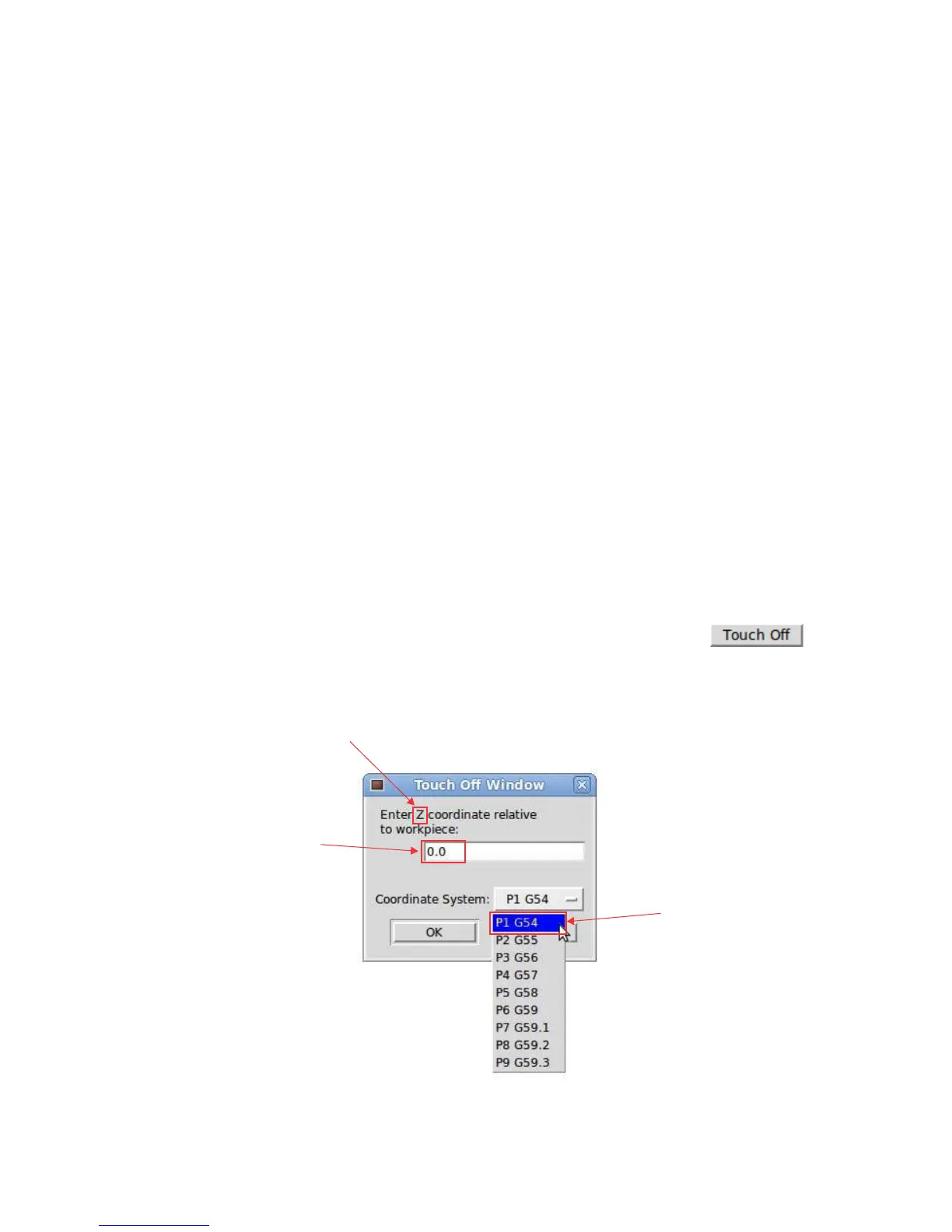
the part, or top center of the part. Then choose each axis and click the
button.
CAM SOFTWARE
G54 COORDINATE SYSTEM
TOUCHING OFF
The current position of the
tool relative to the stock at
this moment. May be zero,
may be the thickness of the
piece of paper you are
sliding under the tool.
This needs to match the
coordinate system that the
CAM software is inserting
into the g-code.
The axis that we are setting the origin for.


 To Next Page
 Loading...