English - 21 -
Settings>Network
and Internet menu. You can also highlight the Con-
nected/Disconnected icon on the Home screen and
press OK to access this menu. For further information
refer to Network and Internet section under the title
of Settings.
Wired Connection
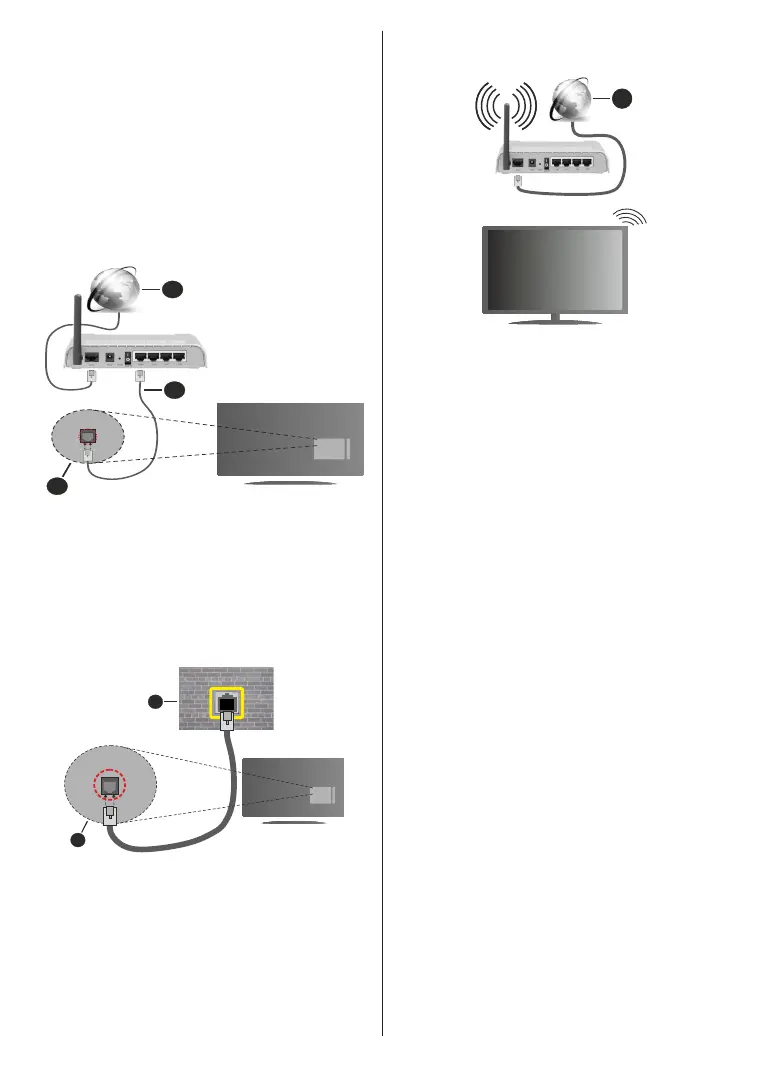
Connect your TV to your modem/router via an Ethernet
cable. There is a LAN port on the rear side of your TV.
The status of the connection under the Ethernet
section in the Network and Internet menu will change
from Not connected to Connected.
1. Broadband ISP connection
2. LAN (Ethernet) cable
3. LAN input on the rear side of the TV
You might be able to connect your TV to a network
In that case, you can connect your TV directly to the
network using an Ethernet cable.
1. Network wall socket
2. LAN input on the rear side of the TV
Wireless Connection
A wireless LAN modem/router is required to connect
the TV to the Internet via wireless LAN.
Highlight the Wi-Fi option in the Network and Internet
menu and press OK to enable wireless connection.
Available networks will be listed. Select one and press
OK to connect. For more information refer to Network
and Internet section under the title of Settings.
1
1. Broadband ISP connection
A network with hidden SSID (network name) can not
be detected by other devices. If you want to connect
to a network with hidden SSID, highlight the Add new
network option in the Network and Internet menu and
press OK. Add the network by entering its name and
selecting the security type manually.
Some networks may have an authorisation system
that requires a second login as such in a work
environment. In this case, after connecting to the
wireless network you want to connect to, highlight
situated on the upper right of the Home
Screen and press OK. Then highlight the Sign in to
Wi-Fi networkOK. Enter your
credentials to log in.
A Wireless-N router (IEEE 802.11a/b/g/n/ac) with
simultaneous 2.4 and 5 GHz bands is designed to
increase bandwidth. These are optimised for smoother
wireless gaming.
Use a LAN connection for quicker data transfer
between other devices like computers.
distance and number of obstructions between the
transmission products, the configuration of these
and the products that you use. The transmission may
on the radio wave conditions, DECT phones or any
other WLAN 11b appliances. The standard values of
the transmission speed are the theoretical maximum
values for the wireless standards. They are not the
actual speeds of data transmission.
The Wireless feature of the TV supports 802.11 a,b,g,n
& ac type modems. It is highly recommended that
you should use the IEEE 802.11n communication










 To Next Page