1. Unplug iron. Pour 4 ounces (
1
⁄2 cup) of ordinary tap water
into water tank opening. Plug iron into outlet.
2. Turn Temperature Control Dial to desired setting in the
steam range. Allow two minutes for the iron to reach
desired temperature.
3. Turn the Adjustable Steam Dial to desired steam setting.
Water: Please use ordinary tap water. If you have extremely
hard water, alternate between tap water and distilled water
for use in the iron.
Steam Settings
How to Steam Iron
5
1. Turn the Adjustable Steam Dial to .
2. Turn Temperature Control Dial to desired temperature.
Allow two minutes for iron to reach desired temperature.
NOTE: The Temperature Control
Dial steam setting should match
the Adjustable Steam Dial
setting. For example, if steam
ironing wool, the Adjustable
Steam Dial should be set to
light steam.
Adjustable
Steam Dial
Temperature
Control Dial
How to Dry Iron
4
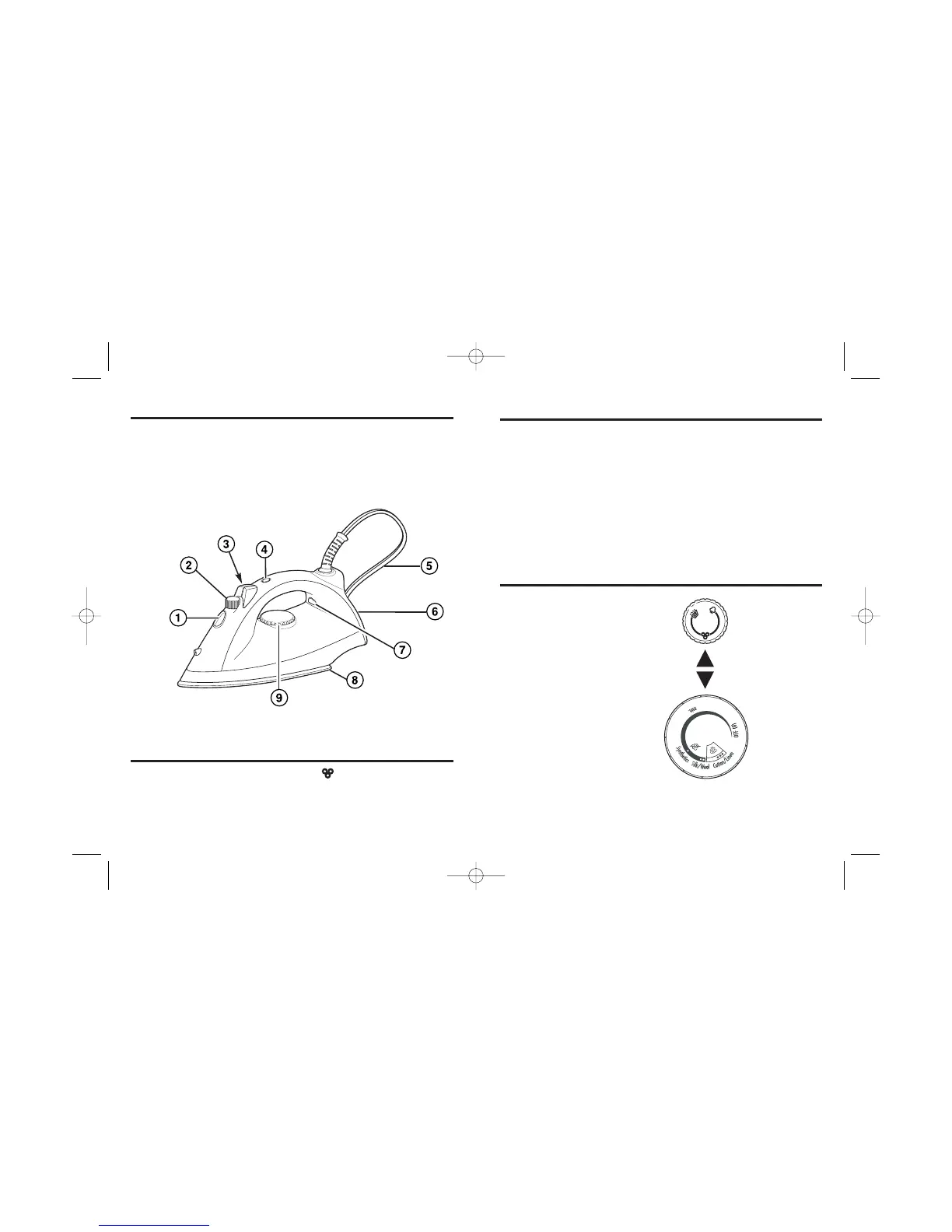
Parts and Features
1. Water Tank Opening
2. Adjustable Steam Dial
3. Spray and Blast of Steam
4. Auto Shutoff Reset Button
5. Swivel Power Cord
6. Heel Rest
7. Power ON Light and
Auto Shutoff Light
8. Soleplate
9. Temperature Control Dial


 To Next Page