PRODUCT PARAMETER
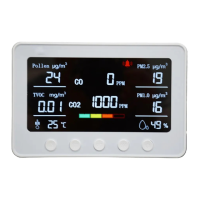
Product Name: Smart Air Quality Monitor
Model Name: PT02
Color: Silver/Black/White
Temperature Measurement Range: -20°C ~ 60°C; ±2 °C
Humidity Measurement Range: 5% ~ 95%RH; ±5%RH
CO2 Measurement Range: 400 - 5000ppm, Resolution: 1ppm
CO2 Measurement Accuracy: ±50ppm or ±5% of reading
TVOC Measurement Range: 0~20mg/m3
PM1.0 Measurement Range: 0~500μg/m3
PM2.5 Measurement Range: 0~500μg/m3
Working Temperature: 0 ° - 50 °C
Working humidity: 0-95% (non-condensing)
Input Voltage: DC 12V/2A
Product Weight: Around 500g
Product Size: 180mm(L) * 39mm(W) * 119mm(H)
Single Output wiring: RS485/Relays for CO2, TVOC, PM1.0, PM2.5, and Humidity signal output
PRODUCT OPERATION
1. Power Device On or Off: Long-press the Power button to switch on/off the device.
2. Wi-Fi setting: Please turn on the device first to set the Wi-Fi function:
I. Rapidly press the Power button three times in a row to turn on or off Wi-Fi. (If the Wi-Fi icon flashing on the device screen means it's On. And if there is
no Wi-Fi icon shown on the screen means it's Off.)
II. Rapidly press the Power button five times in a row to reset the Wi-Fi function. It will take about ten seconds.


 To Next Page
 Loading...