The Smart Air Quality Monitor & Controller, model PT02, is a versatile device designed to monitor various air quality parameters and provide control functionalities for smart home devices. Available in silver, black, or white, this monitor offers comprehensive insights into indoor air conditions.
Function Description:
The PT02 monitors several key air quality indicators: TVOC (Total Volatile Organic Compounds), CO2 (Carbon Dioxide), PM1.0 (Particulate Matter 1.0), PM2.5 (Particulate Matter 2.5), temperature, and humidity. It features a clear display that shows real-time readings for these parameters, along with Wi-Fi and alarm indicators. The device can output signals via RS485/Relays for CO2, TVOC, PM1.0, PM2.5, and humidity, allowing it to integrate with and control other smart devices such as humidifiers, air purifiers, fans, and AC units. It also includes a buzzer for audible alarms.
Important Technical Specifications:
- Temperature Measurement Range: -20°C to 60°C (±2°C accuracy)
- Humidity Measurement Range: 5% to 95%RH (±5%RH accuracy)
- CO2 Measurement Range: 400 to 5000ppm (1ppm resolution, ±50ppm or ±5% accuracy)
- TVOC Measurement Range: 0 to 20mg/m³
- PM1.0 Measurement Range: 0 to 500µg/m³
- PM2.5 Measurement Range: 0 to 500µg/m³
- Working Temperature: 0°C to 50°C
- Working Humidity: 0-95% (non-condensing)
- Input Voltage: DC 12V/2A
- Product Weight: Around 500g
- Product Size: 180mm(L) * 39mm(W) * 119mm(H)
- Output: RS485/Relays for CO2, TVOC, PM1.0, PM2.5, and Humidity signal output
- Sensors: CO2 NDIR Sensor, TVOC and Dust Laser Sensor, Temp & Humidity Sensor
Usage Features:
The PT02 offers a user-friendly interface with several buttons for control and setting adjustments.
- Power On/Off: Long-press the Power button.
- Wi-Fi Control: Rapidly press the Power button three times to toggle Wi-Fi on/off (indicated by a flashing Wi-Fi icon). Rapidly press the Power button five times to reset the Wi-Fi function.
- Temperature Display: Rapidly press the Power button twice to switch between Fahrenheit and Celsius.
- Alarm Management:
- When an AQI index exceeds its threshold, the unit alarms for ten seconds, and the alarm icon blinks.
- Press the Power button once to silence the alarm.
- Long-press the 'ESC' button to mute the alarm (alarm logo disappears).
- Long-press the 'ESC' button again to unmute the alarm (alarm indicator reappears).
- Backlight Adjustment:
- Press the 'Set' button once for dim light mode.
- Press the 'Set' button twice to turn off the backlight.
- Threshold Setting:
- Long-press the 'SET' button to enter the setting interface.
- Use the 'A' button to increase and the 'V' button to decrease threshold values.
- Press the Power button once to switch between Alarm Threshold (T icon) and Alarm-shutdown Threshold (down arrow icon) within the same section.
- Press the 'SET' button once to move to the next parameter for setting.
- Press the 'ESC' button once to quit without saving.
- Long-press the 'SET' button to save settings and quit.
- Default Alarm Thresholds:
- CO2: 1500ppm (shutdown 1000ppm), range 700-5000ppm.
- TVOC: 6mg/m³ (shutdown 3mg/m³), range 1-19.9mg/m³.
- PM2.5: 75µg/m³ (shutdown 35µg/m³), range 10-200µg/m³.
- PM1.0: 45µg/m³ (shutdown 25µg/m³), range 10-200µg/m³.
- Humidity: 30% (shutdown 40%), range 15%-75%.
- Temperature: 38°C/100°F (shutdown 30°C/87°F), range 1°C/34°F - 50°C/122°F (App only).
- Application Areas: Suitable for homes, classrooms, offices, gyms, apartments, hotels, and similar indoor environments.
Maintenance Features:
- Initial Setup: For accurate detection, allow the device to stand for 10 minutes. For confined spaces, allow 24 hours for automatic calibration or perform manual calibration.
- Manual CO2 Calibration: Rapidly press the 'ESC' button three times. The CO2 logo will blink during the 3-minute calibration process. Press 'ESC' again to cancel.
- Factory Reset: Rapidly press the 'ESC' button five times to restore default settings.
- Environmental Considerations:
- Avoid placing the detector in heavily polluted environments (TVOC > 20mg/m³ or particle concentration > 500µg/m³) for extended periods to prevent sensor damage.
- Do not place the monitor in extreme temperatures (high or low).
- Protect the device from thunder, lightning, and rain. Use it in a normal indoor environment.
- Avoid knocking, impacting, or disassembling the product to maintain detection accuracy.
- Avoid wearing perfumes or fragrances near the product as they may affect test results.
- Safety Warnings:
- Keep out of reach of children and babies.
- Do not dismantle, modify, or heat the product.
- Avoid dropping or heavy hitting.
- Do not touch with wet hands.
- Prevent metal objects (pins, keys) from contacting terminals or plugs.
- Do not cut, damage, or modify the power cord.
- Wiring: For RS485/Relays signal output wiring, consult professionals and refer to the instruction book in the packaging box. Exercise caution due to the danger of electricity.
- IoT Integration: For integrating the PT02 with other smart devices (fans, humidifiers, CO2 generators, etc.), refer to the instruction book in the packaging box for IoT solutions.

 Need help?
 General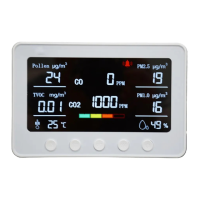

 To Next Page