IV. The default PM1.0 Alarm Threshold is 45ug/m³, and the Alarm-shutdown Threshold is 25ug/m³.
The PM1.0 alarm setting range is 10-200ug/m³.
V. The de fau lt Hum idi ty Ala rm Thre sh ol d i s 30%, and the Alarm-shutdown Threshold is 40%
The Humidity alarm setting range is 15%-75%.
VI. The default Temperature Alarm Threshold is 38℃ (100℉), and the Alarm-shutdown Threshold is 30℃ (87℉). (Only setup in App).
The Temperature alarm setting range is 1℃ (34℉) - 50℃ (122℉). (Only setup in App).
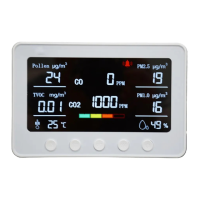
8. How to set the threshold values of CO2/TVOC/PM2.5/PM2.5/Humidity in the device:
A. The icon stands for Alarm Threshold. The icon stands for Alarm-shutdown Threshold.
I. If the AQI value is above the alarm threshold, the alarm will sound. The and alarm icon will blink on the screen.
II. If the AQI value is below the alarm clearing threshold, the alarm icon stops blinking. And the will flash for about ten seconds.
B. And you can reset the Threshold values:
I. Long press the 'SET' button to enter the setting interface.
II. Press the '△' button to increase the Threshold values and press the '▽' button to decrease the Threshold values.
III. Press the Power button one time to switch the setting between the and in the same section.
IV. Press the 'SET' button one time to move to the next section for setting.
V. Press the 'ESC' button one time to quit the setting without saving.
VI. Long press the 'SET' button to save the setting and quit.
Areas of Application:
Home, Classroom, Office, Gym, Apartment, Hotel, etc.


 To Next Page
 Loading...