110
b. Place palm upside in front of you on a at surface such
as table.
c. The middle of the cuff should be at the level of the right
atrium of the heart.
Lying Down Measurement
a. Lie on your back.
b. Place your arm straight along your side with your palm upside.
c. The cuff should be placed at the same level as your heart.
6. Taking Your Blood Pressure Reading
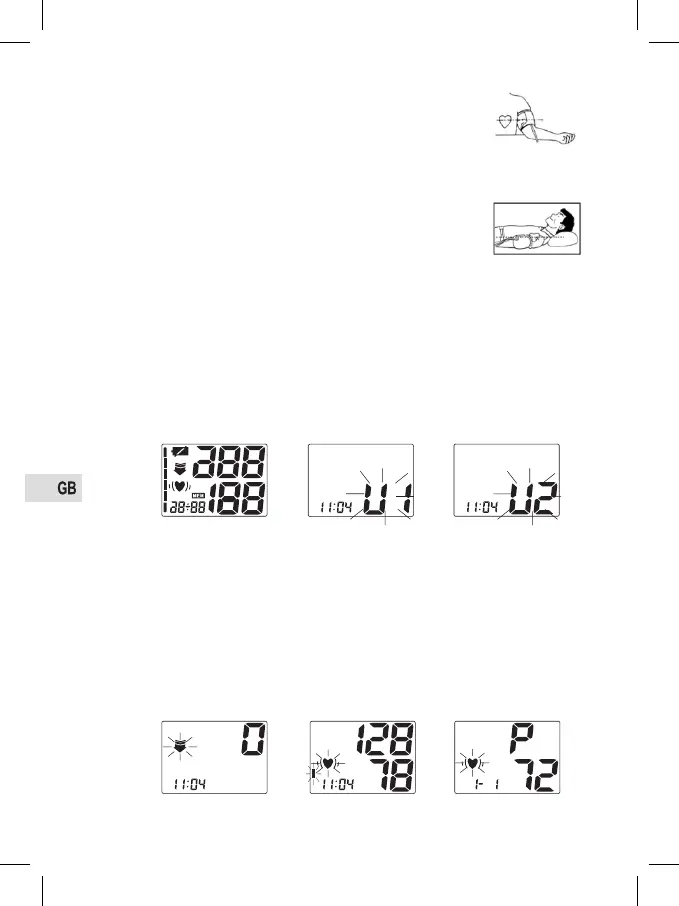
a. After applying the cuff and with your body in a comfortable position, press the
“START” button. A beep is heard and all display characters are shown for self-
test. See Fig. 6-1. Please contact the service centre if a segment is missing.
b. Then the current memory bank (U1 or U2) is ashing. See Fig. 6-2. Press the
“MEM” button to change to the other bank. See Fig. 6-3. Conrm your selec-
tion by pressing the “START” button. The current bank will also be conrmed
automatically after 5 seconds with no operation.
Fig. 6-1
Fig. 6-2
Fig. 6-3
c. After selecting the memory bank, the monitor starts to seek zero pressure.
See Fig. 6-4.
d. The monitor inates the cuff until sufcient pressure has built up for a meas-
urement. Then the monitor slowly releases air from the cuff and carries out
the measurement. Finally the blood pressure and pulse rate will be calculated
and displayed on the LCD screen separately. Irregular heartbeat symbol (if
any) will blink. See Fig. 6-5 & 6-6. The result will be automatically stored in
the current memory bank.
Fig. 6-4
Fig. 6-5 Fig. 6-6


 To Next Page
 Loading...