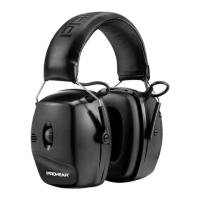
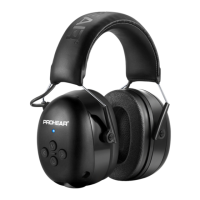
US/UK EM-033 Bluetooth/FM/AM Earmuffs
Key Features
● Bluetooth Music and Bluetooth Function, AM/FM Radio Function
● AM and FM have the function of storing 10 radio stations separately
● Premium Padded Headband
● Rechargeable lithium-ion battery
● Deep Bass & Truly Stereo & Big Sound
● NRR:25dB SNR:31dB
● Breathable and comfortable ear cushions
Introduction
1. POWER BUTTON :(1) Press and hold on for 3 seconds: TURN ON; Press and hold on for 5
seconds: TURN OFF. (2) Quick Press: SWITCH BT/FM/AM.
2. TUNING BUTTON:(1) Press and hold on or for 3 seconds: Search station automatically. (2)
Quick press: manual model.
3. MEMORY BUTTON :(1) Choosing the favorable channel. (2) Long Press & Hold on button
until display flashes to add current channel to your presets, then quick press or to select the
channel, and then press again to save it. (3) Once you have multiple channels saved, just quick
press to switch among them.
4. VOLUME CONTROL KNOB : Adjust Volume.
5.AUX JACK : (1) Extra AUX Cable are provided to connect to audio devices. (2) Power on the ear
defenders. (3) Connect it to MP3 or iPod through AUX cable. (4) LCD-display show: AUX
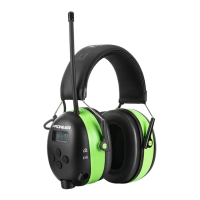
5. RADIO RECEPTION:(1) Put it in right place as photo showed, DO NOT bend aerial.
6. DIGTAL DISPLAY:Showing FM/AM Channel.
7.BATTERY COMPARTMENT : (1) Detachable design, it would be easier to install battery. (2 )
Include a rechargeable lithium polymer battery. (3) Come with a USB charging cable, connect the
AUX interface and USB interface to charge.
PROHEAR EM-033 Wireless Bluetooth Technology
1. Short press for searching BT model ‘----’ after power on.
2. Bluetooth pairing: Open Bluetooth wireless setting on your phone or mp3 player.
Make sure Bluetooth is on and select ‘EM033’ to connect. Once succeed,there showing ‘ON’ in
the LCD display. Auto re-connect to previous last connected device during pairing if the BT device
has been paired previously.
3.Answer/Cancel the call: Short press to pick up or end the call.
Reject call: Press and hold on for 3 seconds; Recall: Press and hold on for 3 seconds
Music situation: Short press for next music; Short press for last music; Short press for
pause music.


 To Next Page