12 | P a ge
In
st
a
ll
T
ra
n
sformer light the
Lights.
R
e
move
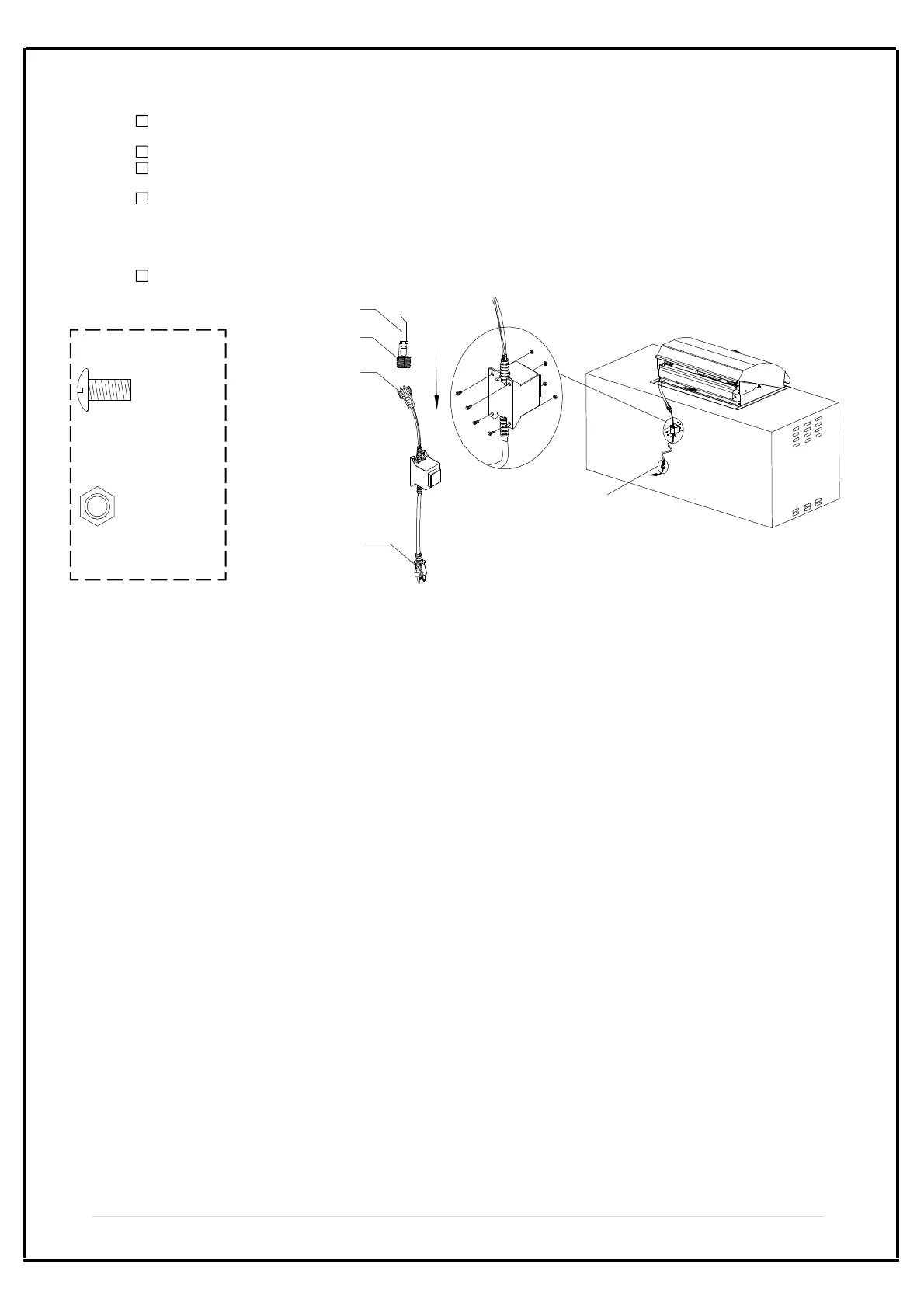
Transformer from box (th
e tr
ansformer is in Grill Head). Remove 4 Phillips Head Screws 3/16"x
1
/
2
"
a
nd 4 He
x
agon Nuts 3/16" from the Transformer.
I
n
s
tall Transformer-Plug into Transformer-Socket and tighten securely. (See Fig. 1)
Install Transformer to the Rear Island Panel* by using 4 Phillips Head Screws 3/16"x1/2". Secure and
tighten using 4 Hexagon Nuts 3/16". (See Fig. 2).
Pull the Transformer Cord out through the hole on the Rear Island Panel, make sure the cord can't touch
the ground.
Rear Island Panel* is not included with the purchase of Grill Head. Depending on your island construction,
you may need to make 5 holes on your Rear Island Panel before installing the Transformer.
Plug Transformer Cord into a properly grounded outlet.
After the installations above connect the power supply then you can use the lights. Push the Switch for
Light on the Control Panel to light the Lights.
F
ig.
1
Wire
T
ra
nsformer-socket
T
r
an
sformer-plug
AC-plug
Fig.
2
A
n
is
land is shown for illustrative
purposes in the diagram.
P
hillip
s Head Screw
3/16" x 1/2"
Qty. 4
Part # S112G03081
H
e
x
a
gon Nut 3/16"
Qty. 4
Part # S362G03061
A
l
r
eady Ins
talled in the
T
r
a
n
s
f
o
rmer
M
a
ke
a hole on
y
o
u
r
R
ea
r Island
Pane
l to pull the
cord out
Step 8:


 To Next Page