Downloaded from www.vandenborre.be
7
C
C
O
O
N
N
T
T
R
R
O
O
L
L
P
P
A
A
N
N
E
E
L
L
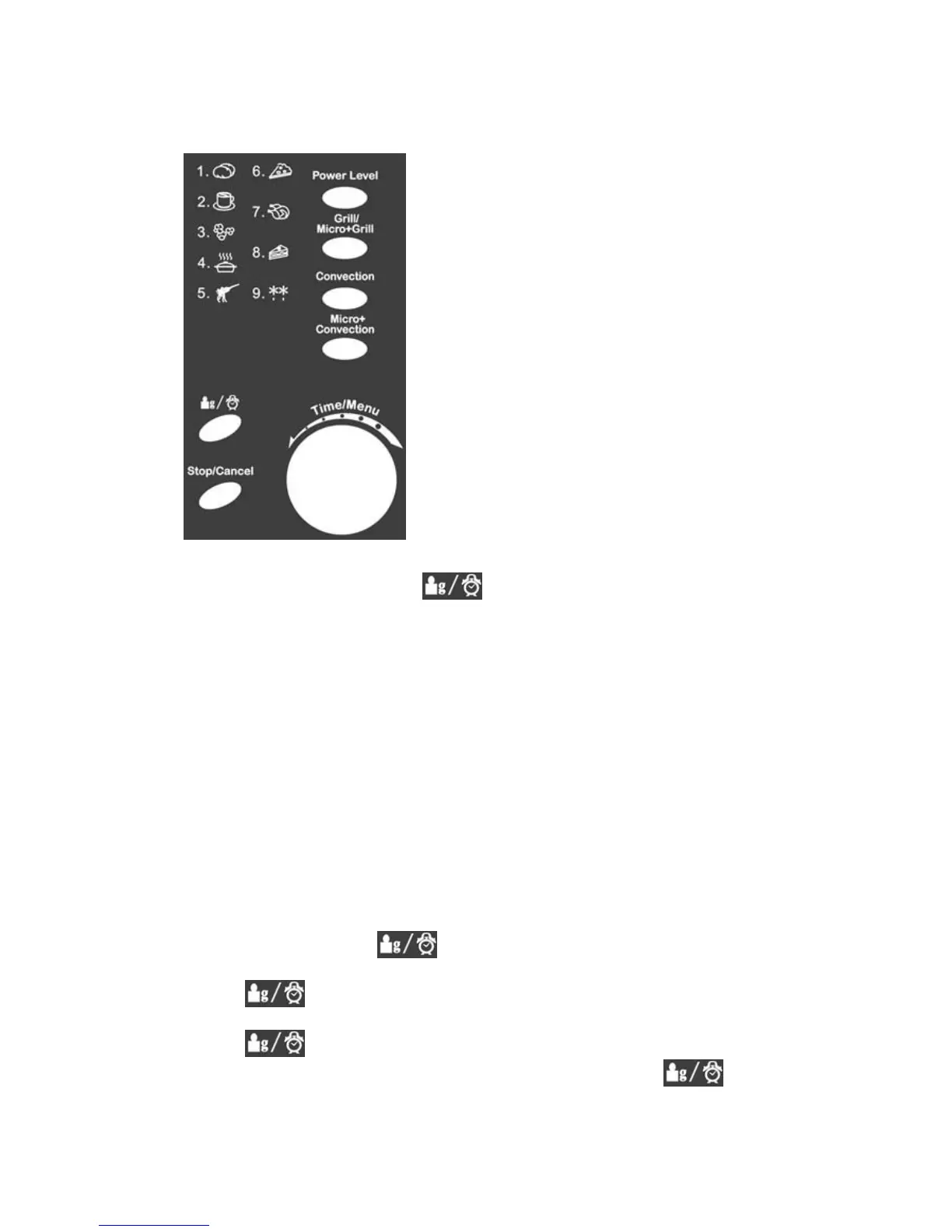
Power Level
Press to set microwave power level.
Grill/Micro+Grill
Press to set a grill cooking program or to select
one of two combination cooking settings.
Convection
Press to program convection temperature.
Micro+Convection
Press to select one of four combination
cooking setting.
Time/Menu
Turn the dial to set cooking time or select
auto-menu.
Press to start or quick start a cooking program.
Weight/Clock
Press to set clock time or to select the amount
of food.
Stop/Cancel
Press to stop cooking program or clear all
previous settings before setting a cooking
program.
O
O
P
P
E
E
R
R
A
A
T
T
I
I
O
O
N
N
Setting the Clock
1. In standby mode, press
to set the clock in 24-hour cycle.
2. Turn the dial until the correct hour is displayed.
3. Press
.
4. Turn the dial until the correct minutes are displayed.
5. Press
to confirm.
NOTE: You can check the clock time during cooking by pressing
.


 To Next Page